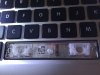
Why the heck is this spacebar stuck? (macbook pro retina)

Thedog

Active Member
Reaction score
56
The spacebar and other keys had a coffee accident so I removed some and cleaned it, worked fine with everything except the spacebar. Somehow it gets totally stuck when I "push it back in" with the small clips, it feels like if I put some mechanism backwards or something but everything fits so fine inside the key. Anyone know whats wrong?
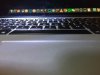
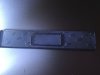
stuck.jpg Foto 2016-08-23 20 34 50.jpg Foto 2016-08-23 20 34 17.jpg
 
Perhaps you reinstalled the spacebar key 180 degrees out of phase? Looking at your pic of the bottom of the spacebar this might be all it is.

I used to clean and replace keys and/or springs but no more. Now I just swap in a brand new kybd.
 
Perhaps you reinstalled the spacebar key 180 degrees out of phase? Looking at your pic of the bottom of the spacebar this might be all it is.

I used to clean and replace keys and/or springs but no more. Now I just swap in a brand new kybd.

Im 100% sure its not 180 degrees out of phase as the spacebar as it only fits one way
 
Did you try to manually push down on both springs with a finger to see if they bounce back or stick?
 
I solved it! In the middle of the spacekey there is a plstic small push thing (don't know what they are called). That one is usually fitted behind the key but it had gotten lose, I used glue to get it in place and afterwards it working. It's kind of logical since that is what pushes the key back after you push it down, kind of like a smaller version of a spring....

Many hours unbillable on this one, but hey it's learning :)
 
I solved it!

Did you happen to take a picture of that? I give you props for getting the thing off and back on again a few times without destroying the mechanics - those things are oddly fragile considering the beating they take from folks that type, shall we say, firmly. I'll get going on a rant about something and my wife will come over and say "Now remember - don't type angry!". No wonder I have CT - haha.
 
Back
Top