Windows updates disabled

Rigo

Active Member
Reaction score
189
Location
Australia
I built this computer and installed Win11 Pro on it about 5 years ago.
Still running on 22H2.
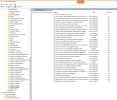
Can't re-enable Windows updates even with the below settings in gpedit and the registry.
System main specs:
CPU AMD Ryzen 5 3400G - Win11 compatible
Mobo Gigabyte B450M DS3H
I'm trying to do this remotely but also noted secure boot is disabled and PC Health Check won't run because of win upd restrictions 🤔
How else can win upd be restricted?

1777377892970.png
1777378057222.png
1777378190762.png
 
It looks like it is setup to get updates pushed through management so is the a WSUS server running you can push updates to it or some management console with the option?
 
It looks like it is setup to get updates pushed through management so is the a WSUS server running you can push updates to it or some management console with the option?
Could you please elaborate on your suggestions as I have no idea how to go about them, thanks for helping.
Checking for updates will install normal regular updates but not the features release versions.
I could manually download and install these but the current blocage is not right.
 
Last edited:
Maybe the system wasn't officially compliant with Windows 11, but your install (perhaps a Rufus-created installer?) installed it anyway. Reasons could be MBR instead of GPT, legacy BIOS instead of UEFI, or TPM 2.0 not enabled in the BIOS.

Download and run the open-source WhyNot11. It's the easiest way of finding out why it's deemed unable to run Windows 11. I've never run it on a Windows 11 system that's refusing to update but it's an idea.
 
Maybe the system wasn't officially compliant with Windows 11
I built myself fully compliant and installed the OS at the time with no hiccup.
I tried the WhyNotWin11 on my main desktop and it comes up all good.
I've asked the customer to bring it back so I can work more closely on it, some BIOS updates to apply as well.
 
It's setup within a managed environment, a radiology clinic. I don't manage the domain.
The policy options were all on default though, and I configured the relevant fields to try to force enable the updates.
 
WSUS, might have a new name its just what I know it as, is Windows System Update Service which is/was the mechanism for managing updates to PCs on a domain and if this is on a domain then it is likely from domain policies that this is being set by and blocked from. If you don't manage the domain and can't access the domain policies this is looking like something out of your hands. I would say the only option would be attempts to manually update to a newer build.
 
WSUS was used back in the day of on prem servers, workstations would be domain joined, and WSUS settings were usually pushed out via group policy.
Would see something like this in the above registry..
You also will see those "Some settings are managed by your organization" from an RMM agent that manages the updates.
 
When I wanted to take a machine away from WSUS I used:

[HKEY_LOCAL_MACHINE\SOFTWARE\Policies\Microsoft\Windows\WindowsUpdate]
"WUServer"=""
"WUStatusServer"=""

[HKEY_LOCAL_MACHINE\SOFTWARE\Policies\Microsoft\Windows\WindowsUpdate\AU]
"UseWUServer"=dword:00000000
 
Honestly, you should just look at the above policy key structure, and nuke the entire thing. Because if there are policies in there, that's non-default behavior.

Nothing below this point : HKEY_LOCAL_MACHINE\SOFTWARE\Policies\Microsoft\Windows\WindowsUpdate

Is default, nor permanently destructive to remove.
 
WSUS was used back in the day of on prem servers, workstations would be domain joined, and WSUS settings were usually pushed out via group policy.
Would see something like this in the above registry..
You also will see those "Some settings are managed by your organization" from an RMM agent that manages the updates.
Yeah I wasn't sure what replaced WSUS but I figured something and I would expect that to be managed along with the domain but that is a bit more of an assumption which could be incorrect.
 
Yeah I wasn't sure what replaced WSUS but I figured something and I would expect that to be managed along with the domain but that is a bit more of an assumption which could be incorrect.

Microsoft 365 tenants took over handling Microsoft Updates...if you get the better licenses, deploy via InTune which uses "autopatch". Works great.
WSUS depreciated starting in 2024...and Microsoft did not replace with another on prem program.
 
Back
Top