Windows updates disabled

Rigo

Active Member
Reaction score
181
Location
Australia
I built this computer and installed Win11 Pro on it about 5 years ago.
Still running on 22H2.
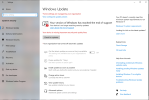
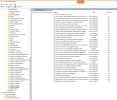
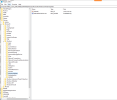
Can't re-enable Windows updates even with the below settings in gpedit and the registry.
System main specs:
CPU AMD Ryzen 5 3400G - Win11 compatible
Mobo Gigabyte B450M DS3H
I'm trying to do this remotely but also noted secure boot is disabled and PC Health Check won't run because of win upd restrictions 🤔
How else can win upd be restricted?

1777377892970.png
1777378057222.png
1777378190762.png
 
It looks like it is setup to get updates pushed through management so is the a WSUS server running you can push updates to it or some management console with the option?
 
It looks like it is setup to get updates pushed through management so is the a WSUS server running you can push updates to it or some management console with the option?
Could you please elaborate on your suggestions as I have no idea how to go about them, thanks for helping.
Checking for updates will install normal regular updates but not the features release versions.
I could manually download and install these but the current blocage is not right.
 
Last edited:
Maybe the system wasn't officially compliant with Windows 11, but your install (perhaps a Rufus-created installer?) installed it anyway. Reasons could be MBR instead of GPT, legacy BIOS instead of UEFI, or TPM 2.0 not enabled in the BIOS.

Download and run the open-source WhyNot11. It's the easiest way of finding out why it's deemed unable to run Windows 11. I've never run it on a Windows 11 system that's refusing to update but it's an idea.
 
Back
Top