Thunderbird and Exchange

Markverhyden

Well-Known Member
Reaction score
11,342
Location
Raleigh, NC
Has anyone recently been able to setup an Exchange, aka M365 or outlook.com, on the latest Thunderbird (152)? Tried both MS and Zorin and can't get it to work. Zorin just won't complete setup. W10 will complete setup but SMTP and IMAP do not work. TIA
 
I haven't had any luck, either. If I use an outlook.com address, Thunderbird always detects (the correct) IMAP and SMTP configuration, but does not use Exchange.

I've tried manually configuring, specifying EWS, and using the URL, https://outlook.office365.com/EWS/Exchange.asmx, but that doesn't seem to work, either, even when the correct password is specified.
 
I also just found this (Copilot):

Why EWS won’t work with Outlook.com in Thunderbird

Even if you had an app password, it wouldn’t help — because:

Outlook.com does not support EWS at all.

EWS is only supported for:

  • Microsoft 365 Business / Enterprise
  • Exchange Server
Outlook.com (the consumer service) only supports:

  • IMAP/SMTP (with OAuth2)
  • Exchange ActiveSync (EAS) — but Thunderbird does not support EAS
  • Microsoft Graph API — Thunderbird does not support this yet
  • Outlook REST API — deprecated
So Thunderbird cannot connect to Outlook.com using EWS under any circumstances.
 
I just got it setup, needed 2 authentication steps though.
Did you happen to get details? I've spent hours on this. When I setup the account as new I do get the code. When I'm in advanced both IMAP and SMTP pass the test when I select test connection. Yet when I go in and try to use it I get server time outs. And I am setup with MFA.
 
@Markverhyden there were no codes, the 365 connector popped up twice for me to give permissions to my 365 Exchange account. I do have an E5 license, so that might make a difference?
Ok. Looks like it's related to what @britechguy mentioned above. There is a difference between M365 Exchange and the free Outlook.com Exchange. Or at least how MS handles traffic. I just assumed they were the "same" more or less. The actual account in question is a <name>@outlook.com. Just tested with my M365, I think it's E3, and it setup properly even when I selected IMAP. So it appears that EWS does have a part in this. I setup my M365 using the same client I was using for the outlook.com address. Thanks for the input everyone.
 
I also just found this (Copilot):

Why EWS won’t work with Outlook.com in Thunderbird

Even if you had an app password, it wouldn’t help — because:

Outlook.com does not support EWS at all.

EWS is only supported for:

  • Microsoft 365 Business / Enterprise
  • Exchange Server
Outlook.com (the consumer service) only supports:

  • IMAP/SMTP (with OAuth2)
  • Exchange ActiveSync (EAS) — but Thunderbird does not support EAS
  • Microsoft Graph API — Thunderbird does not support this yet
  • Outlook REST API — deprecated
So Thunderbird cannot connect to Outlook.com using EWS under any circumstances.
I've tried multiple times and outlook.com IMAP will not setup with tbird OAuth2.
 
I've tried multiple times and outlook.com IMAP will not setup with tbird OAuth2.

Then something's wrong (not that you don't know this). I just set up one of my two Outlook accounts in Tbird without a hitch, and it automatically uses OAUTH and IMAP.

Try a different machine. What I thought is that you wanted an Exchange connection, rather than an IMAP connection, which is the alternative commonly used by email clients that have no Exchange support at all. But for free Microsoft sponsored accounts (e.g., hotmail) it's IMAP only anyway in Thunderbird.

If you want, I will be glad to configure my second outlook.com account and capture screenshots at each step.
 
@Markverhyden is the mail set up to allow IMAP in the user account? I have seen it shut off before.
BING BING BING BING !!!!!

@callthatgirl you've won an all expense trip to nowhere! LOL!!!!

I just assumed, and yes I do know what that spells, that outlook.com (the free stuff) would have had IMAP enabled by default. But I forgot MS is MS, just like Apple is Apple. Both of which operate under the mentality you should only be using our "stuff" or our "way". Which in the case of MS is Exchange.

Then something's wrong (not that you don't know this). I just set up one of my two Outlook accounts in Tbird without a hitch, and it automatically uses OAUTH and IMAP.

Try a different machine. What I thought is that you wanted an Exchange connection, rather than an IMAP connection, which is the alternative commonly used by email clients that have no Exchange support at all. But for free Microsoft sponsored accounts (e.g., hotmail) it's IMAP only anyway in Thunderbird.

If you want, I will be glad to configure my second outlook.com account and capture screenshots at each step.
Lisa hit the nail on the head. I guess outlook.com, at least in my case, had IMAP and POP disabled. I'd expect POP but not IMAP. Enabled it and did the tbird "automated" add. Worked perfect. Thanks for everyone's help with this.
 
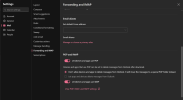
1782174510227.png

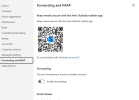
I've never touched this, so it's "as supplied" by Microsoft at the time that this outlook.com account was created. I'd never even consider using POP, so I would never have toggled that setting On.
 
LOL I actually started typing that early this morning (below)...then a phone call came in and..the day ran away from me, never hit submit. I know on 365 Microsoft widely went about disabling it due to the low security of older SMTP and IMAP...but I did pause because I'm not sure how many residential accounts started having it disabled yet..and then phone call.

1782175150712.png
 
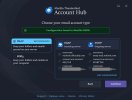
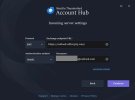
Here are some screenshots of what I get when I try to set up the account that has neither POP or IMAP permissions set, and if I try to use EWS (which I expected to fail):

Bala1.jpg

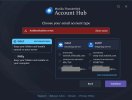
If I stick with the above, without editing the configuration, and try logging in, this is the error dialog:

Bala4.jpg

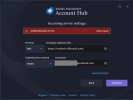
If I hit the Edit Configuration:

Bala2.jpg

And the failure:

Bala3.jpg

So, after all this, I'm convinced that there is no way to set up a free outlook.com account using Exchange in Thunderbird. I don't have one in a tenant anywhere to play with.
 
View attachment 18265

I've never touched this, so it's "as supplied" by Microsoft at the time that this outlook.com account was created. I'd never even consider using POP, so I would never have toggled that setting On.
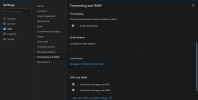
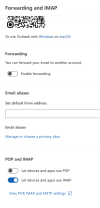
@callthatgirl the page @britechguy posted is similar in nature to what I see. But I'm on macOS and have no idea on account creation timing. Below is what I see. Seems similar to what I saw on my MS ms. Basically logging in and selected account in the upper right corner.

Screenshot 2026-06-22 at 20.52.36.png

Screenshot 2026-06-22 at 20.48.09.png
 
Back
Top