Thunderbird and Exchange

Here are some screenshots of what I get when I try to set up the account that has neither POP or IMAP permissions set, and if I try to use EWS (which I expected to fail):

View attachment 18268

If I stick with the above, without editing the configuration, and try logging in, this is the error dialog:

View attachment 18269

If I hit the Edit Configuration:

View attachment 18271

And the failure:

View attachment 18272

So, after all this, I'm convinced that there is no way to set up a free outlook.com account using Exchange in Thunderbird. I don't have one in a tenant anywhere to play with.

Is IMAP enabled in that legacy account? The outlook.com account I'm using is probably at least 5-6 years old. And it's dormant. Simply a test account.
 
IMAP and POP both are enabled in the older of the two accounts, and my guess is it's approximately 10 years old. I cannot, however, find the "Welcome to Outlook.com" message from the time of its creation. I tend to keep those just so when I need to know age, I can get an exact one, but not in this case.

I am absolutely, positively certain that I never turned on either POP or IMAP via manual intervention in that account, though. I've used it as "a junk account" when working with various email clients for years now.
 
IMAP and POP both are enabled in the older of the two accounts, and my guess is it's approximately 10 years old. I cannot, however, find the "Welcome to Outlook.com" message from the time of its creation. I tend to keep those just so when I need to know age, I can get an exact one, but not in this case.

I am absolutely, positively certain that I never turned on either POP or IMAP via manual intervention in that account, though. I've used it as "a junk account" when working with various email clients for years now.
I think we're into the times change thing.
 
It seems completely bizarre that Microsoft would have pulled IMAP access being available by default for outlook.com or any of the other free email services it provides, but apparently it has, at least for outlook.com

There are tons of users who use email clients that do not support MS-Exchange protocol and OAUTH2 with IMAP has been common practice for quite a while now. It's the only thing that Google accepts for verification for Gmail and I know I went through OAUTH when setting up the outlook.com account that has IMAP turned on in several different email clients.
 
It seems completely bizarre that Microsoft would have pulled IMAP access being available by default for outlook.com or any of the other free email services it provides, but apparently it has, at least for outlook.com

There are tons of users who use email clients that do not support MS-Exchange protocol and OAUTH2 with IMAP has been common practice for quite a while now. It's the only thing that Google accepts for verification for Gmail and I know I went through OAUTH when setting up the outlook.com account that has IMAP turned on in several different email clients.
For grins I decided to see what things are with a brand new account. Followed the basic steps. It did not force me to do MFA. Worked fine as is with OWA. However when I went to Settings>Mail>Forwarding and IMAP I did not have any options other than sign in. After signing in creating MFA I was presented with IMAP and POP options and both are disabled. By the way if you had chosen Advanced Options during tbird setup and clicked on the test server hyperlink you should get both sending and receiving passing. Even though you will not be able to create an IMAP account in a client.
 
By the way if you had chosen Advanced Options during tbird setup and clicked on the test server hyperlink you should get both sending and receiving passing. Even though you will not be able to create an IMAP account in a client.

I believe I actually did this, and thought it incredibly flaky (to put it kindly) that Tbird was able to successfully connect to the servers yet was still forbidden to create the account. The block, if there is to be one, should occur such that the server connection test fails.

Standard MS perverseness (and I hasten to add they're by no means the only company that indulges in same).
 
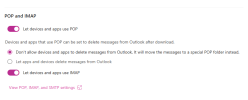
For @Markverhyden these are my settings from my personal MS account created 10 years ago or so. I haven't touched these so maybe newer accounts are disabled. Still not sure why anyone would want to use IMAP with this type of account, but you know what I said. I'm not going to be that girl...but here I am! 🤣

1782264335432.png
 
Settings -> Forwarding and IMAP, and those two switches are at the bottom along with a link to instructions on how to connect.

Now my address is a hotmail.com address, so it's been around awhile. But the UI is quite modern... it seems supported to me.
 
Back
Top