britechguy
Well-Known Member
- Reaction score
- 5,242
- Location
- Staunton, VA
I have a client who sent the following screenshot:
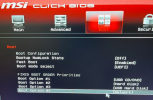
I am not familiar with "Hard Disk" being used as the designation for Windows, per se, and every time I have to deal with MSI BIOS I have to reacquaint myself with how it works.
The computer won't boot. It goes straight into BIOS. I am suspecting a dead SSD, but am not certain. What says the cohort about the meaning of the above as far as boot order and Windows goes? Also, about the possibility of a dead SSD?
I am not familiar with "Hard Disk" being used as the designation for Windows, per se, and every time I have to deal with MSI BIOS I have to reacquaint myself with how it works.
The computer won't boot. It goes straight into BIOS. I am suspecting a dead SSD, but am not certain. What says the cohort about the meaning of the above as far as boot order and Windows goes? Also, about the possibility of a dead SSD?