
Yes, it's a cute little black cylinder, pretty nice and packed powerfully.Mac Pro as in the desktop tower Mac

You are using an out of date browser. It may not display this or other websites correctly.
You should upgrade or use an alternative browser.
You should upgrade or use an alternative browser.
Mac Pro 2013 - can't run any app
- Thread starter Rigo
- Start date
Probably, as it would just be a copy/paste affair?can the old software be reinstalled on another machine?
CorrectThat's not only how I read it, but if you look at the photos, there's an HP monitor and an external keyboard that's clearly not a Mac keyboard, so the only way I "could go" is Mac, not MacBook.

timeshifter
Well-Known Member
- Reaction score
- 2,550
- Location
- USA
Probably not. Some Mac apps it's just a matter of copying the program file to the Applications folder. That was the intention / design of the system. Not all apps follow the rules and have installers just like on Windows.Probably, as it would just be a copy/paste affair?
Does she have any Time Machine backups? Click the clock symbol in the Menu bar and see what it says.
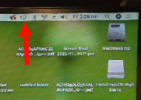
Here's what mine looks like at the moment.
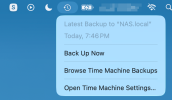
Yes but not for a complete machine backup.Does she have any Time Machine backups?
She only did data backup
timeshifter
Well-Known Member
- Reaction score
- 2,550
- Location
- USA
then she doesn't have a Time Machine backup. Time Machine backs up the entire system. *If* she had a Time Machine backup the chances are pretty good you could restore the system to before the corruption was introduced. We still don't know if it's a hardware or software problem.Yes but not for a complete machine backup.
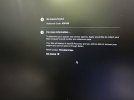
You may want to run the built in diagnostics to see if any obvious hardware errors come up.
Use Apple Diagnostics to test your Mac - Apple Support
Apple Diagnostics, formerly known as Apple Hardware Test, can check your Mac for hardware issues.

NETWizz
Well-Known Member
- Reaction score
- 2,039
It is time to let High Sierra go. At this point if she stays wirh a Mac it should be an Apple Silicon Mac up-to-date.
Maybe the Application will still run wirh Rosetta. What application is it anyway that she uses that is so proprietary that there isn’t something newer she can use to work worh Music?
Maybe the Application will still run wirh Rosetta. What application is it anyway that she uses that is so proprietary that there isn’t something newer she can use to work worh Music?

Markverhyden
Well-Known Member
- Reaction score
- 11,345
- Location
- Raleigh, NC
That machine will have USB3. So take a USB3 stick and do a macOS install on that. Then boot from the stick. Hold down the option key when powering up and you'll see boot options. Select the USB stick. It'll be slow but at least you can test apps. Another very practical option is to VM the Pro machine. Both Parallels and VMWare allow free trials and I'm pretty sure both will allow older macOS versions. I'm guessing that the existing problem is some RAM issue or whatever. So an image might work just fine in a VM. Both do have free versions so you can try it before you buy it. Her new machine just need to have plenty of RAM and disk space. BTW I always thought those coffee cans were really cr@ppy.

lan101
Well-Known Member
- Reaction score
- 739
It is time to let High Sierra go. At this point if she stays wirh a Mac it should be an Apple Silicon Mac up-to-date.
Maybe the Application will still run wirh Rosetta. What application is it anyway that she uses that is so proprietary that there isn’t something newer she can use to work worh Music?
I agree or if they are trying to cheap out there is plenty of refurb 2019 macs for $300 range on ebay.
But yeah M1 or beyond would make the most long term sense for anyone. Seems like just yesterday when those came out and it was 2020 already lol.
timeshifter
Well-Known Member
- Reaction score
- 2,550
- Location
- USA
The faster the USB stick the better. Or better yet get an external NVMe drive with USB connection. I've got a couple. I've got an older one with 10.13 that I've used for testing a lot - I boot various Macs from it. It runs surprisingly well.That machine will have USB3. So take a USB3 stick and do a macOS install on that. Then boot from the stick. Hold down the option key when powering up and you'll see boot options. Select the USB stick. It'll be slow but at least you can test apps.
What we don't know yet is if you're dealing with a hardware or a software problem for sure. It's good that it passed diagnostics but those diags are pretty superficial.
I've been thinking another good test would be to replace the internal drive with a new one. Install a clean Mac OS. See how it runs. If it's smooth and reliable then you can reinstall her software and she'd be happy.
These kits come with a new internal NVMe drive.

OWC SSD Upgrade Kits For Mac Pro Cylinder 2013
Get everything you need to upgrade your 2013 Mac Pro SSD for a total system performance and capacity boost. All OWC SSDs backed by a lifetime warranty.
 eshop.macsales.com
Virtualizing on her new MacBook might be a solution too, but that depends on whether her MacBook is Intel or Apple silicon. If Intel she could run High Sierra in a VM quite nicely.
However, I suspect she likes the Mac Pro - big screen and other stuff connected to it, etc.
Yes, it runs perfectly from an external SSD drive on High Sierra with whatever app I tested from the external working without any issues.If it runs well you've likely proven the hardware is OK before opening up the machine and moving stuff around.
Files from the internal drive open in the portable no problem so I think it's not a hardware problem. And the data is not corrupted.
2 x repairs/upgrades in place failed to correct the corruption of the apps refusing to run though the OS perfectly runs

Very easy to open, I had to clean it internally as dust n fluff were just oozing out.
I tested the SSD on an adapter with DiskGenius from one my Windows test machines and performance is perfect. And it still has relatively sufficient free space.
The RAM is ECC grade, got no mobo to test that but can only rely on the Apple diagnostics for that.
timeshifter
Well-Known Member
- Reaction score
- 2,550
- Location
- USA
Sounds like you're dealing with operating system corruption. Assuming you've got everything backed up I'd say it's time to do a clean install. Boot to a USB and use Disk Utility to erase the drive then install a fresh OS.
Markverhyden
Well-Known Member
- Reaction score
- 11,345
- Location
- Raleigh, NC
Try running Onyx. Other than that just buy a used one from a reputable online site. I just remembered that emulating Intel on Apple silicon is supposed to be really cr@ppy. By the way has she explored converting old to new?
Also have you looked at the logs? You don't have to use Console on the patient. You can locate the logs on the patient and then transfer them to a stick. Then use console on another box.
Also have you looked at the logs? You don't have to use Console on the patient. You can locate the logs on the patient and then transfer them to a stick. Then use console on another box.
Looks like a pretty nifty tool for the toolboxOnyx
Thanks for sharing
Couldn't install it, says no application to do itOnyx
Logic Pro XWhat application is it anyway that she uses
Markverhyden
Well-Known Member
- Reaction score
- 11,345
- Location
- Raleigh, NC
Try boot in safe mode. Power it up holding down the shift key. Keep holding it until you see your desktop then try. As a reminder, in case you forgot, Apple's have what they call Target Disk Mode. aka TDM. This allows you to power up a machine into mode where it's treated as an external drive. Then you can plug it into another Mac and use that Mac to run some tools against the patient.Couldn't install it, says no application to do it
Transfer files between two Mac computers using target disk mode
You can connect an Intel-based Mac to another Mac using a USB, USB-C or Thunderbolt cable, then transfer files.
NETWizz
Well-Known Member
- Reaction score
- 2,039
Simple solution.Logic Pro X
You sell customer a new Apple Laptop with Apple Silicon …
You upgrade them from Logic Pro X to Logic Pro

Logic Pro
Logic Pro is the ultimate music creation experience for Mac and iPad, with powerful features for songwriting, beat-making, editing, and mixing.
www.apple.com
It’s like $199 one time for the software… Done and back on a supported ecosystem.
In all honesty, if the customer wants to save money, they should cut you out of the equation because you should be a pretty expensive part though quite a bit less than a new Apple computer.
That said you must bring value in that you can install applications, and you can help transfer files and settings. The only right answer is a new computer and new software at this juncture.
Last edited:
Similar threads

- Replies
- 12
- Views
- 5K


- Replies
- 1
- Views
- 1K
- Replies
- 24
- Views
- 6K
