Why does Lenovo do this? M.2 Mount

mikeroq

Well-Known Member
Reaction score
1,353
Location
BFE
It's been a bit since this situation but It continues to bug me.

Bought a M710/M910 can't remember exactly.
Has an M.2 Slot. Bought an nvme SSD.

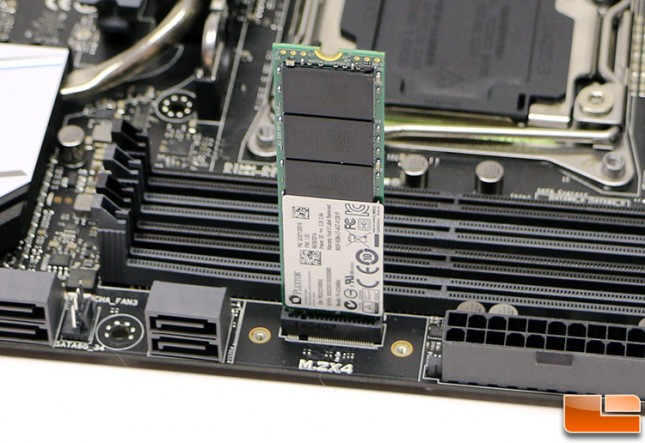
Get the computer, go to put the drive in, find the M.2 slot is near the edge of the board. Hmm where in the world does the drive get held in?!?!

Come to find out you need this:
s-l500.jpg


Really!?!? They design the board so the M.2 has to run off the edge and be secured by a plastic piece.

Ok not a big deal, but it's not included with the computer! A tiny bit of plastic, and they can't bother to include it.

For reference here is what it looks like installed:
large


Seems like I prefer Dell a little more these days. Sold a few Optiplex 5050/7050 recently. Their M.2 slot is on the board with a stand off preinstalled. Just have to supply the screw (really? not as big of a deal as the plastic holder).

GUID-B597D296-9C16-415B-8E87-76CE9754A172-low.jpg
 
That's pretty petty alright. Can't believe it didn't come with the mount.

Honestly, I don't know why they didn't simply use one of the vertical SMD M.2 connectors. Shenanigans!

m2-slot-645x443.jpg
 
It's been a bit since this situation but It continues to bug me.

Bought a M710/M910 can't remember exactly.
Has an M.2 Slot. Bought an nvme SSD.

Get the computer, go to put the drive in, find the M.2 slot is near the edge of the board. Hmm where in the world does the drive get held in?!?!

Come to find out you need this:
s-l500.jpg


Really!?!? They design the board so the M.2 has to run off the edge and be secured by a plastic piece.

Ok not a big deal, but it's not included with the computer! A tiny bit of plastic, and they can't bother to include it.

For reference here is what it looks like installed:
large


Seems like I prefer Dell a little more these days. Sold a few Optiplex 5050/7050 recently. Their M.2 slot is on the board with a stand off preinstalled. Just have to supply the screw (really? not as big of a deal as the plastic holder).

GUID-B597D296-9C16-415B-8E87-76CE9754A172-low.jpg
Bane of my existence for one client of mine. Where did you source the part?
 
That's a good warning to anyone ordering one of these PCs expecting to add an M.2 drive.

Please check which series (M710 or M910), and is it a tower model or SFF?
M710/910 same chassis between them and same motherboard between SFF and tower.

Bane of my existence for one client of mine. Where did you source the part?

Got mine from ebay with expedited shipping.
Seemed hard to find.

Also I noticed they changed the stand. M83/93/700/800/900 I would get stands like this included:
s-l640.jpg


They have moved to some flat pack stand you have to fold together.

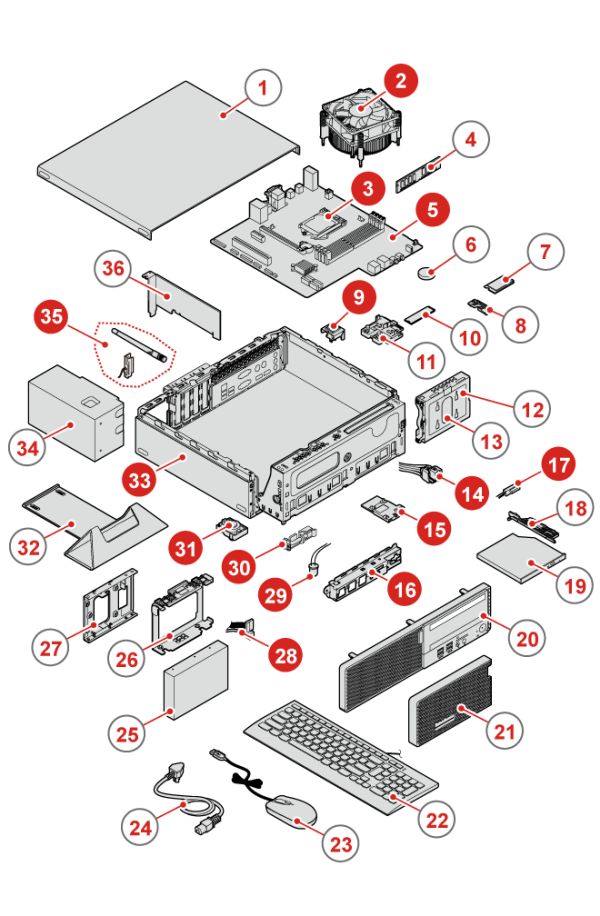
#32 in diagram.
a76a140893cb4d7299bc986dc69a5f9e.jpg


Edit found image
1.jpg
 
Compatibility
AVC,M.2 SSD brk asm(244mm) (01EF811) is compatible with the following machines:

510-15IKL
510S-08IKL
720-18IKL
THINKCENTRE-M710S
THINKCENTRE-M910S
THINKCENTRE-M910T
V520S

Strange I don't see M710T on the list but it should require the bracket just the same.

Also didn't like how they slimmed down this generation. Much shorter in depth. Drive cage goes over motherboard so it limits graphics card options. You might be better in the desktop version but it's not too much bigger and the cage of course goes into that space but it looks like there might be enough room to go under it.
 
Also didn't like how they slimmed down this generation. Much shorter in depth. Drive cage goes over motherboard so it limits graphics card options. You might be better in the desktop version but it's not too much bigger and the cage of course goes into that space but it looks like there might be enough room to go under it.


Can't get enough juice for a decent video card anyway since they changed over to non-standard power supplies a few years ago.
 
Video cards of reasonable performance can now be installed without any special power supply requirements, and cards up to GTX 1050 Ti are available with low profile brackets (great for SFF desktops such as refurbished HP Elites).

I just installed a GTX 1050 into a HP Pavilion tower with i5-6400 and it worked beautifully. I ran Furmark to max out the GPU for an hour and it had no issues. The PC still had the stock PSU rated at only 180W.
 
To me if you need a video card more powerful than what fits in a SFF business PC, you need to move up to a workstation tower.
 
To me if you need a video card more powerful than what fits in a SFF business PC, you need to move up to a workstation tower.

I can agree with that... last time I was adding an upgraded card to a Lenovo Thinkcentre, it was to run multiple monitors. Most of the current models will run 3 monitors off the motherboard so I haven't had the need in awhile.

I still don't like the wonky 14 pin power connector and/or pulling hard drive power off a motherboard header, but they can build them any way they want...lol (I could swear that I've seen a 10 pin power connector recently...)
 
Back
Top