Ultraviewer Issue

River Valley Computer

Well-Known Member
Reaction score
805
Location
Russellville, AR
We have a customers computer with a fresh install of Windows 11 Pro installed. We also installed Ultraviewer. However when we try to run Ultraviewer it starts to load and then quits. We tried Administrator also. Still same. Shut down virus protection during install. We completely wiped the Ultraviewer directory and reinstalled ,same thing. Ran a number of Windows tests such as SFC, etc. No go.


What do you suggest?
 
Is it the Installed version or Portable Version? I would say it sounds like the installed but want to be sure what we are dealing with.
 
Maybe try revo uninstaller and do the advanced search after uninstall and delete all...not sure why it would make a difference on a fresh windows install but worth a shot.
 
Google AI

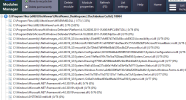
If these steps do not work, check for any ActiveX errors or missing .NET assemblies, as these are common underlying causes for UltraViewer "Line Number: 0" errors.

Certain .NET maybe need downloaded or updated I suppose.
 
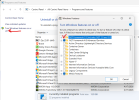
Do a repair on .net or reinstall. The error is because of a mismatch in .net.
Oh and 6.3 is quite old so might want to get the latest 6.6.124.
 
Last edited:
Back
Top