MSI BIOS - Does "Hard Disk" mean Windows boot manager or something else?

britechguy

Well-Known Member
Reaction score
5,110
Location
Staunton, VA
I have a client who sent the following screenshot:
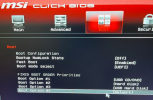
1769900340469.png

I am not familiar with "Hard Disk" being used as the designation for Windows, per se, and every time I have to deal with MSI BIOS I have to reacquaint myself with how it works.

The computer won't boot. It goes straight into BIOS. I am suspecting a dead SSD, but am not certain. What says the cohort about the meaning of the above as far as boot order and Windows goes? Also, about the possibility of a dead SSD?
 
Might be a corrupted Boot Sector, even if USB was selected as 1 it would still roll onto the Hard Drive Boot sector and continue OS Boot; as long as no bootable usb/dvd was connected of course.

In my experience it might be best to use a USB Bootable drive to see if there is a Windows Directory on the actual Hard Drive.
If there is, well it points to a boot sector issue or failure of the SSD. Though check on the drive in question to verify it has not disconnected and is firm into the slot.

As you stated it could be a dead ssd, only real way to know is to remove the SSD and test.
 
I swear it's always a dead ssd these days lol. Any time I even think it is...it always is at least with me lol. It sucks how much the prices have went up...wish I would have stocked up more...shoulda coulda woulda.

So many computers now are gonna be throw away because they won't be worth fixing. It's already been that way to some degree but this will certainly accelerate it I feel like.

I feel like I'm going to have to start sending clients screen shots of the price of parts so that they believe that I'm not trying to rip them off lol.

I'd say the general public majority has no idea how much this stuff has jumped up in price in the last few months especially.
 
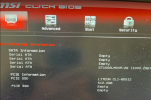
BTW, I'm 99.999% sure it's a dead SSD. These things had LiteOn CL1-80512 SSDs that appear to have been made for MSI in them. Also a 1TB spinner, but that's not the boot disk.

I will, of course, check the seating, but I've been down this road before.
 
Even I had no idea just how much SSDs had jumped.

Last July, I paid $61.57 for this one: https://www.amazon.com/dp/B0CCD6T788 (today's price, and subject to change with time: $157.97)

I bought a 2TB Samsung 990 pro with the heatsink for myself back in early 2024 and it was around $160. Now that one is like $320 with the heatsink. Essentially what you could charge for a 1 off job before on that is now the price of the part only...at least for me.
 
I am not familiar with "Hard Disk" being used as the designation for Windows
In my experience, I've seen a number of BIOS/UEFI implementations that simply report the boot device generically as “Hard Disk” rather than showing the actual model name. MSI is probably the best-known example, but I’ve also seen it on Toshiba laptops and some HP desktops.

It doesn’t appear to be tied strictly to one BIOS vendor (AMI, Insyde, Phoenix, etc.), but rather to how the system firmware chooses to label boot devices. In many cases the BIOS is showing the boot class (HDD/SSD) rather than querying and displaying the drive’s full identity string.

Some drives expose their model and serial information cleanly during early enumeration, others present more minimal data, especially when connected via certain controllers (NVMe vs SATA, RAID mode, or vendor-specific firmware layers). In some cases the BIOS may fall back to a generic label like “Hard Disk” even though the OS will later see the full drive name without issue.

So it’s mostly a firmware/UI choice rather than a fault with the drive itself.
 
I bought a 2TB Samsung 990 pro with the heatsink for myself back in early 2024 and it was around $160. Now that one is like $320 with the heatsink. Essentially what you could charge for a 1 off job before on that is now the price of the part only...at least for me.
Seen the price of Heatsinks alone, ridiculous.
 
As an aside, the machine under discussion . . .
Marketing Name: GL65 Leopard 10SEK
Model Name: MS-16U7

Does anyone happen to know of a source for the service manual? I generally find these pretty easily, but not this time.

@GTP, the UEFI/BIOS does expose the make/model of the "what I assume to be dead" SSD elsewhere:
1769983935703.png

The fact that it reports the correct make and model of the SSD, but still won't boot, that makes me think "effectively dead."

If the hardware brand and model is recognized, I have to believe that it's seated properly, but the system still won't boot. Anyway, I'm waiting on a replacement SSD at this point because it's so likely one will be needed.
 
As an aside, the machine under discussion . . .
Marketing Name: GL65 Leopard 10SEK
Model Name: MS-16U7

Does anyone happen to know of a source for the service manual? I generally find these pretty easily, but not this time.

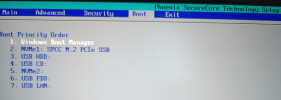
BTW, this is what I'm used to seeing almost everywhere, these days, for boot order, with Windows Boot Manager being listed even before the hardware (my system, and the Silicon Power NVMe is the main system drive):
1769984583066.png
 
the UEFI/BIOS does expose the make/model of the "what I assume to be dead" SSD elsewhere
I suspect "Hard Disk" in the boot order is a reference to the 1TB HDD, which wouldn't be the boot drive. The SSD must be corrupted or faulty so not showing a UEFI compatible boot loader.
 
Does anyone happen to know of a source for the service manual? I generally find these pretty easily, but not this time.
Does this help?

 
Back
Top