Google hoodoo voodoo

During your pre-upgrade tests did you type in both the username and the password or just the password?
I entered both username and password. Neither Skype nor gmail was/is setup to "remember me."

Of course I will have to get permission from the client to share these details.
I'll have a conversation with him shortly.
 
Local cache, updated on connection.
So why didn't it "update on connection" on Friday, when I logged in for about 2 minutes, (while the client was present) then on Monday before the client arrived, when I logged in for another ~2 minutes?
I used exactly the same password and username on both occasions.
We entered the same username and password when it logged in for 3 seconds.
 
So why didn't it "update on connection" on Friday, when I logged in for about 2 minutes, (while the client was present) then on Monday before the client arrived, when I logged in for another ~2 minutes?
Hey, you're the one that suggested something spooky (see thread title) ... ! ;)

On Friday, you hadn't touched Windows yet, so it was working as expected. Your first login on Monday, I don't know. Maybe the MS account hadn't sync'ed (WAG). After that, you've got some setting(s) changed, without your intervention.

You have demonstrated that the original Gmail account works, by replying to a historical email, and that messages sent that way don't appear in the new Gmail account. You have two Gmail accounts, which, by definition, cannot have the same email address, but visually look the same.

@Alexey's earlier post demonstrates how that can be, by substituting, in his example, Cyrillic o and Cyrillic ie in place of Latin o and e, respectively. The Unicode glyphs for these are identical, but they are not the same character. If we still used Code Pages, Alexey's second 'login_name' would have placeholders for the o and e, because they would probably not be displayable on a computer set for Western European Code Page (or whatever – you get my meaning). This is the basis of email scams, where lookalike Unicode characters are substituted in the link to your bank login page, for example. Similar process with the Skype account.

Without wishing to pry and from a purely technical interest point of view, does your client, or someone who uses the computer, have a history of using languages with Cyrillic, Eastern European or Asian (not an exhaustive list) fonts? Was the computer originally bought from a supplier in a region that uses those languages? Does (s)he use a second keyboard at home?

I visited a client here just yesterday who has a computer completely set up entirely in French, with a French keyboard, but with a Croatian keyboard layout (he is originally from Croatia and his wife is French) and no language indicator on the task bar. That was quite an experience until I realised what was happening. See what I mean?

Edit: grammar & typo.
 
Last edited:

1. open blank notepad
2. paste email address into it
3. on the menu, select File -- Save as
4. in save dialog, explicitly switch Encoding from ANSI to UTF-8
5. save file
6. close notepad

repeat with another file

in hex editor, check that both files start with EF BB BF (Unicode byte order mark for UTF8)

after that, repeat the comparsion, see if the files are still identical

Alternatively, save in Unicode encoding, in which case byte order mark becomes FF FE and you get a lot of zero bytes in the file, but net result is the same.

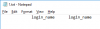
Following is the sample for login_name I used above; I padded it with spaces to improve viewing pleasure in hex.

Notepad looks like this

unicode-notepad.png

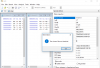
and hex is this

unicode-sample.png

top line is Unicode byte order mark padded with spaces
middle line is login_name in pure English (padded again)
bottom line is login_name with two characters Cyrillic.

important note is that if you do not have byte order mark at the very beginnig of the file, the file is most likely not Unicode and some character mapping was already done possibly losing some fine detail

EDITED TO ADD:

Your original screenshot of comparsion shows byte at offset 0 and it is neither EF nor FF. This suggests the file was saved ANSI, not Unicode.

EDITED TO FURTHER ADD:

if this still shows file as identical, next step would be to check if the email client does not do any character encoding conversions.

 
Last edited:
  • Like
Reactions: GTP
1. open blank notepad
2. paste email address into it
3. on the menu, select File -- Save as
4. in save dialog, explicitly switch Encoding from ANSI to UTF-8
5. save file
6. close notepad


repeat with another file

in hex editor, check that both files start with EF BB BF (Unicode byte order mark for UTF8)

after that, repeat the comparsion, see if the files are still identical

Alternatively, save in Unicode encoding, in which case byte order mark becomes FF FE and you get a lot of zero bytes in the file, but net result is the same.

Following is the sample for login_name I used above; I padded it with spaces to improve viewing pleasure in hex.

Notepad looks like this

View attachment 9515

and hex is this

View attachment 9514

top line is Unicode byte order mark padded with spaces
middle line is login_name in pure English (padded again)
bottom line is login_name with two characters Cyrillic.

important note is that if you do not have byte order mark at the very beginnig of the file, the file is most likely not Unicode and some character mapping was already done possibly losing some fine detail

EDITED TO ADD:

Your original screenshot of comparsion shows byte at offset 0 and it is neither EF nor FF. This suggests the file was saved ANSI, not Unicode.

EDITED TO FURTHER ADD:

if this still shows file as identical, next step would be to check if the email client does not do any character encoding conversions.
Ok @Alexey here is the output after following your directions implicitly.

Comparison.png
check if the email client does not do any character encoding conversions.

No email client. Gmail accessed through a web browser.
 
does your client, or someone who uses the computer, have a history of using languages with Cyrillic, Eastern European or Asian (not an exhaustive list) fonts?
No. Client is the only user.
Was the computer originally bought from a supplier in a region that uses those languages?
No, comp was purchased "new" from my supplier, setup and delivered to the client.
Language and keyboard setup as English Australia and English, US respectively.
Does (s)he use a second keyboard at home?
No, he uses the inbuilt keyboard only.

Thanks I appreciate everyone's input.
 
here is the output
Hells bells.

We need a better test. Did you look at the raw headers for two messages, from the current address and from the original one, to see maybe something is different? Yeah I guess you did already, but I still have to ask.
 
Client wants his privacy respected. Client doesn't care about why it happened. His email and Skype are working that's all he cares about. I'm out as well.
Thanks everyone.
 
Well with you guys applying so much pressure and making me feel like I did something wrong - demanding that I do this or that - I'm kind of glad to be out.
 
Well with you guys applying so much pressure and making me feel like I did something wrong - demanding that I do this or that - I'm kind of glad to be out.
That's a bit disingenuous – if your client had been beating you to get his old emails back, you would have been glad of all the help you could get. (He may be back yet, when he needs a historical message.)

Anyway, interesting that it happened; would have been nice to get to the bottom of it.
 
This is indicative of computers if it was a different industry it would not be tolerated lost count of how many times similar things have happened to me
 
Back
Top