1. open blank notepad
2. paste email address into it
3. on the menu, select File -- Save as
4. in save dialog,
explicitly switch Encoding from ANSI to UTF-8
5. save file
6. close notepad
repeat with another file
in hex editor, check that both files start with EF BB BF (Unicode byte order mark for UTF8)
after that, repeat the comparsion, see if the files are still identical
Alternatively, save in Unicode encoding, in which case byte order mark becomes FF FE and you get a lot of zero bytes in the file, but net result is the same.
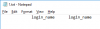
Following is the sample for login_name I used above; I padded it with spaces to improve viewing pleasure in hex.
Notepad looks like this
View attachment 9515
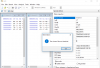
and hex is this
View attachment 9514
top line is Unicode byte order mark padded with spaces
middle line is login_name in pure English (padded again)
bottom line is login_name with two characters Cyrillic.
important note is that if you do not have byte order mark at the very beginnig of the file, the file is most likely not Unicode and some character mapping was already done possibly losing some fine detail
EDITED TO ADD:
Your original screenshot of comparsion shows byte at offset 0 and it is neither EF nor FF. This suggests the file was saved ANSI, not Unicode.
EDITED TO FURTHER ADD:
if this still shows file as identical, next step would be to check if the email client does not do any character encoding conversions.