<#
.SYNOPSIS
Combined browser and system configuration script:
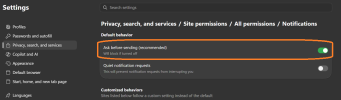
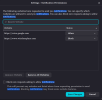
1. Deletes all existing site "notification" permissions in Edge, Chrome,
and Firefox, then sets policy so those browsers can no longer show
(or ask to show) notifications going forward.
2. Silently force-installs an ad blocker (uBlock Origin Lite on
Chrome/Edge, full uBlock Origin on Firefox) via enterprise policy,
so no manual "Add to browser" click is needed.
3. Disables Windows Fast Startup.
4. Forces Google as the default (and, on Firefox, only) search engine,
and resets the homepage to
http://www.google.com, for all three
browsers.
.DESCRIPTION
- "Delete" = removes any sites currently granted permission to show
desktop notifications, for every local user profile.
- "Disable" (notifications) = writes browser enterprise policies (via
registry / policies.json) so the notification permission prompt/feature
is blocked from now on.
- "Force-install" = writes browser enterprise policies so uBlock Origin
(Lite on Chrome/Edge, full version on Firefox) installs automatically
on next browser launch, with no user interaction required.
- "Disable" (Fast Startup) = sets the HiberbootEnabled registry value to 0
so Windows performs a full shutdown instead of a hybrid
shutdown/hibernation on next power-off. Takes effect after the next
full shutdown or restart.
- "Search engine / homepage" = writes browser enterprise policies so
Google is set as the default search provider and homepage on Edge and
Chrome, and as the default search engine (with other built-in engines
removed) and homepage on Firefox.
.NOTES
- Must be run as Administrator (writes to HKLM and Program Files).
- Closes Edge, Chrome, and Firefox if they're running, since their
profile files are locked while the browser is open.
- For Firefox, this deletes permissions.sqlite entirely (all per-site
permissions, not just notifications) because editing individual rows
requires a SQLite driver that isn't available by default in Windows
PowerShell. Firefox recreates an empty file on next launch.
- Users won't be able to disable or remove the force-installed extension
while its policy is in place.
#>
[CmdletBinding()]
param()
$ErrorActionPreference = "Stop"
function Write-Status($msg) {
Write-Host "[*] $msg" -ForegroundColor Cyan
}
# ---- 0. Require admin ------------------------------------------------------
$currentUser = [Security.Principal.WindowsIdentity]::GetCurrent()
$isAdmin = (New-Object Security.Principal.WindowsPrincipal $currentUser).IsInRole([Security.Principal.WindowsBuiltInRole]::Administrator)
if (-not $isAdmin) {
Write-Error "This script must be run from an elevated (Administrator) PowerShell session."
exit 1
}
# =============================================================================
# 1. CLOSE BROWSERS (profile files are locked while running)
# =============================================================================
Write-Status "Closing Edge, Chrome, and Firefox if running..."
foreach ($proc in @("msedge", "chrome", "firefox")) {
Get-Process -Name $proc -ErrorAction SilentlyContinue | Stop-Process -Force -ErrorAction SilentlyContinue
}
Start-Sleep -Seconds 2
# =============================================================================
# 2. HELPER: strip notification exceptions from a Chromium "Preferences" file
# =============================================================================
function Clear-ChromiumNotificationPrefs {
param([string]$PreferencesPath)
if (-not (Test-Path $PreferencesPath)) { return }
try {
$json = Get-Content -Path $PreferencesPath -Raw | ConvertFrom-Json
if ($json.profile -and $json.profile.content_settings -and $json.profile.content_settings.exceptions) {
if ($json.profile.content_settings.exceptions.PSObject.Properties.Name -contains "notifications") {
$json.profile.content_settings.exceptions.notifications = New-Object PSObject
}
}
$json | ConvertTo-Json -Depth 100 | Set-Content -Path $PreferencesPath -Encoding UTF8
Write-Host " Cleared notification permissions in: $PreferencesPath" -ForegroundColor Green
} catch {
Write-Warning " Could not update $PreferencesPath : $_"
}
}
# =============================================================================
# 3. CLEAR EXISTING NOTIFICATION PERMISSIONS - EDGE & CHROME (all profiles, all users)
# =============================================================================
Write-Status "Clearing existing notification permissions for Edge and Chrome..."
$userDataRoots = @(
@{ Browser = "Edge"; Path = "AppData\Local\Microsoft\Edge\User Data" }
@{ Browser = "Chrome"; Path = "AppData\Local\Google\Chrome\User Data" }
)
$userProfiles = Get-ChildItem "C:\Users" -Directory -ErrorAction SilentlyContinue
foreach ($u in $userProfiles) {
foreach ($root in $userDataRoots) {
$userDataDir = Join-Path $u.FullName $root.Path
if (-not (Test-Path $userDataDir)) { continue }
# Default profile + any additional "Profile N" folders
Get-ChildItem $userDataDir -Directory -ErrorAction SilentlyContinue |
Where-Object { $_.Name -eq "Default" -or $_.Name -like "Profile *" } |
ForEach-Object {
$prefsPath = Join-Path $_.FullName "Preferences"
Clear-ChromiumNotificationPrefs -PreferencesPath $prefsPath
}
}
}
# =============================================================================
# 4. CLEAR EXISTING NOTIFICATION PERMISSIONS - FIREFOX (all users)
# =============================================================================
Write-Status "Clearing existing notification permissions for Firefox..."
foreach ($u in $userProfiles) {
$ffProfilesRoot = Join-Path $u.FullName "AppData\Roaming\Mozilla\Firefox\Profiles"
if (-not (Test-Path $ffProfilesRoot)) { continue }
Get-ChildItem $ffProfilesRoot -Directory -ErrorAction SilentlyContinue | ForEach-Object {
$permsDb = Join-Path $_.FullName "permissions.sqlite"
if (Test-Path $permsDb) {
Remove-Item -Path $permsDb -Force -ErrorAction SilentlyContinue
Write-Host " Removed permissions.sqlite in: $($_.FullName)" -ForegroundColor Green
}
}
}
# =============================================================================
# 5. DISABLE NOTIFICATIONS GOING FORWARD - VIA BROWSER ENTERPRISE POLICY
# =============================================================================
Write-Status "Applying policy to disable notifications going forward..."
# --- Edge ---
$edgePolicyPath = "HKLM:\SOFTWARE\Policies\Microsoft\Edge"
New-Item -Path $edgePolicyPath -Force | Out-Null
New-ItemProperty -Path $edgePolicyPath -Name "DefaultNotificationsSetting" -Value 2 -PropertyType DWord -Force | Out-Null
# --- Chrome ---
$chromePolicyPath = "HKLM:\SOFTWARE\Policies\Google\Chrome"
New-Item -Path $chromePolicyPath -Force | Out-Null
New-ItemProperty -Path $chromePolicyPath -Name "DefaultNotificationsSetting" -Value 2 -PropertyType DWord -Force | Out-Null
# --- Firefox ---
# Firefox's policy engine maps nested registry keys to its JSON policy schema.
$ffPolicyPath = "HKLM:\SOFTWARE\Policies\Mozilla\Firefox\Permissions\Notifications"
New-Item -Path $ffPolicyPath -Force | Out-Null
New-ItemProperty -Path $ffPolicyPath -Name "BlockNewRequests" -Value 1 -PropertyType DWord -Force | Out-Null
New-ItemProperty -Path $ffPolicyPath -Name "Locked" -Value 1 -PropertyType DWord -Force | Out-Null
Write-Host "Existing site notification permissions were removed, and Edge, Chrome, and Firefox are now policy-locked to block notifications." -ForegroundColor Green
# =============================================================================
# 6. FORCE-INSTALL AD BLOCKER (uBlock Origin Lite / uBlock Origin)
# =============================================================================
function Install-ChromeExtension {
Write-Status "Configuring Chrome force-install policy for uBlock Origin Lite..."
$chromeExtensionId = "ddkjiahejlhfcafbddmgiahcphecmpfh" # uBlock Origin Lite
$updateUrl = "
https://clients2.google.com/service/update2/crx"
$regPath = "HKLM:\SOFTWARE\Policies\Google\Chrome\ExtensionInstallForcelist"
if (-not (Test-Path $regPath)) {
New-Item -Path $regPath -Force | Out-Null
}
$existing = Get-Item -Path $regPath
$nextIndex = ($existing.Property | Where-Object { $_ -match '^\d+$' } |
ForEach-Object { [int]$_ } | Sort-Object -Descending | Select-Object -First 1) + 1
if (-not $nextIndex) { $nextIndex = 1 }
New-ItemProperty -Path $regPath -Name $nextIndex `
-Value "$chromeExtensionId;$updateUrl" -PropertyType String -Force | Out-Null
Write-Status "Chrome policy set. uBlock Origin Lite will install on next Chrome launch."
}
function Install-EdgeExtension {
Write-Status "Configuring Edge force-install policy for uBlock Origin Lite..."
$edgeExtensionId = "cimighlppcgcoapaliogpjjdehbnofhn" # uBlock Origin Lite (Edge Add-ons)
$updateUrl = "
https://edge.microsoft.com/extensionwebstorebase/v1/crx"
$regPath = "HKLM:\SOFTWARE\Policies\Microsoft\Edge\ExtensionInstallForcelist"
if (-not (Test-Path $regPath)) {
New-Item -Path $regPath -Force | Out-Null
}
$existing = Get-Item -Path $regPath
$nextIndex = ($existing.Property | Where-Object { $_ -match '^\d+$' } |
ForEach-Object { [int]$_ } | Sort-Object -Descending | Select-Object -First 1) + 1
if (-not $nextIndex) { $nextIndex = 1 }
New-ItemProperty -Path $regPath -Name $nextIndex `
-Value "$edgeExtensionId;$updateUrl" -PropertyType String -Force | Out-Null
Write-Status "Edge policy set. uBlock Origin Lite will install on next Edge launch."
}
function Install-FirefoxExtension {
Write-Status "Configuring Firefox force-install policy for uBlock Origin..."
$possiblePaths = @(
"${env

rogramFiles}\Mozilla Firefox",
"${env
rogramFiles(x86)}\Mozilla Firefox"
)
$firefoxDir = $possiblePaths | Where-Object { Test-Path $_ } | Select-Object -First 1
if (-not $firefoxDir) {
Write-Warning "Firefox installation not found in Program Files. Skipping Firefox."
return
}
$distributionDir = Join-Path $firefoxDir "distribution"
$policiesPath = Join-Path $distributionDir "policies.json"
if (-not (Test-Path $distributionDir)) {
New-Item -Path $distributionDir -ItemType Directory -Force | Out-Null
}
# Merge with any existing policies.json instead of clobbering it
$policies = @{ policies = @{ ExtensionSettings = @{} } }
if (Test-Path $policiesPath) {
try {
$policies = Get-Content $policiesPath -Raw | ConvertFrom-Json -AsHashtable
if (-not $policies.policies) { $policies.policies = @{} }
if (-not $policies.policies.ExtensionSettings) { $policies.policies.ExtensionSettings = @{} }
} catch {
Write-Warning "Existing policies.json could not be parsed; it will be overwritten."
$policies = @{ policies = @{ ExtensionSettings = @{} } }
}
}
$policies.policies.ExtensionSettings["
uBlock0@raymondhill.net"] = @{
installation_mode = "force_installed"
install_url = "
https://addons.mozilla.org/firefox/downloads/latest/ublock-origin/latest.xpi"
}
($policies | ConvertTo-Json -Depth 10) | Set-Content -Path $policiesPath -Encoding UTF8
Write-Status "Firefox policy set. uBlock Origin will install on next Firefox launch."
}
Write-Status "Applying ad blocker force-install policies..."
Install-ChromeExtension
Install-EdgeExtension
Install-FirefoxExtension
Write-Host ""
Write-Host "Ad blocker: users won't be able to disable or remove the force-installed extension" -ForegroundColor Yellow
Write-Host "while this policy is in place. Remove the registry keys / policies.json entry to lift it." -ForegroundColor Yellow
# =============================================================================
# 7. DISABLE FAST STARTUP
# =============================================================================
Write-Status "Disabling Fast Startup..."
$powerRegPath = "HKLM:\SYSTEM\CurrentControlSet\Control\Session Manager\Power"
if (-not (Test-Path $powerRegPath)) {
New-Item -Path $powerRegPath -Force | Out-Null
}
New-ItemProperty -Path $powerRegPath -Name "HiberbootEnabled" -Value 0 -PropertyType DWord -Force | Out-Null
Write-Host "Fast Startup disabled." -ForegroundColor Green
# =============================================================================
# 8. FORCE GOOGLE AS DEFAULT SEARCH ENGINE + RESET HOMEPAGE
# =============================================================================
Write-Status "Setting Google as the default search engine and homepage..."
$googleHomepage = "
http://www.google.com"
$googleSearchUrl = "
https://www.google.com/search?q={searchTerms}"
# --- Edge ---
$edgePolicyPath = "HKLM:\SOFTWARE\Policies\Microsoft\Edge"
New-ItemProperty -Path $edgePolicyPath -Name "DefaultSearchProviderEnabled" -Value 1 -PropertyType DWord -Force | Out-Null
New-ItemProperty -Path $edgePolicyPath -Name "DefaultSearchProviderName" -Value "Google" -PropertyType String -Force | Out-Null
New-ItemProperty -Path $edgePolicyPath -Name "DefaultSearchProviderSearchURL" -Value $googleSearchUrl -PropertyType String -Force | Out-Null
New-ItemProperty -Path $edgePolicyPath -Name "HomepageLocation" -Value $googleHomepage -PropertyType String -Force | Out-Null
New-ItemProperty -Path $edgePolicyPath -Name "HomepageIsNewTabPage" -Value 0 -PropertyType DWord -Force | Out-Null
New-ItemProperty -Path $edgePolicyPath -Name "RestoreOnStartup" -Value 4 -PropertyType DWord -Force | Out-Null
$edgeStartupUrlsPath = "$edgePolicyPath\RestoreOnStartupURLs"
New-Item -Path $edgeStartupUrlsPath -Force | Out-Null
New-ItemProperty -Path $edgeStartupUrlsPath -Name "1" -Value $googleHomepage -PropertyType String -Force | Out-Null
Write-Status "Edge: Google set as default search engine and homepage."
# --- Chrome ---
$chromePolicyPath = "HKLM:\SOFTWARE\Policies\Google\Chrome"
New-ItemProperty -Path $chromePolicyPath -Name "DefaultSearchProviderEnabled" -Value 1 -PropertyType DWord -Force | Out-Null
New-ItemProperty -Path $chromePolicyPath -Name "DefaultSearchProviderName" -Value "Google" -PropertyType String -Force | Out-Null
New-ItemProperty -Path $chromePolicyPath -Name "DefaultSearchProviderSearchURL" -Value $googleSearchUrl -PropertyType String -Force | Out-Null
New-ItemProperty -Path $chromePolicyPath -Name "HomepageLocation" -Value $googleHomepage -PropertyType String -Force | Out-Null
New-ItemProperty -Path $chromePolicyPath -Name "HomepageIsNewTabPage" -Value 0 -PropertyType DWord -Force | Out-Null
New-ItemProperty -Path $chromePolicyPath -Name "RestoreOnStartup" -Value 4 -PropertyType DWord -Force | Out-Null
$chromeStartupUrlsPath = "$chromePolicyPath\RestoreOnStartupURLs"
New-Item -Path $chromeStartupUrlsPath -Force | Out-Null
New-ItemProperty -Path $chromeStartupUrlsPath -Name "1" -Value $googleHomepage -PropertyType String -Force | Out-Null
Write-Status "Chrome: Google set as default search engine and homepage."
# --- Firefox ---
# Reuse/merge the same policies.json touched earlier for the ad-blocker force-install.
$possiblePaths = @(
"${env
rogramFiles}\Mozilla Firefox",
"${env
rogramFiles(x86)}\Mozilla Firefox"
)
$firefoxDir = $possiblePaths | Where-Object { Test-Path $_ } | Select-Object -First 1
if ($firefoxDir) {
$distributionDir = Join-Path $firefoxDir "distribution"
$policiesPath = Join-Path $distributionDir "policies.json"
if (-not (Test-Path $distributionDir)) {
New-Item -Path $distributionDir -ItemType Directory -Force | Out-Null
}
$policies = @{ policies = @{} }
if (Test-Path $policiesPath) {
try {
$policies = Get-Content $policiesPath -Raw | ConvertFrom-Json -AsHashtable
if (-not $policies.policies) { $policies.policies = @{} }
} catch {
Write-Warning "Existing policies.json could not be parsed; it will be overwritten."
$policies = @{ policies = @{} }
}
}
# Force Google as the only search engine (removes the other built-in defaults).
$policies.policies.SearchEngines = @{
Default = "Google"
PreventInstalls = $true
Remove = @("Bing", "DuckDuckGo", "eBay", "Wikipedia (en)", "Amazon.com")
}
# Reset and lock the homepage.
$policies.policies.Homepage = @{
URL = $googleHomepage
StartPage = "homepage"
}
($policies | ConvertTo-Json -Depth 10) | Set-Content -Path $policiesPath -Encoding UTF8
Write-Status "Firefox: Google set as default search engine and homepage."
} else {
Write-Warning "Firefox installation not found in Program Files. Skipping Firefox search/homepage settings."
}
# =============================================================================
# 9. RESTART EXPLORER TO REFRESH THE SYSTEM
# =============================================================================
Write-Status "Restarting Explorer to refresh the system..."
Get-Process -Name "explorer" -ErrorAction SilentlyContinue | Stop-Process -Force -ErrorAction SilentlyContinue
Start-Sleep -Seconds 2
Start-Process "explorer.exe"
Write-Host ""
Write-Host "Done. Notification permissions were cleared and blocked, uBlock Origin will" -ForegroundColor Green
Write-Host "install automatically the next time Chrome, Edge, and Firefox are opened," -ForegroundColor Green
Write-Host "Fast Startup has been disabled, and Google has been set as the default" -ForegroundColor Green
Write-Host "search engine and homepage for Edge, Chrome, and Firefox." -ForegroundColor Green