
- You are here:
- Home »
- Blog »
- Computer Technician Tools »
- Xpy – Windows XP Tweaking Tool
Xpy – Windows XP Tweaking Tool
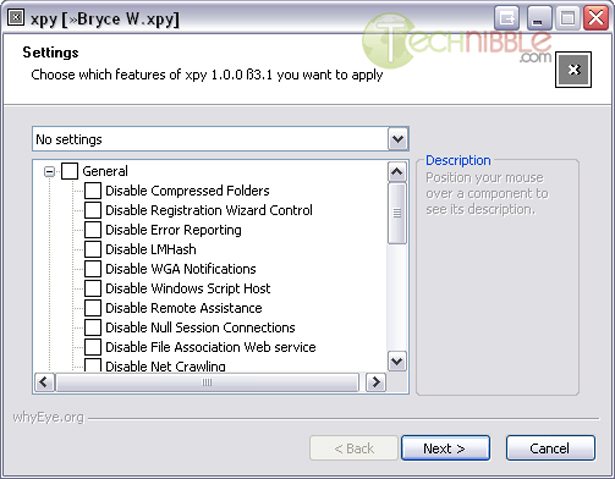
Xpy is a small, portable and freeware registry tweaker with an emphasis on tweaking privacy and security settings. It has the ability to disable Windows communicating with Microsoft (WGA, crash reports, usage tracking, automatic updates etc..), disable services which are not used in most cases, remove Windows Messenger, tweak Internet Explorer and Windows Media Player and many other settings you would expect in a registry tweaker.
This application comes with a few nice features such as the ability to save and load profiles so you can apply the same tweak setup to multiple computers without having to re-select all the tweaks you wanted to do. The application will also make a Windows Restore Point before it makes any changes in-case something doesn’t go well.
Xpy works on Windows 2000, XP and Server 2003. There is also a Vista/Server 2008/Win7 version called Vispa.
Screenshots:
Downloads:
Download from Official Site – Windows 2000, XP and Server 2003 – 93kb
Session expired
Please log in again. The login page will open in a new tab. After logging in you can close it and return to this page.
We use cookies to help you navigate efficiently and perform certain functions. You will find detailed information about all cookies under each consent category below.
The cookies that are categorised as "Necessary" are stored on your browser as they are essential for enabling the basic functionalities of the site.
We also use third-party cookies that help us analyse how you use this website, store your preferences, and provide the content and marketing materials that are relevant to you. These cookies will only be stored in your browser with your prior consent.
You can choose to enable or disable some or all of these cookies but disabling some of them may affect your browsing experience.
We use third-party cookies that help us analyse how you use this website, store your preferences, and provide the content and marketing materials that are relevant to you. However, you can opt out of these cookies by checking "Do Not Sell or Share My Personal Information" and clicking the "Save My Preferences" button. Once you opt out, you can opt in again at any time by unchecking "Do Not Sell or Share My Personal Information" and clicking the "Save My Preferences" button.
Your opt-out settings for this website have been respected since we detected a Global Privacy Control signal from your browser and, therefore, you cannot change this setting.

Right on, love the profiles!
Thanks for another great repair tool. FYI – The vista link doesn’t work because it has a speech mark at the end.
excellent tool , thank you
Tampa Computer Services…….what profiles?
I hadn’t heard of this piece of software before and handy as I believe it would be for privacy, would it contravene microsoft policies at all? does it stop office and genuine advantage notifications so microsoft can’t tell if an OS is genuine. I would have thought it would come under the heading of a hack tool or is it not that comprehensive?
reminds me of xp-AntiSpy
http://www.xp-antispy.org