
- You are here:
- Home »
- Blog »
- Computer Technician Tools »
- iSSIDer – Find Wireless Networks
iSSIDer – Find Wireless Networks
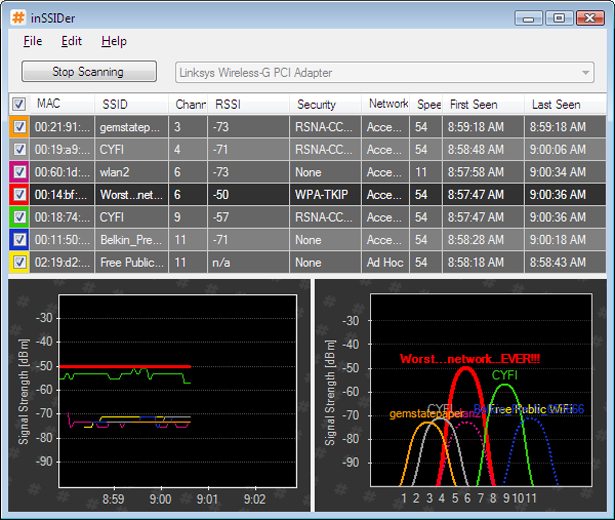
inSSIDer is a small freeware application designed to scan for wireless networks within the reach of your wireless antenna. When wireless networks are found, it will display them in both list form and graphic form. The list form will show you the the MAC address, SSID, Channel, RSSI, Security Type, Network Type, Speed, Time it was first seen and time it was last seen.
The graph form will give you a visual reference of how strong each wireless signal is. This is great when you are walking around with a laptop trying to find the strongest signal location.
NetStumbler used to be the old favorite but unfortunately it doesn’t work well with Windows Vista or the 64 bit version of Windows XP. Additionally, NetStumbler hasn’t been updated in a long time so it may not support some of the more modern wireless cards. inSSIDer, on the other hand, works great with Windows Vista and XP. It is also open source.
The only downside of inSSIDer is that it is not portable since it requires .NET 2.0 to be installed. However, I usually use my own laptop when seeking out dead spots in my clients home or business, so it has never been a problem for me.
Screenshots:
Downloads:
Session expired
Please log in again. The login page will open in a new tab. After logging in you can close it and return to this page.
We use cookies to help you navigate efficiently and perform certain functions. You will find detailed information about all cookies under each consent category below.
The cookies that are categorised as "Necessary" are stored on your browser as they are essential for enabling the basic functionalities of the site.
We also use third-party cookies that help us analyse how you use this website, store your preferences, and provide the content and marketing materials that are relevant to you. These cookies will only be stored in your browser with your prior consent.
You can choose to enable or disable some or all of these cookies but disabling some of them may affect your browsing experience.
We use third-party cookies that help us analyse how you use this website, store your preferences, and provide the content and marketing materials that are relevant to you. However, you can opt out of these cookies by checking "Do Not Sell or Share My Personal Information" and clicking the "Save My Preferences" button. Once you opt out, you can opt in again at any time by unchecking "Do Not Sell or Share My Personal Information" and clicking the "Save My Preferences" button.
Your opt-out settings for this website have been respected since we detected a Global Privacy Control signal from your browser and, therefore, you cannot change this setting.

Hi there, I tested it and it works great with Windows 7.
I also use vistumbler, also free and works with on windows 7.
Thanks all, David
Good find. I will check it out! Thanks for your continued efforts in finding tools.
Tom (hamrad)
Been using Insidder for a while and it is a good one.
Great program, I use this to check on WAP signal strength in residential halls at my university, we also use it to sniff out rogue DHCPs.
It’s great and so is the Wi-Spy Analyzer product they have.
Might I also add this is a great tool for determining what frequency/channel to set your wireless router to minimize overlap which would reduce bandwidth
Does requiring .net really deem a program as not being portable? Less portable, maybe? But I think as long as it doesn’t need to be installed itself, it’s still a portable app. .net is a pretty common runtime.
I can’t remember if it has been posted here before or on tekzilla but it’s a great program and I use it quite a lot.
Great program. I have this on my laptop as my laptop has .Net installed already. I use it with XP Pro.
I used this to help relocate the router so I could use the laptop in the backyard since summer is now in full effect. Thanks.