
strange external drive corruption

pcpete

Well-Known Member
Reaction score
564
I have this external drive brought to us for a data recovery. It made an image flawlessly at full speed without missed sectors. it is a toshiba with the usb port as part of the main PCB. After making the image I plugged the drive into windows to see what it would do since the image went as if the drive was not damaged. I got these strange looking folders that could not be browsed. I attached the file of the screenshot. Curious if any of you have seen this.

I am transferring my image to a drive to run rstudio on it to see what it might be able to do.
 

Attachments
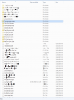
  • Capture.PNG
    Capture.PNG
    57.3 KB · Views: 37
Last edited:
Corrupt MFT, it looks like to me.

I would get it on a Linux box to see if things were a bit more "fixed". It is possible that you already "messed up" by plugging it into the Windows box because Windows will "Intelligently fix" (They mean break) the MFT... what you see is probably Windows' best guess as to the MFT.
 
What did the EU have stored on the drive? The files at root are all multi GB. I'm thinking that it maybe encrypted or one of those "special" USB2SATA adapters.
 
Corrupt MFT, it looks like to me.

I would get it on a Linux box to see if things were a bit more "fixed". It is possible that you already "messed up" by plugging it into the Windows box because Windows will "Intelligently fix" (They mean break) the MFT... what you see is probably Windows' best guess as to the MFT.
Close...my guess is that it is FAT32, not NTFS.
 
What did the EU have stored on the drive? The files at root are all multi GB. I'm thinking that it maybe encrypted or one of those "special" USB2SATA adapters.
I think the OP is suggesting that it is a USB only device. I don't suspect encryption, otherwise no file structure would be found.

Just do a full scan with R-Studio or GetDataBack FAT.
 
A
Corrupt MFT, it looks like to me.

I would get it on a Linux box to see if things were a bit more "fixed". It is possible that you already "messed up" by plugging it into the Windows box because Windows will "Intelligently fix" (They mean break) the MFT... what you see is probably Windows' best guess as to the MFT.

I made an image before I plugged it in. The reason I plugged in was to see if the drive behaved normally on my computer. In my opinion the insight received was worth the tradeoff of plugging it in.

Same basic corruption in Linux

It is fat32
 
Yeah, no worries.. I didn't mean to imply you did something wrong just that Windows is crappy for these types. You got this!

Maybe lcoughey can chime in and let me know if I am even slightly correct - as I understand it the MFT or FAT tables are "streams" of data rather than "addressed" like a file... so if a part of the stream is broken or incomplete this can cause the stream to have an offset which gives you the gobbly-gook file listing... am I right on that? Don't want to hijack the thread.
 
I think the OP is suggesting that it is a USB only device. I don't suspect encryption, otherwise no file structure would be found.

Just do a full scan with R-Studio or GetDataBack FAT.

If it's a spinning HD then there must be a SATA interface. At least I'm pretty certain about that. On the encryption. Not all encryption is FDE. Some of these external drives I've seen present a regular partition table. Then the data is written in XXGB blocks to the drive. I've seen this when the USB2SATA adapter is removed and the drive is attached using the native SATA.

But I also agree it could just be plain file corruption. Had some of those in the past and could recover files by meta data. But it is messy. And if those multi GB files are real then they are probably toast.
 
Back
Top