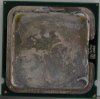
Is this the result of overheating the chip?

Reaction score
11
I've seen the paste solidify and chip off, but never turn gold/yellow and gel up like this.

This is an intel chip off an Alienware ALXR6 that was watercooled. It appears the owner did not maintain it and the pump was ran dry and nothing cooled the cpu therefore making the pc turn itself off to prevent melt down.


Is that what this yellow/gold substance is? The owner was also a smoker and I'm wondering if that has anything to do with the discoloration.
 

Attachments

  • overheated_chip_smaller.jpg
    overheated_chip_smaller.jpg
    74.4 KB · Views: 121
..

I would clean it up good and see if the discoloration stays, if so might want to stress test the chip (Prime95) to assure stability.
 
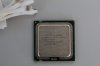
This is after it's been cleaned. Will reassemble with a new Zalman 9900 heatsink and give it a try on the testing.

The watercooler material had geled up and you can see where it leaked down the side to the bottom of the case and collected all that tar from the smoke filled air (YUCK!)

This guy spent over $10,000 on this PC and is still willing to put an endless amount of money into it.

Wish I could convince him to just let me build him something way more badass for that $10k.
 

Attachments

  • overheated_chip_smaller_CLEAN.jpg
    overheated_chip_smaller_CLEAN.jpg
    36.2 KB · Views: 92
The before pic looks like a lot of cooked thermal gel. Looks like it was applied too heavily to being with.

The problem with thermal paste is that people often put on too much. You don't need a lot. You really don't even need to spread it. A drop the size of a grain of rice (two max) is plenty of paste. The paste will spread itself naturally.

Curious to see if it works.
 
Ran prime and memtest and this CPU is 100% working. We went the extra mile to help this guy restore his alien ware to its former glorey after all that tobacco mess. He is going for a 8gb ram upgrade and ssd HD upgrade. :)
 
Glad to hear it's working.

I'm not sure why you used a Zalman 9900. A cooler master hyper 212 plus is $30 or so and is one beast of a cooler, especially with two 120mm fans.

If the case was big enough to use it, and I'm willing to be that the alienware was, then I'd be using a hyper 212 plus.

Either way, good work!
 
Glad to hear it's working.

I'm not sure why you used a Zalman 9900. A cooler master hyper 212 plus is $30 or so and is one beast of a cooler, especially with two 120mm fans.

If the case was big enough to use it, and I'm willing to be that the alienware was, then I'd be using a hyper 212 plus.

Either way, good work!

I have not used one of those yet. I've had a lot of perfect experiences with the Zalman. I've even got a few cpus OC'd to 5ghz stable on one of those heatsinks. Everything I have read about the Zalman on all the benchmarks showed it coming out on top as well. Plus in my servers I've built, the placement of the fans and the heatsink is perfection with the way the fans line up and flow.
 
I have not used one of those yet. I've had a lot of perfect experiences with the Zalman. I've even got a few cpus OC'd to 5ghz stable on one of those heatsinks. Everything I have read about the Zalman on all the benchmarks showed it coming out on top as well. Plus in my servers I've built, the placement of the fans and the heatsink is perfection with the way the fans line up and flow.

Also glad to hear its working, usually when you see that much burn, something is toast. Has definitely had a few years takin off its life none the less...
@Brandon: Every OEM uses too much paste, and unfortunatly Alienware (aka Dell) is just another OEM. I think they do it on purpose to inflate the price, cause thats really the only extra ya get for your money! :D

Zalman is a really good cooler! But Im kinda with Brandon, the CM Hyper 212+ is a great cooler for cheap! Just sayin, might look that way next time, but that Zalman is still a great choice! ;)
 
This guy went for a 256GB samsung 840 pro, zalman cooler, and 8GB DDR2 GSkill memory and W7 HP upgrade.


Going from a 4GB Corsair setup with Vista 32bit that only saw 2.5GB of memory lol.


This guy had some other shop previously that worked on it, and I must say they were sub par for sure in what they have done to this machine. They even broke the front face piece somehow. They also broke his raid array and made it so he was only using 1 of his 3 working hard drives O_O.

I'll post some nice before/after shots when it's done next week.
 
Curious as to why he dumped so much money into an old Core 2 Quad system. Those aren't terrible, but they are starting to show their age in some applications. Gaming and so on.

The one thing I like about the Hyper212+ is that for the price, it's a cooling god send. SO much better then the crap OEM's put on and yet usually on par with the best of the air cooling. It's also nice because of the 120MM fans. They are often much quieter then smaller fans. Some people may or may not care about that.

The biggest downside I can see to them is that:

1) You need to have access to the back of the motherboard as they had a mounting plate that needs to be installed

2) They are BIG. I would think most ATX Mid Tower cases wouldn't hold one.
 
Curious as to why he dumped so much money into an old Core 2 Quad system. Those aren't terrible, but they are starting to show their age in some applications. Gaming and so on.

The one thing I like about the Hyper212+ is that for the price, it's a cooling god send. SO much better then the crap OEM's put on and yet usually on par with the best of the air cooling. It's also nice because of the 120MM fans. They are often much quieter then smaller fans. Some people may or may not care about that.

The biggest downside I can see to them is that:

1) You need to have access to the back of the motherboard as they had a mounting plate that needs to be installed

2) They are BIG. I would think most ATX Mid Tower cases wouldn't hold one.

Actually #2 is one of the better selling points, that it will fit in most ATX cases, especially when compared against other tower coolers from Thermal Right and Xigmatic (which is really the exact same design as TR).
and #1 shouldn't be a problem either, almost all aftermarket coolers have backplates. All watercoolers do. And really all heatsinks should, board warping is a a horrible thing.

As for why put all that in a Core2Quad system, well I can tell ya at 3.6GHz, my old ass Q6600 still loves games. Anything I have had issue with was more due to my 5770 Video card and trying to run settings too high for it. And if a Q6600 can handle anything I throw at it, I think a QX6850 Extreme Edition shouldn't have any problems when paired with a good video card. Lots of life left in that chip (from a usability standpoint, still not sure about lifetime with the cooking and all :cool:)
 
Hmm...

You've found that the Hyper212+ fits well into mid tower cases?


Someone I talk to online (who is technically oriented) told me his Q6600 was holding back his radeon 4870.

This may have been a bit of a mixed bag though, as I believe the game he quoted (StarCraft 2) was more fixated on processor horsepower opposed to graphical capabilities. His upgrade to a Core i5 2500K may not have had quite as much of an impact as he thinks. Basically he felt that the Q6600 was bottlenecking his card.
 
Hmm...

You've found that the Hyper212+ fits well into mid tower cases?


Someone I talk to online (who is technically oriented) told me his Q6600 was holding back his radeon 4870.

This may have been a bit of a mixed bag though, as I believe the game he quoted (StarCraft 2) was more fixated on processor horsepower opposed to graphical capabilities. His upgrade to a Core i5 2500K may not have had quite as much of an impact as he thinks. Basically he felt that the Q6600 was bottlenecking his card.

Yeah I've put a couple Hyper212+'s in midtowers without any issue at all. But then I've put a Noctua D14 in a couple mid tower cases without issue either, and its considerably bigger... Actually thinking about it, the only heatsink I've ever had size issues with was a Zalman that was too tall. Traded it out for a CM V8 and customer was very happy I did!

And yes a Q6600 will bottleneck Starcraft 2, because as you said its very processor intensive. Most games rely more on the card. But in reality its not the proc that bottlenecks a card, its the PCI Express lanes, and therefore on older machines, the chipset. Since on older systems the PCIe Buses are not directly connected to the Proc, they are always a bottleneck. But the last article I read on it (and I'll admit its been a year or two), it didn't matter much until the higher AMD 6000 series cards. Most of the 5000 and below never used much more than 8 of the 16 PCIe lanes anyway, hence why running crossfire/SLI on a x16/x8 (or the more common x16/x4) board didn't hurt you with those cards.
Personally, I feel (have no quantifiable tests, just opinion) that my 5770 performs at its max on my Abit P35 Pro and Q6600 @3.6GHz. At least, Sins Of A Solar Empire sure doesn't mind it with everything set at high, zoomed into the battle, with a fleet of ~1500 ships on my side and similar sized on my opponents... Lots of laser blasts going everywhere with wonderful particle physics. Metro 2033 doesn't care for it though, but then the 5770 is minimum recommended for that game, and it does play at medium settings....
All that being said, I really need an upgrade!!!

@ Elemental: If your not overclocking, stick with stock Intel for MiniITX boards. Else your asking for fitment issues. If you are overclocking, good luck as it may be just trial-and-error till you find a good fit.

 
Last edited:
Back
Top