Is this a case use for mass HyperV guest deployment?

thecomputerguy

Well-Known Member
Reaction score
1,486
Client has a Precision Workstation in RAID1 being used as a dedicated Quickbooks Server. The original plan was to use this one-time purchase (About $3000 5-Years ago) as a bridge until the client chose to either move to Quickbooks Online or RightNetworks hosting.

They have decided that Quickbooks Online is a no go for them.
They have also decided that the $60 (roughly) per user per year for RightNetworks isn't for them considering their user count. Costs likely being $600 or so per month.

They have since expanded the need for people to access Quickbooks remotely significantly.

It started as 1 person who may or may not work from home, to now 4+ people need to access it remotely along with the 5+ people using it in-house.

I originally set them up with some remote access software directly to the server (as a bridge). Now with the amount of people requiring remote access they will constantly be bumping each other out. This along with the fact that I don't want people "using" this station, it was never meant to be used for this.

My thought's were to either deploy 4 mini PC's as a gateway for them to login to (Think NUC, or Tiny PC's) at $600 per unit.

OR

Bump the Precision station up to 64GB of RAM and spin up 4 HyperV guests with 4GB-6GB of RAM each with only a Windows License and Quickbooks installed. Then have them VPN into the network and then RDP into their respective HyperV guests. I also only have about 80GB of storage left on this Server so I'd need to either upgrade the storage or each station would only be alotted 20GB.

Edit: I'll probably need to bump the storage and the RAM up since 20GB won't be enough. I'll probably need to reconfigure the whole station with either a single 1TB NVme SSD or two 1TB NVme SSD's in RAID 1, and then since it's 5-Years old it might just make more sense to replace the whole station since it appears that it will now be utilized long-term.

I have a single HyperV guest running barebones at it's already at 40GB.

Anyone have thoughts on this?
 
With just 4 remote users...even 5 or 6...IMO a couple of NUCs sitting in the corner, and then do something like Splashtop Business (with MFA) to have them securely and easily log in from home, great multi monitor support (can even add virtual second monitors to the host NUCs)...

I don't like supporting VPNs anymore, and...malware is network aware and remote rigs can infest the business LAN through a VPN. Not to mention the support overhead. Something like Splashtop Business is so easy peasy, reliable, great multi monitor support, great performance, good remote printing.

Beefy "quickbooks host" dedicated rig at the office to also host for the in house users. (unless you need to get past 10x concurrent users...as Windows desktop is only valid for up to 10x concurrent connections.
 
With just 4 remote users...even 5 or 6...IMO a couple of NUCs sitting in the corner, and then do something like Splashtop Business (with MFA) to have them securely and easily log in from home, great multi monitor support (can even add virtual second monitors to the host NUCs)...

I don't like supporting VPNs anymore, and...malware is network aware and remote rigs can infest the business LAN through a VPN. Not to mention the support overhead. Something like Splashtop Business is so easy peasy, reliable, great multi monitor support, great performance, good remote printing.

Beefy "quickbooks host" dedicated rig at the office to also host for the in house users. (unless you need to get past 10x concurrent users...as Windows desktop is only valid for up to 10x concurrent connections.

Hmmm ...

Even VPN's are dead now? I still see them all over the place.

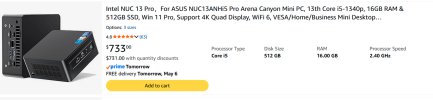
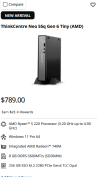
NUC's and Lenovo Tiny's seem to be around the same price ... the NUC has more juice though ... should I be buying NUC's off Amazon or Barebones kit's from Techdata/D&H and filling them with my own stuff?

I can see a NUC approaching $1000 per unit is that right?

Ive had weird issues with NUC's in the past (heating, and freezing up requiring a reboot etc.)

1778012418283.png


1778012429601.png
 
Hmmm ...

Even VPN's are dead now? I still see them all over the place.

VPNs have been "dead" for those in the know for some time now. (Perplexity.ai: [What security is provided by using a VPN in 2026?]) And, yes, you will still see them all over the place - a triumph of marketing.

They are good for spoofing your physical location, though.
 
Let me bring up something very important that I didn't see mentioned. Business continuity. In the case of extending the life of the Precision box what will you do if it dies? I always ask customer's how long can you stay in business without <insert something>. That's the whole point of cloud services. The providers can maintain a level of continuity that is unaffordable to individuals including small businesses.
 
yeah under my breath I'm lined up with Mark above...how much money and time and effort and complexity must someone throw at resisting the ease and simplicity of....moving to the cloud.

BUT...if going the mini PC route, we don't do "Celeron equiv" CPUs for any clients doing any tasks. But ESPECIALLY...for accounting software users..else, it really does earn the nickname "Slowbooks". Doesn't have to be though. Minimum full 5x class CPU (Intel i5 or Ryzen 5 Pro) or higher, and 16 gigs of RAM minimum.

Can snag a Lenovo TinyPC for under 1k. If a super low budget, Lenovo Factory Outlet!
 
Let me bring up something very important that I didn't see mentioned. Business continuity. In the case of extending the life of the Precision box what will you do if it dies? I always ask customer's how long can you stay in business without <insert something>. That's the whole point of cloud services. The providers can maintain a level of continuity that is unaffordable to individuals including small businesses.

I see your point but honestly ... if they were down a day they would be fine. I can't really see them being down for longer than that. Also .. if the computer were to suddenly not turn on tomorrow I could stick a new workstation out there, restore the QB data and have them operational in probably a couple hours.

The "Server" is literally a beefy workstation with Quickbooks installed and the data on a Share. Everything else is Teams/SP and it's all backed up and on a RAID1.

So ......

New Computer
Restore Data
Install QB
Setup Sharing Creds
Computers should auto-map since Servername/IP will be the same
Done

2 Hours tops.
 
Bump the Precision station up to 64GB of RAM and spin up 4 HyperV guests with 4GB-6GB of RAM each with only a Windows License and Quickbooks installed.
Quickbooks will run like a$$ on only 6GB of RAM,

Also, with 10 users, you are talking a lot of hardware to purchase and maintain to give each of them a machine. I'd really be pushing the Rightworks solution, if I were you - do the math, it sounds like a no-brainer.
 
Quickbooks will run like a$$ on only 6GB of RAM,

Also, with 10 users, you are talking a lot of hardware to purchase and maintain to give each of them a machine. I'd really be pushing the Rightworks solution, if I were you - do the math, it sounds like a no-brainer.
Right up until you need to email an invoice... then it crashes.
16gb or bust!
 
the cheapest thing i can think of (while still maintaining some type of standards)... buy a refurb server (to replace the desktop pc), and install windows server on it and install remote desktop role (just the session host), and install and host the QB data from there. If the only thing they need the server for locally is QB, then thats all you need. remote users can VPN + RDP into the server. local peeps can run QB from their own desktop that points to unc path of the server. If you're worried about security implications of people VPN'ing in from personal machines, just restrict VPN on the firewall to port 3389 of the remote desktop server. You're probably looking around 6K up front for the server but compare that to 6K a year for right networks (which is basically the same thing).
 
the cheapest thing i can think of (while still maintaining some type of standards)... buy a refurb server (to replace the desktop pc), and install windows server on it and install remote desktop role (just the session host), and install and host the QB data from there. If the only thing they need the server for locally is QB, then thats all you need. remote users can VPN + RDP into the server. local peeps can run QB from their own desktop that points to unc path of the server. If you're worried about security implications of people VPN'ing in from personal machines, just restrict VPN on the firewall to port 3389 of the remote desktop server. You're probably looking around 6K up front for the server but compare that to 6K a year for right networks (which is basically the same thing).

That's kind of what I was thinking. In some of the above posts moving to RightNetworks is a "no brainer" until you realize that 10 x $60 per month is $600 per month or $7200 per year, or $36,000 over a standard 5-Year life cycle.

Then a client asks how much a baby server would be to host it in house and you deliver a $5k-$7k one time charge.

That's some hard math to argue.

If you are a part of any of the sysadmin type subreddits you will find that the giant leap into cloud services is slowing down. People are starting to realize that they are paying more than they originally did, significantly more, and/or more than they expected to. Sometimes, A LOT more. There is some strong pullback into self-hosted services and steps moving away from the cloud back into Hybrid environments. Some are being held hostage to ever increasing cloud storage costs because the massive steps that were taken move to the cloud in the first place have turned into sunken cost fallacies.

I was in this position 5+ years ago with this exact client when we made the move to Teams/SP for data storage. I pushed hard to go completely cloud which would include Quickbooks. The owner of the company had me get pricing for both.

It was either $5,000 for this precision workstation to dump a singular QB file on it and it should last at least years. Or as said above $40k for RightNetworks. I can't argue that math.

I will add that remote access to the QB data was not required at the time which made it a double negative. Now remote access is required which does bring RightNetworks back into relevancy but it's still a math problem.
 
I see your point but honestly ... if they were down a day they would be fine. I can't really see them being down for longer than that. Also .. if the computer were to suddenly not turn on tomorrow I could stick a new workstation out there, restore the QB data and have them operational in probably a couple hours.

The "Server" is literally a beefy workstation with Quickbooks installed and the data on a Share. Everything else is Teams/SP and it's all backed up and on a RAID1.

So ......

New Computer
Restore Data
Install QB
Setup Sharing Creds
Computers should auto-map since Servername/IP will be the same
Done

2 Hours tops.
Well sounds like you've got the situation down pat. I always try to bring it up because it's always a case of when the poo hit's the fan then what. I've had plenty of customer just say they don't worry about. They're all about this is FUD stuff. Using fear, uncertainty and doubt to drive a sale. Some have regretted that position but luckily none have had to close because of it.
 
Don't forget additional costs of a server...there's always more than just the raw cost of a server
*Electricity...at least another 20 - 30 bucks a month for a baby server...more for a bigger server
*Backup costs for Business Continuity Backup...another good 100 bucks minimum......probably 150 minimum...esp if an MSP is watching it every day.
*MSP monthly support costs to do monitoring, monthly Microsoft updates and reboots after hours, vendor firmware/BIOS/driver updates a few times a year after hours, etc
*Refresh server hardware every 5-7 years depending on what the MSP requires...so not only the cost of the server bare metal itself....but the costs of doing a migration....usually after hours(thus...after hours = higher hourly rate) Granted...hyper-v migrations are easy peasy...but there's still a couple of grand at least
*Pay the IT guy to do Quickbooks upgrades every 2 or 3 years...also usually after hours work.
 
Back
Top