ics Calendar on Mac issue

callthatgirl

Well-Known Member
Vendor
Reaction score
3,040
Location
Fort Myers, FL
Hey gang, I'm stumped on this one. Client is on a Mac and when she tries to download an ICS file to add to her Outlook calendar, it opens the calendar app. I removed all the accounts in the mail app so it's empty, no joy. I changed the default mail client to Outlook, no joy. I tested using one of my appts from my online scheduler, went right to her Outlook. Then...I tried to add to the online calendar in 365, gave an error about "try again" very odd. I'm not a Mac expert and usually handle all my Mac calls fine. Seeing if anyone here has fixed this before. I'll call MS next. Thanks!
 
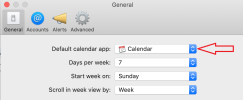
Yep, what @mikeroq posts is what I'd try first. I went looking for a default calendar in System Preferences. You open the Mac Calendar app for the system wide preferences.
 
In the preferences in Calendar you should be able to set Outlook as the default Calendar application.
View attachment 14018
This is the correct method to handle this. Unlike Outlook, which handles all three items together, email, contacts and calendar, you have to change the default app each in Mail, Contacts, and Calendar which are the default apps in macOS. And be aware that sometimes, as in rarely, a macOS update might undo those choices.
 
Back
Top