stick1977
Member
- Reaction score
- 0
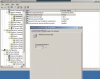
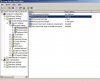
server 2003, please see screen shot. I want to disable all these settings per the company owner's request. I can change the "Enforce password history" but the other 5 are greyed out. They want to be able to have short passwords, no maximum password age, etc.
The answer I found in search was: All password policies are to be done on the Domain Security Policy and they are domain wide changes. You cannot exclude an OU, for example, from password enforcement policies.
However this only says why it can't be done from here, doesn't show how to do it. For the time being I just ticked the check box in the AD accts for "password never expires" but real curious on how to change these settings.
thanks
The answer I found in search was: All password policies are to be done on the Domain Security Policy and they are domain wide changes. You cannot exclude an OU, for example, from password enforcement policies.
However this only says why it can't be done from here, doesn't show how to do it. For the time being I just ticked the check box in the AD accts for "password never expires" but real curious on how to change these settings.
thanks