[HELP] Need to connect 2 buildings using existing fiber run

DocGreen

Well-Known Member
Reaction score
44
Location
South Bend, IN
A client of mine is moving to a new location and needs to have his network equipment transferred over. The new location is already cabled, so for the most part it's a cake job, except...

There's a fiber link between two of the buildings... and I've never worked with fiber.

It's already terminated on each end, but I'm honestly not 100% sure how to connect it to the LAN. Here's a pic of the termination...
https://onedrive.live.com/redir?res...authkey=!AAg3ltpTm2mZaSQ&v=3&ithint=photo,jpg

The markings on the cable read: 6x50/125 UM GRADE 5 F232795-30 (UL) TYPE OFNP C (UL) OFNP --- FT6

Because the new location has so many more cable runs, and the company is anticipating hiring enough staff to eventually fill the building, I planned to replace their existing 16-port switch with a 48-port. I figured if I ordered switches that also had fiber ports I'd kill 2 birds with one stone. Question is... how do I go from the existing fiber runs (those are ST connectors, right?) to the SFP ports on the switch? I've not been able to find an ST-SFP patch... just ST-LC and ST-MTRJ.

Here's the switch that I've been looking at: http://www.amazon.com/dp/B00CUD1KFE...lid=2UCK2FNSZ5PM4&coliid=I3BKH6LGHD5B96&psc=1

Can anyone point me in the right direction?

(Can I get a refund on those Structured Cabling classes from ITT? LOL)
 
Wait, wait... I think I might have it.

I use an ST-LC 50/125 jumper, to an SX – 850 nm SFP Tranciever, to the switch.

That sound about right?
 
I will PM you my phone number if you have any problems I will be happy to help a fellow Tech Nibbler (free of charge). Do not worry though - this is going to be cake; I promise.

That "termination" you are referring to we refer to in the industry as an LIU.

Does the cable say 50/125 or 62.5/125??? You must match it.

Attenuation would happen if you buy the wrong stuff:
mismatch.gif


***********************


http://www.monoprice.com/Category?c_id=102&cp_id=10237&cs_id=1023705

The connectors on that LIU are, indeed ST


The three most common you are going to encounter are ST, LC, and SC


Presumably, if you buy a modern switch, it will take SFP modules (HP sometimes calls these min-GBIC)


The transceivers you want are indeed 850nm SX (Media type is 1000-BaseSX) ... Make sure BOTH transceivers on each end match the wavelength, type, and speed, because these do NOT auto-negotiate.

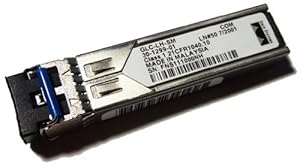
412j1oZMXzL._SX300_.jpg


This style transceiver fits an LC connector.. .Hence, you would need an LC to ST in the 62.5/125 micro-meter (orange) type to do the job properly.


*******************************

Now, please, please, please buy quality equipment. If the budget is tight, please buy either Brocade or ProCurve... they are both really good quality stuff. If Layer 2, I would personally choose the Brocade ICX-6430... if Layer-3 the ICX-6450


Cisco is usually overpriced.
 
Last edited:
Thanks for the confirmation, NETWizz! The cable is marked as 50/125, btw. I guess what really threw me off was the SFP ports on the switches... I was expecting a cable would plug directly into it. Silly me, lol.
 
No, you need media converters. SFP's are by far the best way to go if you are getting new equipment anyways. But there are standalone converters (modems really), like those by Canoga Perkins.
 
Buy and use the correct cleaning equipment prior to making any connections. Not cleaning the connection (including the fiber patch cables) can cause permanent damage to the equipment. Do not blow into the connectors to try and clean them as you will just make it worse.

Dust caps are just that. Things that are great for collecting dust and transferring it to the fiber end.
 
It is not a bad idea, but truthfully those are probably clean enough to work well. You DO need the aqua colored 50/125 cables that are LC/ST...

If buying the SX 850nm stuff, make certain that both ends are the same (or it won't work). What switch are you buying?
No, you need media converters. SFP's are by far the best way to go if you are getting new equipment anyways. But there are standalone converters (modems really), like those by Canoga Perkins.


I hate media converters, but they do work.
 
Please do not skimp on the switches. Buy Cisco, Brocade (Foundary), or ProCurve...

Again, I will be happy to walk you through the configuration... it's cake.
 
Depending on network load and how you plan to design the rest of the network, a "modular" solution like this might work : http://www.amazon.com/MC210CS-Conve...=1437521749&sr=1-3&keywords=ethernet+to+fiber

You can get these in almost any termination.

How many users will this network have? I agree that a high-quality switch is important, but unless you need certain enterprise features, I'd stick with an unmanaged switch.
 
It is not a bad idea, but truthfully those are probably clean enough to work well.

There is no such thing as clean enough when it comes to fiber connections. A speck of dust smaller than can be seen by the naked eye or even the oil from a finger print can and will cause varous problem from signal loss to permenant damaged to the equipment fiber ports.

Cleaning is a must. Not an option.
 
The switches that I'm looking at are these: http://www.tp-link.com/en/products/details/cat-40_TL-SG2452.html

I've been using TP-Link quite a bit lately and have been really happy with them so far. Bldg 1 will have the 48-port linked above, Bldg 2 will have the 24-port equivalent. I'd thought about just using media converters, but like someone said, I've got to replace the switches anyway so I might as well just get switches w/ SFP. (Their current network only has around 24 drops... the new location has around 150)

I don't think they're going to need enterprise-grade features... for all intents and purposes, it's still going to be a fairly basic network. A few Ubiquiti AP's, a basic fileserver, and until they hire more staff they've only got 5 VoIP phones and 5 workstations. They are poised to explode, and given the owner's history I'm sure they will, so I'm setting them up so the network can grow with them without replacing much.
 
I encourage you to shoot for higher grade switches when it comes to fiber. I've seen more than 1 network that has cheap switches with fiber in between and that fiber backbone "drops" a lot, requiring power cycling of the switches...which of course disrupts the network. If he's growing...and you want to start out with something solid that allows growth, go with better than tp-stink. They're almost tolerable for little SOHO grade workgroup switches, that's about it. I'd recommend ProCurve.
 
I encourage you to shoot for higher grade switches when it comes to fiber. I've seen more than 1 network that has cheap switches with fiber in between and that fiber backbone "drops" a lot, requiring power cycling of the switches...which of course disrupts the network. If he's growing...and you want to start out with something solid that allows growth, go with better than tp-stink. They're almost tolerable for little SOHO grade workgroup switches, that's about it. I'd recommend ProCurve.

I've had that experience with TP-Link's home routers, but not their Enterprise switches. I've got several of them installed around town and every one of them has performed perfectly. That being said, if problems DO arise with the fiber link, it would be more cost effective to add a couple quality media converters than go with ProCurve switches in the first place. (The client already had a bit of sticker shock as is)
 
I've had that experience with TP-Link's home routers, but not their Enterprise switches.

My personal network runs over a TP-Link enterprise switch (the good, 5 year warranty enterprise stuff) and I've never had an issue -- but a chunk of that is the environment it's used in. For basic file sharing / NAS, I'd say TP-Link should work fine. If you're doing network intense stuff (like recording lots of IP security cameras) I'd say something beefier would be better.
 
quality media converters than go with ProCurve switches in the first place. (The client already had a bit of sticker shock as is)

I don't see a Procurve adding to the sticker shock..actually would alleviate some of it, I can purchase a Procurve 1820-48G switch that includes 4x SFP slots for about 27 dollars less than the TP model you linked above (wholesale prices)

Just trying to pass a tip along, follows the saying "A chain is only as strong as its weakest link"...
If it's a "bill each time they call"..hey no problem.
If it's an MSP client and each call costs you time...you may want to revisit. I learned this the hard way with one client that insisted on skimping with their switches that had a fiber run 'tween....I am still paying the price for letting them chip down the selected switch, although I finally have ProCurves going in this fall due to them going with IP phones.
 
I don't think they're going to need enterprise-grade features... for all intents and purposes, it's still going to be a fairly basic network. A few Ubiquiti AP's, a basic fileserver, and until they hire more staff they've only got 5 VoIP phones and 5 workstations. They are poised to explode, and given the owner's history I'm sure they will, so I'm setting them up so the network can grow with them without replacing much.

That comment contradicts itself. They don't need "enterprise grade" but it is a new network that you want to be able to grow even "rapidly". Situation like this I personally would not do anything less than enterprise grade. This is the kind of situation that is ideal for doing enterprise grade now so that you don't have to come back and do it all again later. I design networks for a living and believe me I have learned this lesson the hard way.

As others I am not that fond of tp-link for business networks. My switch preference for business networks is Cisco or HP. With that being said based on what I have read about your situation I would just be happy seeing you use anything higher-end (enterprise grade) regardless of brand.
 
There is no such thing as clean enough when it comes to fiber connections. A speck of dust smaller than can be seen by the naked eye or even the oil from a finger print can and will cause varous problem from signal loss to permenant damaged to the equipment fiber ports.

Cleaning is a must. Not an option.

While you are, indeed, correct... virtually nobody I know ever cleans fiber, and it just plain works (most of the time). Every-time I ever had a problem it was mismatched transceivers, speeds, bad patch cables (which may have simply needed the ferrules cleaned), etc. Honestly, I very rarely ever clean them and have literally connected thousands without an issue. The only transceivers you have to watch out for are the Long-Haul ones, some of which require a special attenuation patch cord. Otherwise, a dirty fiber will merely result in attenuation, which could link problems, but the actual transceivers should be fine.

When/if the fiber has attenuation problems or connection issues, I just call my cabling contractor our... He or she can clean, re-terminate, replace the LIU or pull new fiber for all I care. :-)
 
Depending on network load and how you plan to design the rest of the network, a "modular" solution like this might work : http://www.amazon.com/MC210CS-Conve...=1437521749&sr=1-3&keywords=ethernet+to+fiber

You can get these in almost any termination.

How many users will this network have? I agree that a high-quality switch is important, but unless you need certain enterprise features, I'd stick with an unmanaged switch.


You are correct, but I personally HATE media converters! Please take notice that if you use one of these, you MUST match it to the Media converter or Transceiver on the other side. Hence if it is MultiMode verify it is SX 850nm (and not LX). Also make sure you match 1000 to 1000 etc. The connector these have on them is SC if you need to buy fiber patch cables to make them work.
 
I encourage you to shoot for higher grade switches when it comes to fiber. I've seen more than 1 network that has cheap switches with fiber in between and that fiber backbone "drops" a lot, requiring power cycling of the switches...which of course disrupts the network. If he's growing...and you want to start out with something solid that allows growth, go with better than tp-stink. They're almost tolerable for little SOHO grade workgroup switches, that's about it. I'd recommend ProCurve.


I Second everything said here! DO NOT use SOHO grade workgroup switches! Personally, I would recommend Brocade over ProCurve having used both, but either is fine from a reliability standpoint.

If you use ProCurve, DO NOT get their Small Business Smart Managed (or Unmanaged) stuff... it is complete junk!

What you want (still very affordable) is their Campus/Branch LAN Access stuff ... This is the true ProCurve "Edge" stuff that belongs in the network Access model. It is a step below their Network Distribution/Core stuff and two steps below their Data Center stuff.

http://www8.hp.com/us/en/networking/switches/portfolio.html#branch

**************

Personally, I would buy Brocade ICX-6430 switches if you are working at Layer-2:
http://www.brocade.com/en/products-...work-switches/icx-6430-and-6450-switches.html
 
I don't see a Procurve adding to the sticker shock..actually would alleviate some of it, I can purchase a Procurve 1820-48G switch that includes 4x SFP slots for about 27 dollars less than the TP model you linked above (wholesale prices)

Just trying to pass a tip along, follows the saying "A chain is only as strong as its weakest link"...
If it's a "bill each time they call"..hey no problem.
If it's an MSP client and each call costs you time...you may want to revisit. I learned this the hard way with one client that insisted on skimping with their switches that had a fiber run 'tween....I am still paying the price for letting them chip down the selected switch, although I finally have ProCurves going in this fall due to them going with IP phones.


While you are right, the Procurve 1820-48G is managed SOHO Workgroup junk! I would avoid buying their "Small Business - Smart Managed" stuff and buy their "Campus - LAN Access" stuff if I were buying ProCurve... If you want real CoS, QoS, Sflow, Tagging/Trunking, routing, oh and a REAL CLI interface, the 1820-48G will simply not deliver.

Honestly, the 1820-48G is to Procurve as the Linksys LGS552P is to Cisco!
 
Back
Top