
DRPCNZ
Well-Known Member
- Reaction score
- 310
- Location
- Moerewa, New Zealand
Both modes look GREAT. Nice work


Very nice! Did you design it yourself or did you pay someone to do the design? How does branding work in version 8? It's not the end of the world if I can't add my logo anymore but it was kind of a nice feature even if it's just at the home screen. Speaking of which, what does the home screen look like? Or is the home screen the "backup data" screen? Any idea when the release date of version 8 will be?I guess it is not so bad is it ?

I've designed it myself, mostly based on Windows 11 build in icons and simple items such as regular buttons instead of colored panels. It makes the design simpler. I'm struggling a bit making the app DPI aware to make it still look good if pixel per inch value is different than 100%.Very nice! Did you design it yourself or did you pay someone to do the design? How does branding work in version 8? It's not the end of the world if I can't add my logo anymore but it was kind of a nice feature even if it's just at the home screen. Speaking of which, what does the home screen look like? Or is the home screen the "backup data" screen? Any idea when the release date of version 8 will be?
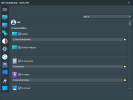
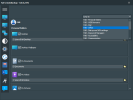
Yeah that would be my suggestion. That's just wasted space up there.I'm also thinking about putting the items scroll box and "jump to" menu at a higher position one this screen so more items will be visible at one sight.
Thanks. I'm putting a lot of efforts in this as I'm tired to see comments like "it's ugly but at least it's functional"@fabs Well I know you said that you weren't very good at design but when you try you can make something very pretty!

That would complicate a bit how visual items are dynamically generated. Then I would have to set item generation with a row handling switching between row 1 and row 2. That seems doable with a bit of work. I could also try to add some expand/collapse button to show or hide detected path so item boxes would be thinner.I like the "jump to" dropdown but there's still a lot of scrolling required. You might want to make each field (ie "desktop" "desktop wallpaper" my documents" etc.) 50% of the viewable area so you can put them side by side. That will reduce the scrolling requirement by 50%. Most user's default path is quite short so I wouldn't worry about that text box being half as long as it currently is.
There's actually no need to open the hamburger menu to click on of the buttons.And I highly suggest creating a home screen where you can access basic functions without having to open the hamburger menu and where you an add your logo if you want to. The hamburger menu will still be very useful as a quick way to switch functions without having to hit the back button 20x to return to the home screen. The home screen should have a place for your logo and then the three options ("backup data" "restore data" "transfer data") just like the home screen in version 7 but you can use the modern design/icons to make them three square boxes side by side instead of rectangles that are stacked like Version 7.
Well, I just did as soon as I posted the messageYeah that would be my suggestion. That's just wasted space up there.

Yeah I think that's a great idea. The less scrolling the user has to do the better.That seems doable with a bit of work. I could also try to add some expand/collapse button to show or hide detected path so item boxes would be thinner.
Oh really? I didn't realize that. Still, you have to click the hamburger menu for the icon labels to show. I think it would be better/more intuitive to have a home screen like in Version 7.There's actually no need to open the hamburger menu to click on of the buttons.
Yeah I think that would be really nice!if a real home screen like the one in 7 is preferred, then I would remove the 3 options from side menu and replace them with a "home" button. Then I would put the 3 buttons onto a home screen where it would be possible to put a logo like in 7
In fact, the label appears in a baloon on mouse over when menu is collapsed.Oh really? I didn't realize that. Still, you have to click the hamburger menu for the icon labels to show.
GotchaI think it would be better/more intuitive to have a home screen like in Version 7.
I don't really agree. It's a change that we'd need to get used to but it's more efficient without the home screen. There could be a 'simple' mode with a home screen, and 'advanced' mode that skips that.I think it would be better/more intuitive to have a home screen like in Version 7.
That doesn't bother me personally. I only use it internally. The only branding I would bother with is in the reports.A home screen allows for branding
I see your point, but my point is also valid: efficiency, and it would be easy to get used to.It makes no sense.
So do I but I'd prefer to have my logo on the program if a client sees it. It seems more professional to have branded software. I've custom branded other software that I use as well.I only use it internally
How is it efficient to have a software automatically throw you into a mode you don't want to use? That would be like Windows automatically launching Edge at startup with no way to turn it off. Maybe I don't want to use Edge the first thing I do when I start Windows (or ever hopefully). Yeah you can just close it but why do that in the first place? Windows starts at the desktop for a reason.efficiency

A home screen allows for branding
I'd prefer to have my logo on the program if a client sees it. It seems more professional to have branded software. I've custom branded other software that I use as well.
Then apparently you never read the manual. Branding has been available for as long as I've owned the program. Most programs aimed at professional service providers are brandable. My mechanic's shop's software is branded as is my vacuum service and sales store.To my knowledge, this is not a tool that has ever allowed such, nor would I think it should.
Branding has been available for as long as I've owned the program.

You would be surprised at how "nosey" some clients can be. If they think they can get the tools you use, then they could fix it themselves for free.I doubt that your clients pay the least attention to whether or not your logo and name appear on the tools you use
I use my business name/logo on Fabs and have done since I've owned it as well.Unless it's that it doesn't allow a logo placement.
Those home visits when the client is seated beside you and they "pretend" like they're not looking. They are.
As long as I can remember. I guess only Fabrice would know the exact date it was offered as an option......has already been an option with Fabs for quite some time.

I set up a new computer remotely today with data transfer. What should have taken 2-3 hours max took 5 since the user kept questioning me on every other thing. Spoiler alert, I do not charge by the hour. Never have. If I charged by the hour, the charge would have been more than the computer cost and would not have any business.I invite my clients to sit and watch if they so choose. I consider that I am there not only to offer a service, but to educate.
As do I, but you do get the cheeky ones who will try to save a few dollars.Well, this is where practices differ, too. I invite my clients to sit and watch if they so choose.


