Fab's AutoBackup 7 Pro - a must have tool for techs

I consider excluding the folder where I keep them to be as "simple as pie."
If you know where the setting is. I just tried in my Windows 11 VM. I can't find it on the first try. Gonna have to Google it.

OK, not too bad, I just wasn't seeing it
 
Fabs used to add exclusions to Defender. If using a 3rd party AV you have to do the exclusions/disabling yourself.
But the exclusions for Defender don't exist now?

Naive question: how can a program do that? Don't recall ever seeing software add files or folders to an AV's exclusion list. I guess it could be done with a UAC prompt?
 
But the exclusions for Defender don't exist now?

Naive question: how can a program do that? Don't recall ever seeing software add files or folders to an AV's exclusion list. I guess it could be done with a UAC prompt?
I assume that it's in the registry somewhere. Like everything else in Winders
 
Sorry guys but that will not be that simple. Powershell commands were pretty easy ton find for Defender but if I succeed doing that with other AVs, then they will just remove Fab's entirely...
 
Sorry guys but that will not be that simple. Powershell commands were pretty easy ton find for Defender but if I succeed doing that with other AVs, then they will just remove Fab's entirely...
So how do we add exceptions to Defender? Are the Powershell commands included with Fabs?
 
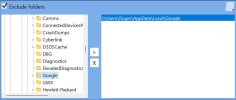
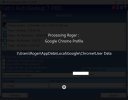
@fabs, I just ran into a problem trying to exclude a folder that AutoBackup 7 Pro build 7.12.1.5971 was unable to read. I left it trying for a long time but it seemed to be stalled trying forever. (I thought it would time out and skip the file/folder?) Anyway, I backed up and excluded the folder but on retry, it still stalled on the same folder, rather than skipping it.

Edit: I left it trying the excluded folder and the job eventually proceeded and did exclude the selected folder. I'm retrying without the exclusion to see what it does if I give it enough time.

Edit 2: it eventually resumed and backed up the previously excluded folder and its sub-folders.
 

Attachments

  • Exclusion.jpg
    Exclusion.jpg
    58.9 KB · Views: 6
  • Stalled trying.jpg
    Stalled trying.jpg
    66.6 KB · Views: 6
Last edited:
@fabs, I just ran into a problem trying to exclude a folder that AutoBackup 7 Pro build 7.12.1.5971 was unable to read. I left it trying for a long time but it seemed to be stalled trying forever. (I thought it would time out and skip the file/folder?) Anyway, I backed up and excluded the folder but on retry, it still stalled on the same folder, rather than skipping it.

Edit: I left it trying the excluded folder and the job eventually proceeded and did exclude the selected folder. I'm retrying without the exclusion to see what it does if I give it enough time.

Edit 2: it eventually resumed and backed up the previously excluded folder and its sub-folders.
sounds like a bad sector on the drive.
 
sounds like a bad sector on the drive.
I agree(*); my concern was with the program appearing to ignore the exclusion, but not.

Edit: (*) the drive has over 60,000 power-on hours of operation and likely suffers from a slow-responding firmware problem, in spite of a healthy SMART report. It's slow as molasses.
 
Last edited:
I agree; my concern was with the program appearing to ignore the exclusion, but not.
I see that you excluded the "I:\Users\Roger\AppData\Local\Google" folder. The program looks for the "I:\Users\Roger\AppData\Local\Google\Chrome\User Data" folder when it deals with Chrome profile. I agree it should not have been processed at all since it has been excluded. However, the Chrome profile was still selected on the main interface. That may be why it kept trying to process it anyway.
 
When I selected the Google folder, I assumed that included all sub-folders, including the Chrome\User Data folder.
Exclusion does not prevent Fabs from looking into such folders. It will prevent it from listing what's inside for copy.
The search engine crawls inside folders. If it finds a file that is part of an exclusion, then it will not add it to copy list. I don't know if I can tweak that a bit so it will not even look into it.
 
The search engine crawls inside folders. If it finds a file that is part of an exclusion, then it will not add it to copy list. I don't know if I can tweak that a bit so it will not even look into it.
In cases like mine, where I suspect there are bad sectors within one of the sub-folders, it would be best not to look, if that's possible. :)
 
In cases like mine, where I suspect there are bad sectors within one of the sub-folders, it would be best not to look, if that's possible. :)
I'm currently working on it. Hopefully I'll find something. So far, not so good.

Edit : I've found something that looks suitable. Needs some more testing.
 
Last edited:
@Larry Sabo : Tests results are good. In your case, it would display that it's processing Google Chrome profile but only for an eye blink time (not sure that you could see it) and skip to next item without starting any file search.
 
Last edited:
Back
Top