Driverpack solutions Help

pc-rebuilders

Member
Reaction score
6
Location
Daytona Beach, Fl. US
I have been to this site http://drp.su/ and I'll be damn if I can get this working!
Not in English, at least not on my system & would like to see if someone has a walk through...Looks like several versions and not really sure about sites (THREATS)! Thanks in advance.
 
After you download it, first thing you should do is delete the programs folder - that way you don't have to worry about accidentally installing a bunch of junk programs..

Junkware aside, its the best auto-driver program I've found
 
After you download it, first thing you should do is delete the programs folder - that way you don't have to worry about accidentally installing a bunch of junk programs..

Junkware aside, its the best auto-driver program I've found

After the download is done how does one go about removing the folder from the DVD version and then recreating the image (ISO)?

I bet it's really simple but I'd like to know how one goes about doing it.

thank$
 
Its been a while but I think the version I downloaded was just folders, not an iso.. I imagine you could mount the iso in daemon tools and extract everything but the programs.
 
After the download is done how does one go about removing the folder from the DVD version and then recreating the image (ISO)?

I bet it's really simple but I'd like to know how one goes about doing it.

thank$

Use Iso Maker (softpedia), open iso remove folder, create new iso, burn to disk if you want. or leave on hard drive. Simples. :)
 
Use Iso Maker (softpedia), open iso remove folder, create new iso, burn to disk if you want. or leave on hard drive. Simples. :)

Iso Maker (softpedia) wouldn't work for me, but I do have an image mounting program that I used to mount it (as a drive). Then I copied the files / folders from the image to diff folder, then downloaded and used IsoCreator (sourceforge) and used that to create the new ISO file.

Thanks for the info on this "HowTo".
 
Thanks to the mental nudging of this thread, I finally decided to give this a try. I've installed utorrent, and put in the link, but after 48 hours on a 50mb Comcast business connection, I've only got about 140MB of the 4.4GB file downloaded.

Any way to speed this up? By the time this download finishes I'll be retiring! :D

I might try it at home with my residential service, maybe the business service throttles torrents?
 
Well I looked it over and am not real happy when it installs itself on the computer. And after getting rid of the programs folder, it still contacts its home page (phones home) and installs the software - whether you want it to o not! <at least this is my experience with it>

I have problem with the author(s) of the software. In fact it's good to see others out there trying to make a good thing of unknown drivers installation. I'd just rather not find programs installed which are in Russian in my computers.

That being said I won't give up on this program as of yet. I'll keep experimenting with it for awhile.
 
Thanks to the mental nudging of this thread, I finally decided to give this a try. I've installed utorrent, and put in the link, but after 48 hours on a 50mb Comcast business connection, I've only got about 140MB of the 4.4GB file downloaded.

Any way to speed this up? By the time this download finishes I'll be retiring! :D

I might try it at home with my residential service, maybe the business service throttles torrents?

Took me about 10 to 15 minutes using uTorrent. Enough seeders so probably your connection like you mentioned :confused:

Well I looked it over and am not real happy when it installs itself on the computer. And after getting rid of the programs folder, it still contacts its home page (phones home) and installs the software - whether you want it to o not!

I have problem with the author(s) of the software. In fact it's good to see others out there trying to make a good thing of unknown drivers installation. I'd just rather not find programs installed which are in Russian in my computers.

That being said I won't give up on this program as of yet. I'll keep experimenting with it for awhile.

So I've been using this for a while now and just upgraded to version 13. While in version 12.something you needed (wanted) to get rid of the programs folder, in this version it's the folder called Soft you would want to lose. Also, get rid of the files called DrvUpdater and drv_update in the Tools folder. I could be wrong but I believe this should stop your concerns. Of course the tab Programs has become useless now because of the missing Soft folder.

If something is still calling home the just block it in your firewall.

Nice touch :D: in X:Tools\Branding you can brand your copy by editing the file called branding and replace the logo file with your own logo (but keep the file named logo).

As for the discussion on ISO mounting and burning: I've been using Virtual Clone Drive for ages (mount ISO files to virtual drives) and it has never let me down. Very small footprint, smallest and easiest GUI you've ever seen. And for burning: is there something else than ImgBurn??;)
Why you guys would want to recreate the ISO-file anyway is beyond me. Mount the ISO, copy all files to a USB-drive and get rid of the files and folders you don't want. Just make it a part of your toolbox-drive.


Hope this helps.

Sebastian.

EDIT: just found DRPSu in my system tray -> updater function. Traced it to C:\Users\Sebastian\AppData\Roaming\DRPSu\DrvUpdater.exe. Unticked in startup items and deleted DRPSu folder in Roaming: done. No loss of functionality.

 
Last edited:
Are you sure DRPSu is what gave you more than you bargained for? I haven't seen this happen during my 'tests'. :confused:

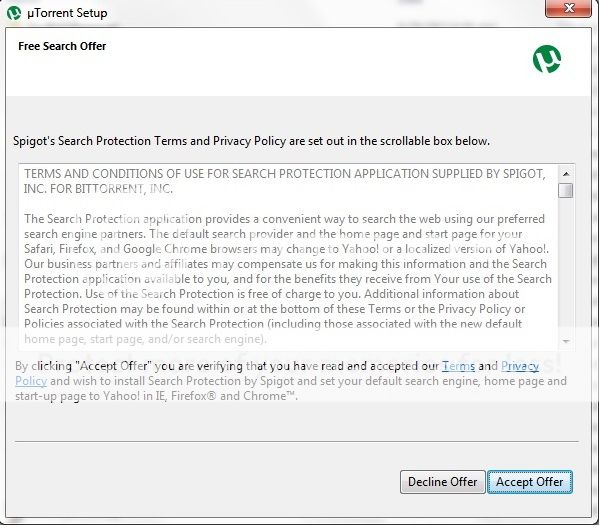
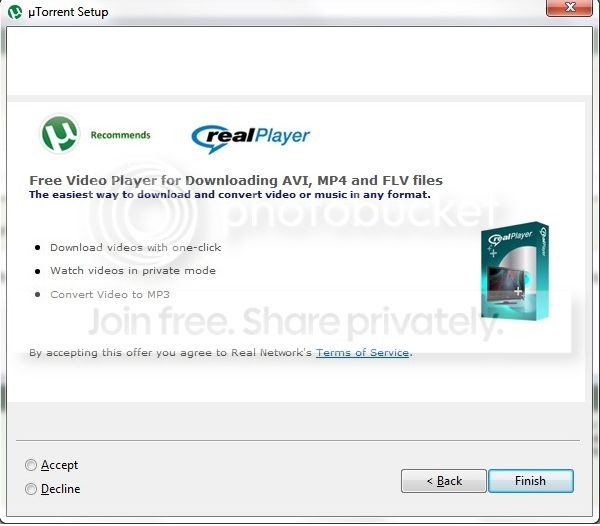
I think he is referring to utorrent. Latest builds have been bundled with crapware you have to opt out of. And it displays ads that you can't turn off. Time to start looking back a Vuze I guess. :(
 
I've been using this for years on systems.
Branding gives a nice professional look to it when a customer is standing over your shoulder - and instead of deleting the Soft directory, fill it full of your "Standard Install" apps and edit the javascript file to install them for you.

I use it less now than I used to since I've been slipstreaming, but still it comes in handy once in a while.
 
I could have sworn I declined Spigot, but maybe not. I reinstalled utorrent a 2nd time and definitely chose "decline" and Spigot did not install.

Note it also tries to push a Pixie download as well as a RealPlayer install, both with opt out options. And, as already mentioned, full time banner ads.

spigot_zps38a66e66.jpg


realplayer_zps5057efa2.jpg
 
Last edited:
Back
Top