HCHTech
Well-Known Member
- Reaction score
- 4,548
- Location
- Pittsburgh, PA - USA
I did the walkthrough for a new client yesterday. They have Comcast business service, and we'll be installing a firewall soon. This is a 3-person office with a conference room, so I should be able to do this in my sleep, but I want to make sure I don't break things when I add my firewall to the mix.
They have their phones through Comcast as well, and there is a Cradlepoint 5G backup device there as well. Absolutely no documentation, and I don't think they had a regular tech in the past, just a series of "can you fix this one thing" guys cycling through.
The Cradlepoint is connected to a LAN port on the Comcast gateway, and their documentation says:
If we install a firewall and pull the public IP directly through the Comcast gateway, that would have to break their stupid failover setup, wouldn't it?
I have a crudely drawn diagram of the current setup, just for fun:
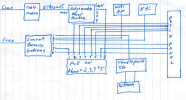
I think I just need to get a bigger switch, but I have no idea how to setup the Cradlepoint thing. I could connect it to the WAN2 port of our firewall if I knew in advance what IP scheme it would provide when it wakes up, or maybe it will just do DHCP. I'm sure I'll end up talking to the nice lady in India if I have to call Comcast.
Has anyone done this successfully and kept the Cradlepoint service in place?
They have their phones through Comcast as well, and there is a Cradlepoint 5G backup device there as well. Absolutely no documentation, and I don't think they had a regular tech in the past, just a series of "can you fix this one thing" guys cycling through.
The Cradlepoint is connected to a LAN port on the Comcast gateway, and their documentation says:
- Failover Activation:
- The Cradlepoint instantly switches from the failed wired connection to its built-in cellular modem (4G LTE/5G).
- It starts routing all traffic through the cellular network, using its internal SIM card(s) for connectivity.
- Providing Backup Internet:
- Connected devices continue to send traffic to the Cradlepoint, which now directs it out over the cellular network.
- This allows critical systems (like POS, email) to stay online, often for hours, thanks to its internal battery and cellular access.
- Modes:
- NAT Mode (Common): The Cradlepoint creates its own private network (e.g., 192.168.165.x), resulting in double NAT, but keeps your devices online.'
If we install a firewall and pull the public IP directly through the Comcast gateway, that would have to break their stupid failover setup, wouldn't it?
I have a crudely drawn diagram of the current setup, just for fun:
I think I just need to get a bigger switch, but I have no idea how to setup the Cradlepoint thing. I could connect it to the WAN2 port of our firewall if I knew in advance what IP scheme it would provide when it wakes up, or maybe it will just do DHCP. I'm sure I'll end up talking to the nice lady in India if I have to call Comcast.
Has anyone done this successfully and kept the Cradlepoint service in place?