How do Cradlepoint 5G backup devices work? (Comcast Business installs)

HCHTech

Well-Known Member
Reaction score
4,404
Location
Pittsburgh, PA - USA
I did the walkthrough for a new client yesterday. They have Comcast business service, and we'll be installing a firewall soon. This is a 3-person office with a conference room, so I should be able to do this in my sleep, but I want to make sure I don't break things when I add my firewall to the mix.

They have their phones through Comcast as well, and there is a Cradlepoint 5G backup device there as well. Absolutely no documentation, and I don't think they had a regular tech in the past, just a series of "can you fix this one thing" guys cycling through.

The Cradlepoint is connected to a LAN port on the Comcast gateway, and their documentation says:
  1. Failover Activation:
    • The Cradlepoint instantly switches from the failed wired connection to its built-in cellular modem (4G LTE/5G).
    • It starts routing all traffic through the cellular network, using its internal SIM card(s) for connectivity.
  2. Providing Backup Internet:
    • Connected devices continue to send traffic to the Cradlepoint, which now directs it out over the cellular network.
    • This allows critical systems (like POS, email) to stay online, often for hours, thanks to its internal battery and cellular access.
  3. Modes:
    • NAT Mode (Common): The Cradlepoint creates its own private network (e.g., 192.168.165.x), resulting in double NAT, but keeps your devices online.'
Well, that doesn't sound like the best way to accomplish WAN failover to me. Why wouldn't the Cradlepoint connect to the 2nd WAN port of the gateway so no new network would have to stand up and no double-NATing would be necessary?
If we install a firewall and pull the public IP directly through the Comcast gateway, that would have to break their stupid failover setup, wouldn't it?
I have a crudely drawn diagram of the current setup, just for fun:
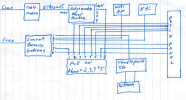
1765569840884.png

I think I just need to get a bigger switch, but I have no idea how to setup the Cradlepoint thing. I could connect it to the WAN2 port of our firewall if I knew in advance what IP scheme it would provide when it wakes up, or maybe it will just do DHCP. I'm sure I'll end up talking to the nice lady in India if I have to call Comcast.

Has anyone done this successfully and kept the Cradlepoint service in place?
 
The cradlepoint device should be a router, and I'm not sure why it's on the inside of the gateway... it needs to be on a WAN port, and that gateway needs to do the multi-wan... I don't see how the cradlepoint in this case is doing anything. Comcast Business Gateways cannot do multiwan... unless someone was manually kicking the DHCP scope to the cradlepoint's IP address and rebooting things to get stuff back online manually.
 
Comcast casts "Connection Pro 5G" setup ....at least on the couple that I have seen, the Connection Pro 5G box sits in between the primary Comcast Business Gateway, and your LAN.
Meaning....the Comcast Business Gateway....has the LAN port going to the Connection Pro box ETH1. And then on the Connection Pro box ETH2....you have an ethernet cable go to your switch...from there the rest of your network.

The Connection Pro 5G box gets configured WITH the Business Gateway...so they talk to each other. I have read that the 5G box will "fire up its own DHCP" when it detects it needs to kick in....which, to me, means making a possible mess of your LAN...esp if you have static/sticky devices. I have not configured this with a complex network, only done it at restaurants/bars with dynamic POS devices (like Toast, Clover, etc).

I'm not entirely fond of the setup, I'd rather have a Unifi gateway at the edge with multi WAN...with the 5G device hanging off of WAN2.
 
Comcast Business Gateway....has the LAN port going to the Connection Pro box ETH1.
I'd rather have a Unifi gateway at the edge with multi WAN...with the 5G device hanging off of WAN2.
Yep, me too. That's why I was wondering if it could be configured that way. Your analysis matches the docs from Comcast, but I don't know if there is another option. I'm going to set aside an afternoon to call Comcast and try to figure this out. Maybe we can just decommission it in favor of a more configurable option that can connect as WAN2 to our firewall.
 
Been a few years but as I remember it the Comcast modem/router is the Gateway (edge device) with the Cradle point hanging off of it. Never really understood the traffic flow but that's moot as far as I'm concerned. There's very little you can do with Comcast WAN/LAN stuff anyways.

Buy a multi wan capable router and plug both the modem and cp into it. There's tons of options for that type of edge device. Currently on a large project, about 30 sites, that is using Inhand ER805's. Of course cradle points have had that for years. Couple of customers use peplinks.
 
Ubiquiti just released a new cellular data modem.

 
I reached out to the client to discuss, and no surprise, he didn't even know he had this feature. He is calling Comcast today to see if he is paying 1 cent extra to have this and cancelling - haha. I'm going to rip it out during the install of the firewall.

w/r/t the Unifi, it seems to want a Unifi gateway. It's too new to get much data from folks already using it. Also, I note in their description that you "just plug it into a PoE switch", which makes me think it works just like the Cradlepoint where it creates a whole new LAN when it wakes up. Time will tell on that, I guess.
 
Buy a multi wan capable router and plug both the modem and cp into it.

That was my original plan to see if that would work, but I'm sure you would have to reconfigure it if so. The posts I've found on Comcast's forums (Here's one)and elsewhere seem to say that there is no customer-accessible interface for their box, and it "works" only by talking directly to the Comcast gateway to know when the main internet is down.....and requires that you connect it directly to that gateway for that to work.
 
Never liked Cradlepoints. They were a complete mess back when I was setting up tunnels to them years ago, BUT they do make an Internet Hotspot right out of the box, AND they can be configured via NetCloud.

Anyway looking at your diagram had my head spinning for a bit. This is a LOT of complexity for a network for three people, and I have so many unanswered questions.

Anyway, it appears that you have a Cable Modem (provides Internet) that is connected to an Edgewater VoIP/SIP device. Then that Device clearly goes into port 8 on an 8 port PoE switch. I do not know if the switch is managed or not supports VLANs or not or anything about that.

What I do know is that you then indicate phones are connected via ports 2 - 5

Q: Is the Edgewater doing it's own NAT and making a private VoIP subnet, and the PoE Switch putting that all on its own VLAN, so the DHCP requests have layer-2 isolation and another network device cannot answer (like the Comcast Business Gateway)?

***

Next I see another Coax service to a Comcast Business Gateway, which also provides Internet (and maybe has an AP probably disabled and managed by Comcast).

Q: Can you confirm the Comcast Business Gateway provides Internet, hosts its own local/private subnet, NATs back to the carrier, and um perhaps runs DHCP for the connected endpoints?

Assuming that is the case, you clearly have it running an AP (presumably on the same data subnet), a NAS device also on the same data subnet, two ports to the patch panel (for endpoints), and another port to the switch (hopefully in a different VLAN than Voice)...

Q: Do ports 1, 6, and 7 share your Data VLAN??

Q: I take it your Cradlepoint just so happens to to connect to the LAN side of the Comcast Business Gateway, which presumably is the only side with network connections and not Coax.... That it is just connecting to to your Local-Area-Network by virtue of connecting to the Comcast Business Gateway (i.e. a Data VLAN port) ???


***

Q: What is your fail-over strategy?

Q: Does your fail-over involve VoIP? It doesn't appear that way.


Q: Does the Cradlepoint have the same or a different Data subnet as the Comcast Business Gateway? Regardless, how are you getting DHCP to answer from one device vs the other?

The only way I can see this topology supporting data failover (VoIP excluded) is through the use of a first-hop redundancy protocol such as VRRP, which I know is supported by Cradle point. Assuming the Comcast Business Gateway even supports it, both the Comcast Business Gateway and the Cradlepoint would participate in VRRP and present a shared virtual default gateway IP address within the same subnet. The virtual IP itself does not move; instead, it remains associated with a fixed, VRRP-defined virtual MAC address. VRRP advertisements (multicast among all participating devices) determine which device is the active Master, and only that device responds to ARP requests for the virtual IP using the virtual MAC. In the event of a failure, the Master role transitions to the other device, which begins answering for the same virtual MAC, allowing failover to occur without requiring ARP cache updates on downstream hosts for their default gateway IP.

Otherwise you would be looking at something like IP SLA to monitor reachability for something to go down on a Managed switch like a Cisco Catalyst, which you clearly do not have. You could then implement various Policy-Based-Routing rules and favor one path or another.

***

If you just want to run hard-wired Internet through the Cradle point and have it provided Cellular backup, you might be able to chain:

Coax ---> Comcast Business Gateway (Internet) --> Cradlepoint (can provide backup)--> Your switch --> Your End-Points

If you do this, your Wi-Fi AP should be relocated off your switch, too.... and Yes, you would need a bigger switch... Please at least make sure it supports VLANs if you do buy a switch.

In this topology, the Cradlepoint would need to ultimately NAT to whatever the Comcast Business Gateway provides, which assuming that device does NAT does make a double-NAT. Maybe there is a pass-thru mode. Either way it is not super critical unless you are trying to host something on the Internet or do port-forwarding or something like that in which case you get to make firewall and NAT rules twice to get it to work.

==>You are going to find that hot spot Internet generally stinks.

You PROBABLY would want to backup VoIP, too. In that case, if it isn't specific to what Internet is provided to it, you might feed it's Internet side from the Cradlepoint, too. Of course, you would idealy make ALL of the ports work for Internet and phones. Not sure what VoIP phones you have, but especially if they have a network pass-thru it would be a good thing.

You might want to dump the VoIP into its own VLAN (if you haven't already), and present that as a Tagged "Trunk" VLAN on the switch ports to the end-points and patch panel. On the same switch ports, you would presumably want to run the Data VLAN to be the NATIVE VLAN (lacking an 802.1q tag i.e. UNTAGGED). If your devices and phones support LLDP or CDP etc, that is ultimately how Voice services generally get announced to the devices.

Idealy, you would plug in a phone and it would receive PoE/PoE+/UPoE etc and boot initially seeing the Data VLAN but reading LLDP or CDP and changing its own VLAN to be TAGGED to the VoIP VLAN whereby it would request an IP from DHCP from there and get one from the Edgewater thing. Likewise, a PC ignors the LLDP VoIP announcements and just transmits and receives layer-2 without any 802.1q tag therby being in the UNTAGGED data VLAN.

Hope that helps.

The answer to this project most likely is a re-design.
 
Last edited:
To answer the big book above, Comcasts EdgeWater "can" run its own DHCP, or let the host network run it (how you can to create/manage your VLANs, or not...it's up to you) You "can" just let the voice vlan mix in with a flat primary default network, or...if a larger network, you can VLAN off a Voice VLAN.....

Depending on your LAN equipment, and depending on which Comcast VoIP package you get, some of the bottom end Alcatel phones Comcast provides are horrible at obeying LLDP MED auto voice VLAN. They're sensitive to a DHCP timer setting on some LAN hardware. So...sometimes doing the usual converged data and voice...with phones doing pass-through....doesn't always work.

Myself, I like to let the Comcrud EdgeWater run DHCP. I create a corporate VLAN (2) within Unifi. I setup a converged network profile in Unifi....data as default, tagging the Corp VLAN (2). And I tell Unifi to make VLAN2 the auto voice VLAN in that switch port profile....binding LLDP-MED to that.

I create a unique switch port profile that sets VLAN2 as its only assignment, thus UNtagging that VLAN, and I uplink that switch port to the Edgewater.

The switch port profile of the converged data/VOIP network...is assigned to all switch ports facing the computers....so the phones can do pass through. Unless Comcast is using the bottom end phones, in which case...no passthrough, another switch port used just for the phones also untagged VLAN2 facing the phones.
 
Back
Top