
- You are here:
- Home »
- Blog »
- Computer Technician Tools »
- OpenedFilesView – Delete Files Currently in Use
OpenedFilesView – Delete Files Currently in Use
We’ve all had it happen before. We go to delete some file and it cant be deleted because its currently in use. That’s easy enough to fix. All you have to do is fire up some sort of process manager like Process Explorer and kill the process, right?
Well, often the file that’s said to be currently in use isn’t a running .EXE in file so it cant be killed by a process manager. It might be a .DAT, .DLL or a .TMP file and its hard to tell whats running it.
This is where OpenedFilesView comes in. Its a freeware, portable application that shows you all the currently open files and what process opened them. The application also allows you to kill any of the currently open files listed so you can delete or move it.
This is definitely a handy tool to have when removing viruses that are running .DLL’s’s that are difficult to delete.
Screenshots:
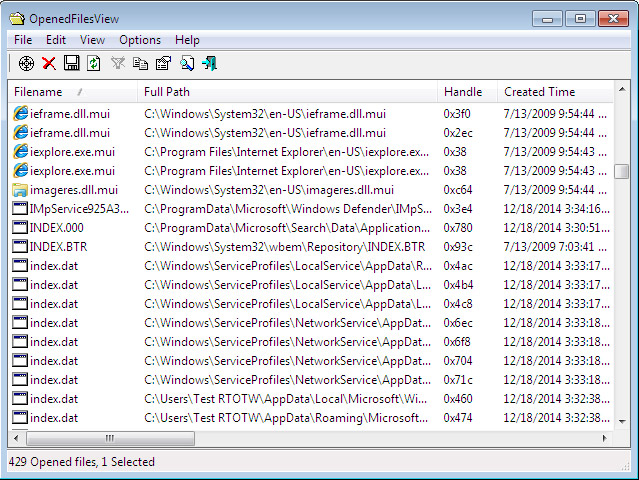
Downloads:
Session expired
Please log in again. The login page will open in a new tab. After logging in you can close it and return to this page.
We use cookies to help you navigate efficiently and perform certain functions. You will find detailed information about all cookies under each consent category below.
The cookies that are categorised as "Necessary" are stored on your browser as they are essential for enabling the basic functionalities of the site.
We also use third-party cookies that help us analyse how you use this website, store your preferences, and provide the content and marketing materials that are relevant to you. These cookies will only be stored in your browser with your prior consent.
You can choose to enable or disable some or all of these cookies but disabling some of them may affect your browsing experience.
We use third-party cookies that help us analyse how you use this website, store your preferences, and provide the content and marketing materials that are relevant to you. However, you can opt out of these cookies by checking "Do Not Sell or Share My Personal Information" and clicking the "Save My Preferences" button. Once you opt out, you can opt in again at any time by unchecking "Do Not Sell or Share My Personal Information" and clicking the "Save My Preferences" button.
Your opt-out settings for this website have been respected since we detected a Global Privacy Control signal from your browser and, therefore, you cannot change this setting.

I’ll definitely be adding this to my tool kit. Thanks, Bryce!
Hey,
Have you used PMW 1.6? never heard ?
google it today, try it today, if you like write about it tomorrow :)
-Thanks
-Arif
There’s a better tool named Unlocker ! :)
http://ccollomb.free.fr/unlocker/
Makes your life much easier ;)
OpenFilesView is great, but process explorer can now find all open handles to a file and kill them (on a handle-by-handle basis – no need to kill the host process). It’s in the ‘Find’ menu.
The “Find Window’s Process” button does a similar job; drag it onto a window (such as an error message or spyware/virus popup) and it will show you which process has created that window.
Nice one indeed. Very useful when it comes to boring viruses. Thanks for the share.
I use . Its an explorer right-click extension and works like a charm. =)
Opps.. that didn’t work very well ^^^^^
Click the link anyway, its called Unlocker. And also has a reference table of why its better than similar products =) Enjoy
I also use unlocker, but it needs to be installed and also kills the entire process, and doesn’t ALWAYS work
I love portable apps, it’s the way all decent apps should be (no, I am not a Mac fanboy :-)
Definitely adding this to the toolkit!