
- You are here:
- Home »
- Blog »
- Computer Technician Tools »
- Print from iOS with Windows AirPrint Installer
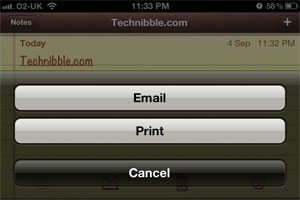
Print from iOS with Windows AirPrint Installer
I have had few clients have asked me about how to print from their iPads and iPhones because certain applications such as Notes and Mail have had a print button available since iOS 4.2.1. The problem is unless you have a printer with a feature called “AirPrint”, you cannot print from the iOS devices. That was until some smart coders created a free application called “AirPrint Installer” that will allow any USB printer to become an AirPrint printer.
In order for this to work you need the following:
- iTunes 10.1 or above installed on the system
- The USB printer must be shared on the local PC
- The iOS device and the printer are on the same network
- Make sure you have administrative rights on the computer as this will be installing a service
To Install:
- Download the attachment on THIS forum post
- Unzip the file, right click on the file “AirPrint_Installer.exe” and choose “Run as Administrator”
- After the executable finishes installing, run one of the registry files “AirPrint iOS 5 Fix – ##Bit.reg” choosing the appropriate system architecture (32bit or 64 bit). Do not run both
- Go back to “AirPrint_Installer.exe” and make sure “Service Startup” is set to “Auto” and click “start
- Restart the computer
Please keep in mind that this application is a hack made by a member of the MacRumors.com forum so it has little to no support and could break in a future iOS update. If you are looking for something more solid to recommend to your clients, checkout FingerPrint which is a more polished paid product.
Session expired
Please log in again. The login page will open in a new tab. After logging in you can close it and return to this page.
Excellent information to have. Airprint has been a requisite for a majority of printer sales in my area, and this information will bring a host of previously ill-equipped printers into the limelight of satisfactory recommendations. (This and Fingerprint!)
I have found a application called “Print share”. It is compatable with Apple, Android and Windows. You just have to download it on your Decive and Computer that had acces to your printer. My Printer is already “Air Print” capable, but I like it because I can print from anywhere. It’s not something I use on a daily basis, but it is nice to have if needed.
http://www.printershare.com/
Thank you for sharing.
Q Computer Repair Service
Leesburg, VA
I used the $10 FingerPrint until Netgear Genie (free) enabled airprint earlier this year. Netgear equipment not required.
Apparently you missed the point of the entire article. Netgear genie simply lets you print to Airprint printers.
No, Netgear Genie allows you to “Print on any printer from your iPad® or iPhone® with AirPrint®”. I use it to print to my 2 non-AirPrint printers.
I’m interested in how to print from an iPad to a network printer. I support a Windows Active Directory network with a whole lot of printers attached to the network. They are all defined on a print server. Is there a way to print to one or more of these printers from IOS? THis is the single biggest obstacle to out considering ading iPads to our hardware mix.