
WIFI setup for RV park

axem56

Member
Reaction score
0
Location
NC
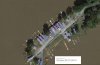
I am looking for a solution using Ubiquiti equipment to cover a RV park(actually tiny homes). The internet connection is located in the bath house with a Engenius AP mounted out side on a telephone pole as marked on the photo in red. This AP does a decent job covering the area, but there are more homes to cover now. All homes have metal roofs and the walls are standard siding.Capture.JPG
 
What is their budget for this? You could go in all sorts of directions here. Do you have power at structures at each end of the park? Light poles that aren't municipal that you can tap into? Are you planning on *actively* managing this? If you are, go Unifi, if not you could save a chunk of money with just some bullet M2's with nano loco backhauls.
 
No set budget, it will be taken before the owners to decide if they want to move forward. The devices could be connected at any of the homes, as which I believe they would be willing to do in order to get better connectivity. This will not be managed.

So nano loco and m2 at current AP location, and 1 each at both ends of the park.
 
I assume your n-central server has an internet resolvable address. Have you configured your local dns to resolve to your server locally?
 
You can either use (3) M2's - one at each end and the middle and run them WDS or use a combo at each end (loco + m2).
You can also use an NM5 instead of the loco and eliminate running two cat5 cables outside and use the nm5's passthrough PoE.
The only disadvantage of running just the M2's is the end units are performing double duty and their bandwidth will be cut in half. I doubt this will be a problem with the number of users this will be serving though. One word of advice on those M2's - even if you spring for the titanium version, do yourself a favor and run a line of silicon sealant around the seam of the housing. Get you some of that silicon tape and wrap up the antenna connection. These things can take some abuse but they aren't 100% water tight.
 
Even the cheapest ones are twice as much as your baseline airMAX units but like Brian said - still inexpensive in the grand scheme of things. However, if you aren't going to be actively managing it, there isn't a need to use UniFi. It's why they have two distinct product lines. We do service calls to "replace" these units every few weeks and 99% of the time its the cat5 end or an ESD failure with the PoE adapter. One of the few brand names I've ever dealt with that I trust 100%.
 

The 2.4 ones.....I don't think about 5.0 when going for outdoor distance and penetration. They're about 110 bucks.
I prefer to go with "managed"....because once in a while you may need to troubleshoot something. And it's nice to do that easily from your cloud control panel, without leaving the comfort of your office chair, or couch at home. You may get a call about <something>.,...would be helpful to easily see from some dashboard if an AP died, or your suddenly have super poor performance...another nearby wireless causing interference...or one particular computer hogging the bandwidth like crazy...or a request for a quick password change.
 
Even the cheapest ones are twice as much as your baseline airMAX units but like Brian said - still inexpensive in the grand scheme of things. However, if you aren't going to be actively managing it, there isn't a need to use UniFi. It's why they have two distinct product lines. We do service calls to "replace" these units every few weeks and 99% of the time its the cat5 end or an ESD failure with the PoE adapter. One of the few brand names I've ever dealt with that I trust 100%.

Which model are you referring to when you say you replace these because of POE failures? The M2 loco's?
 
Which model are you referring to when you say you replace these because of POE failures? The M2 loco's?

Primarily powerbridge since these are on the longest cable runs (tops of water towers) but sometimes the nanostations. I don't recall ever having a problem with the locos but to be fair we only have a few of these in the field
 
The 2.4 ones.....I don't think about 5.0 when going for outdoor distance and penetration. They're about 110 bucks.
I prefer to go with "managed"....because once in a while you may need to troubleshoot something. And it's nice to do that easily from your cloud control panel, without leaving the comfort of your office chair, or couch at home. You may get a call about <something>.,...would be helpful to easily see from some dashboard if an AP died, or your suddenly have super poor performance...another nearby wireless causing interference...or one particular computer hogging the bandwidth like crazy...or a request for a quick password change.

You can do this with airMAX using airControl2. Right now I can view over 150 units we have in the field and see a topographical map of each unit, its speed, signal, airmax capacity, etc. You know real quick which unit isn't working and can reboot others, perform firmware upgrades and change settings. Granted we have a VPN into an aircontrol2 server that exists on the same subnet as all the radios but there are guys on the forums who have this running in Amazon AWS.

UniFI is certainly more capable and can be used for policing traffic and overall hotspot management but if by "managing" you mean just diagnosing connection issues, then airMAX with airControl can do the same thing. The only downside is I don't believe it supports airFiber.
 
Back
Top