Why does Windows sometimes change the default printer by itself?

davidbeckham

New Member
Reaction score
0
Location
FL, USA
Not sure if anyone else has seen this.

Sometimes Windows randomly switches my default printer to another one on the network. I already set the one I want as default but it still changes occasionally.

Is this a Windows setting somewhere?
 
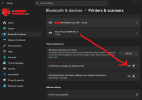
If you set that toggle so that Windows manages your default printer, then it will consistently change to be the last one you printed to. If you don't want that behavior (and I can't imagine why anyone would), then you have to turn that toggle off. Then, you can specify which printer you want as the default and it will stay that way.
 
Interesting. I haven't done it in a while, but it wasn't all that long ago that if you changed the default printer in Control Panel, Devices and Printers (which now directs you to Windows Settings) it would automatically stop managing the default printer. But you had to be doing this in Control Panel.

But I see now in Windows Settings that if this toggle is On, you don't even get the option to select your default printer when you are in the settings for each individual printer. I guess I turned it Off so long ago that I forgot about this, or it inherited the off-state way, way back.
 
Sometime in Windows 10 the "Let Windows manage my default printer" option came to be and I have found it a completely useless feature. When I deal with offices people have a default and they want to ensure that is their default and if you use MS Word to print envelopes it only prints to your default so you need to have it dedicated. For most home users or small offices there isn't really more than 1 printer to choose from so it kind of feels like what is the purpose of this "feature". I would say this is probably a "feature" for people who work from multiple locations and it can swap the default up based on what is available or perhaps some other logic to determine the correct default.
 
Back
Top