sort excel sheet by characters.

computertechguy

Active Member
Reaction score
34
Location
New Jersey
I have been trying every which way I can and I can't figure out how to get an excel column to sort by character qty..
We have a column with a customer code which consists of a total of 5 characters or 6 characters.I need to sort by these as 5 characters means one thing to my client and the 6 means another.

Any thoughts?
 
Create a new column that takes the =LEN(<column letter>)

Then do a custom sort like normal: first on the length column ascending and then by whatever other columns you want.


Sent from my iPhone using Tapatalk
 
Create a new column that takes the =LEN(<column letter>)

Then do a custom sort like normal: first on the length column ascending and then by whatever other columns you want.


Sent from my iPhone using Tapatalk
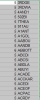
For some reason the LEN= doesn't work It still randomly puts the number value willy nilly.
 

Attachments

  • excelscreenshot.PNG
    excelscreenshot.PNG
    7.2 KB · Views: 11
I'm confused (normal). Can you elaborate on how the desired sort would look? What is Excel doing that you don't want? Do you want the 6-character strings to sort after the 5-character strings?
 
@Tech Savvy is correct.

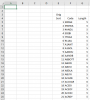
I copied your data into a new spreadsheet. I created a Length column with the formula =LEN(F5) and copied it down. This gave the correct length in characters of the Code column entries. Like this:

upload_2020-7-15_11-23-12.png

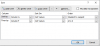
Then I did a sort first by the Length column in ascending order, then by the code column in ascending order. Like this:

upload_2020-7-15_11-22-0.png

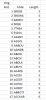
Which gave me the expected answer. All of the "5's" were sorted alphabetically first, followed by all of the "6's". Is this what you were looking for?

upload_2020-7-15_11-24-53.png
 
Back
Top