
IDE->SATA adapter and data recovery

Xander

Banned
Reaction score
66
Location
Niagara region, Ontario
Anyone tried this? Does it help?

I've got a near-abandoned IDE drive on my shelf that I couldn't get the mobo of my old bench machine to even recognize. I got nowhere with it so I was going to give it back to the customer with some data recovery references.

I got to thinking last night about plugging it into my current bench box but realized that it has no IDE connectors. Hmm.. what about an adapter?
The current box is full linux so I don't know if that would give me much more help but I figure I might give it a shot.

Had anyone had any success with these? Tips to pass?
 
Check CDW or Newegg for a Sata /IDE to USB adaptor kit. ($17.00 US)You can then hook up the drive to a desktop via USB. As for viewing the files. Use linix to mount the drive and you can search for the files. The other method I have used is to load up Herin's utility disk on a machine. Wait until after it loads than power on the IDE drive in the USB. Wait until the says it found new hardware and use the the "my computer" to view the drive and use copy/paste to move files to a different drive.
 
Check CDW or Newegg for a Sata /IDE to USB adaptor kit. ($17.00 US)You can then hook up the drive to a desktop via USB. As for viewing the files. Use linix to mount the drive and you can search for the files. The other method I have used is to load up Herin's utility disk on a machine. Wait until after it loads than power on the IDE drive in the USB. Wait until the says it found new hardware and use the the "my computer" to view the drive and use copy/paste to move files to a different drive.
Thanks but I'm not brand new to all this; I just want to know if anyone has had any better luck with one of these adapters.
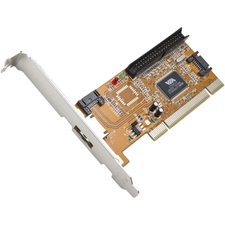
I typically avoid adapters unless I am onsite. In my recovery computer, I have some PCI cards, one that has IDE which work quite well. Im sure I didnt pay more than $20 for it.
I'm probably going to pick up one of these locally today while I'm out.
1020196175.jpg

2 SATAs, 1 IDE and an eSata. It'll be a $15 experiment
 
I have never had any good experiences with IDE to SATA adapters, but the PCI cards work well.
 
Last edited by a moderator:
Thanks but I'm not brand new to all this; I just want to know if anyone has had any better luck with one of these adapters.

I use my PCI card with Windows 7 64-bit and it works great. Sometimes, I will run across a disk that will BSOD the machine. In which case, I will use the USB adapter, but it is a last resort.
 
I have two IDE/SATA-to-USB adapter kits; keep one in the car, one in the office.

They are invaluable and like $30. Get at least one for sure. Works like a charm.
 
In regard to the SATA/IDE thing, I dont know the answer, but tend to agree that in absence of a definitive answer, its probably best to avoid the adapter and use native cable.
 
Last edited by a moderator:
On topic, what I've been looking at is less of an adapter as it is a mobo-based PCI card. I'm new to data recovery but lesson #1 is that you don't do it via USB.

However, the card I picked up this afternoon isn't recognized by my linux box.
 
these pci cards dont have all the feature of it being right on the board. i know it doesnt matter for this but they are not bootable. atleast the ones i have used. i avoid them as much as possible. never use usb ide or sata
 
Anyone tried this? Does it help?

I've got a near-abandoned IDE drive on my shelf that I couldn't get the mobo of my old bench machine to even recognize. I got nowhere with it so I was going to give it back to the customer with some data recovery references.

I got to thinking last night about plugging it into my current bench box but realized that it has no IDE connectors. Hmm.. what about an adapter?
The current box is full linux so I don't know if that would give me much more help but I figure I might give it a shot.

Had anyone had any success with these? Tips to pass?

Get this one, works great.

http://asapdatarecovery.com/temp/ide.jpg

ide.jpghttp:
 
Back
Top