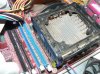
Having trouble removing this heatsink - pics included

joydivision

Well-Known Member
Reaction score
58
Location
Manchester, UK
Its the slow PC giving me trouble, just going to replace the heatsink.
Its an Intel 478 socket.

How do I remove this heatsink I have never done one of these before as I have mostly worked on AMDs at this age. I can see two levers but I just cannot work out how to release the silly thing.

small1.jpg


small2.jpg
 
never seen a model like that before but i would assume you push each of the two tabs away from the heatsink. From what i remember, there was a base around the socket that was on the mobo, and that this provided a means to hold the heatsink down with pressure.
 
I've tried doing that but they won't shift. Also worried that the base on the motherboard may be unique to this processor heatsink making it impossible to replace it with a generic one. Getting close to just offering a partial refund on this job now :( Its taking too much of my time.
 
I have not seen this before either hmmm.. take the motherboard out and see if the plastic piece is screwed in from the bottom side.
 
I can't really see, but this is just a socket 478 heatsink, right? You just unclip it from the plastic bracket that's attached to the board.
If you have a second, take a picture of it from two adjoining sides...(instead of a top down view.)

But from looking at it, and if I'm right about which type it is...I just use a flat screw driver to pry the plastic arms out of the bracket on the board, then wiggle it loose.
 
Yeah, it's just a Socket 478. See the picture, I highlighted the corner closest to the camera. You have two parts. The bracket attached to the motherboard is in green. Don't break it! :D
The blue part is the heatsink clips. You can carefully just stick a screwdriver between the two and release the heatsink.
 

Attachments

  • small4.jpg
    small4.jpg
    86.2 KB · Views: 141
yup but it should give you an idea of how the mechanism works.

I'm wondering do you need to squeeze the tabs in closer to the heatsink to be able to remove it?
 
Tried it but it feels like something is about to snap. On top of all this I have flipping rootkits to sort out tonight (its now gone midnight).
 
Yeah, it's just a Socket 478. See the picture, I highlighted the corner closest to the camera. You have two parts. The bracket attached to the motherboard is in green. Don't break it! :D
The blue part is the heatsink clips. You can carefully just stick a screwdriver between the two and release the heatsink.

Did you try this yet?
 
By the way, what makes you want to replace the heatsink in the first place? Because the system is running slow? Did you check to see if the processor is running within operating temp ranges first? From the pics it looks like there's one stick of RAM, and knowing the era these systems were built I'd guess it's most likely 256MB, maybe 512MB. Did you try increasing the RAM yet?
 
I had one of these last month, and it wasn't the easiest heatsink to remove. From what I can remember, I had to apply a little pressure to the side with the hinge, then squeeze the two tabs together. It wasn't easy though.

small4.jpg
 
The RAM is brand new tempory memory, it did have 2 X 256MB RAM PC2100 so I replaced it with a brand new PC3200 for testing purposes to see if it made any difference.

The reason I suspect its over heating is the heatsink is always stone cold, I did leave it with the fan of for a few minutes and even then the heatsink was only luke warm. I would have thought if the thermal paste was bonding properly with no fan it would burn my hands off :(.

The CPU temperature is 37c but it never rises or goes any lower so I suspect that is faulty. I will try speedfan on it tomorrow.

As for the picture suggesting to squeeze the clips together I have tried it and it feels like nothing is happening but I didn't apply the preasure where suggested so I will try that.

I am over welemed with viruses and rootkits atm so this problem has come at the worst time :(.

As you may be able to tell my typos I am now extremely tired but still working :(.

Edit all the drivers are up to date, it does have 512MB RAM and that is enough for the basic setup this is, it idles at just over 200MB of RAM. Pretty certain its not a RAM issue as its completly different behaviour. Worked on so many machines this age and spec so I know something is not right. The machine I fixed earlier today runs faster than thats a 1.2 Ghz Celeron :(.
 
Last edited:
I believe these are made by evercool. P4 Tool free Clip Model. There is a installation guide on there website.

Here is a link to their website

http://www.evercool.com/

Good Luck

Gazza
 
Last edited by a moderator:
I believe these are made by evercool. P4 Tool free Clip Model. There is a installation guide on there website.
evercool has nice instructions:
http://www.evercool.com.tw/install/free_clip.htm


The evercool heatsink kits looks similar to the ones made by Titan


If you do break the retention bracket they are cheap and easy to replace. I think the last one I bought was 3 or 4 dollars, they have four screws under the heat sink that screw into a backplate on the bottom of the motherboard.
 
Back
Top