
You are using an out of date browser. It may not display this or other websites correctly.
You should upgrade or use an alternative browser.
You should upgrade or use an alternative browser.
Disable browsers "what's new" window after updating
- Thread starter Rigo
- Start date


britechguy
Well-Known Member
- Reaction score
- 5,140
- Location
- Staunton, VA
Perplexity.ai: Is there a way to disable the "what's new" tabs that open when relaunching a browser after an update?
I suspected this would be an "it varies by browser" thing, and it is.
I suspected this would be an "it varies by browser" thing, and it is.
britechguy
Well-Known Member
- Reaction score
- 5,140
- Location
- Staunton, VA
It looks like Edge has the equivalent of Chrome, and following the same instructions as noted for Chrome:
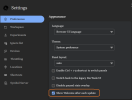
britechguy
Well-Known Member
- Reaction score
- 5,140
- Location
- Staunton, VA
And in digging further, this appears to be a "Chromium thing." Brave and Vivaldi both have the same checkbox as Edge does, but both have the Chromium logo next to the word "Settings."
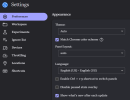
britechguy
Well-Known Member
- Reaction score
- 5,140
- Location
- Staunton, VA
Rigo,
You're looking in the wrong place. You must follow these steps, shown by Perplexity.ai:
----
----
This is NOT a part of regular settings, but the settings that show only once Developer Tools are opened and the Settings there opened afterward.
You're looking in the wrong place. You must follow these steps, shown by Perplexity.ai:
----
Chrome Solution
Access Chrome's Developer Tools with F12 or Ctrl+Shift+I, then open the gear icon for settings. Navigate to Preferences > Appearance and uncheck "Show What's New after each update" to prevent the tab from appearing post-relaunch.----
This is NOT a part of regular settings, but the settings that show only once Developer Tools are opened and the Settings there opened afterward.

ThatPlace928
Well-Known Member
- Reaction score
- 2,950
- Location
- Bullhead City, AZ
@britechguy , thank you! I also find the What's New tab frustrating. Is there a setting for turning off Chrome updates? Mine updates nearly every week and it's annoying.
My bad,Rigo,
You're looking in the wrong place. You must follow these steps, shown by Perplexity.ai:
----
Chrome Solution
Access Chrome's Developer Tools with F12 or Ctrl+Shift+I, then open the gear icon for settings. Navigate to Preferences > Appearance and uncheck "Show What's New after each update" to prevent the tab from appearing post-relaunch.
----
This is NOT a part of regular settings, but the settings that show only once Developer Tools are opened and the Settings there opened afterward.
I had only looked at the screenshots without following your link.
Got into the developper tools and unticked the relevant box in Chrome.
Fortunately there was a pending update for testing, re-launched to apply and STILL got the "What's new" thing


britechguy
Well-Known Member
- Reaction score
- 5,140
- Location
- Staunton, VA
Is there a setting for turning off Chrome updates?
Only what I can find via Perplexity.ai: Is there a way to turn off auto-updating in the Chrome browser?
ThatPlace928
Well-Known Member
- Reaction score
- 2,950
- Location
- Bullhead City, AZ
Thanks for trying. I did a little research on it a couple months ago but never found anything. I would love to change the frequency of the updates.Only what I can find via Perplexity.ai: Is there a way to turn off auto-updating in the Chrome browser?

HCHTech
Well-Known Member
- Reaction score
- 4,457
- Location
- Pittsburgh, PA - USA
Chrome updates are part of the patch management in our RMM, so we technically control those, although we have them on auto-approval. I can't remember a Chrome update breaking anything.I would love to change the frequency of the updates.
ThatPlace928
Well-Known Member
- Reaction score
- 2,950
- Location
- Bullhead City, AZ
They're not breaking anything. I never said that. They're just annoying and I'd love to change the frequency of them, is all.Chrome updates are part of the patch management in our RMM, so we technically control those, although we have them on auto-approval. I can't remember a Chrome update breaking anything.
britechguy
Well-Known Member
- Reaction score
- 5,140
- Location
- Staunton, VA
I never said that.
And I don't think @HCHTech was saying, nor implying, that you did. It is possible to make observations based on experience without making any implications about the comments that triggered them.
And I can agree with you that the frequency of updates in a very great many web browsers is annoying. I've just gotten used to either doing an immediate update and restart (with my tabs restored) or intentionally ignoring the prompt. My partner seems to be able to ignore those prompts along with the Restart button that sits in the browser toolbar, often for days.
ThatPlace928
Well-Known Member
- Reaction score
- 2,950
- Location
- Bullhead City, AZ
Chrome will only sit for so long with the message to restart to update, then it will do it on its own and usually overnight. I wake up in the morning and any programs I had open on the desktop are all closed. I always save my work so that's not a problem. I just prefer that Chrome doesn't do that. If I could put it on a set schedule, I'd do it in a heartbeat.And I don't think @HCHTech was saying, nor implying, that you did. It is possible to make observations based on experience without making any implications about the comments that triggered them.
And I can agree with you that the frequency of updates in a very great many web browsers is annoying. I've just gotten used to either doing an immediate update and restart (with my tabs restored) or intentionally ignoring the prompt. My partner seems to be able to ignore those prompts along with the Restart button that sits in the browser toolbar, often for days.
britechguy
Well-Known Member
- Reaction score
- 5,140
- Location
- Staunton, VA
I wake up in the morning and any programs I had open on the desktop are all closed.
Then you are having behavior I've literally never seen from any Chromium-based browser update. I've never seen them need anything other than a restart of the browser itself; certainly not a Windows system restart.
ThatPlace928
Well-Known Member
- Reaction score
- 2,950
- Location
- Bullhead City, AZ
Weird, isn't it? But, yes, it does restart my laptop, not just the browser. I double-check every time to make sure it wasn't coinciding with a Windows update and it never is.Then you are having behavior I've literally never seen from any Chromium-based browser update. I've never seen them need anything other than a restart of the browser itself; certainly not a Windows system restart.
britechguy
Well-Known Member
- Reaction score
- 5,140
- Location
- Staunton, VA
@ThatPlace928
If you have not tried Performing a Windows 10 or 11 Repair Install or Feature Update Using the Windows ISO file on the machine where this is happening, I absolutely would. Definitely not typical post-browser-update behavior for any Chromium-based browser or Firefox on any machine I've ever worked with, and I doubt that Chrome, per se, is the root cause here. And I'm not saying it's not happening, but it strikes me as the side effect of that Chrome update because something's "off" with Windows.
If you have not tried Performing a Windows 10 or 11 Repair Install or Feature Update Using the Windows ISO file on the machine where this is happening, I absolutely would. Definitely not typical post-browser-update behavior for any Chromium-based browser or Firefox on any machine I've ever worked with, and I doubt that Chrome, per se, is the root cause here. And I'm not saying it's not happening, but it strikes me as the side effect of that Chrome update because something's "off" with Windows.
ThatPlace928
Well-Known Member
- Reaction score
- 2,950
- Location
- Bullhead City, AZ
It's the only thing that seems to be "broken" in my system. Everything else works as it should and the system restart doesn't happen every time a browser restart is needed to update. It's been happening for about 4 months now, maybe 5. When it happened more than once, I ran Windows Defender's full scan and came up with 4 Trojans. Got rid of those and have run numerous scans since then and no more have come up. But I'm thinking they might be why the system restart happens. I don't know and, at this point, I've gotten used to it happening so, as long as there's no other aberrant behavior, I'm just going to leave it alone.@ThatPlace928
If you have not tried Performing a Windows 10 or 11 Repair Install or Feature Update Using the Windows ISO file on the machine where this is happening, I absolutely would. Definitely not typical post-browser-update behavior for any Chromium-based browser or Firefox on any machine I've ever worked with, and I doubt that Chrome, per se, is the root cause here. And I'm not saying it's not happening, but it strikes me as the side effect of that Chrome update because something's "off" with Windows.
Similar threads

- Replies
- 8
- Views
- 2K

- Replies
- 19
- Views
- 2K

