Crash after login on rMBP

timeshifter

Well-Known Member
Reaction score
2,491
Location
USA
MacBook Pro Retina 13-inch Early 2015. Customer had installed some updates, maybe 10.12.4 latest and / or some Office updates. Machine powers on and you can log in. After signing in there's a progress bar. Before that bar hits about 2% the machine reboots.

I was able to fix it (temporarily) by booting to the recovery partition and doing a reinstall. I thought it was all fixed. After about half a day it started doing it again.

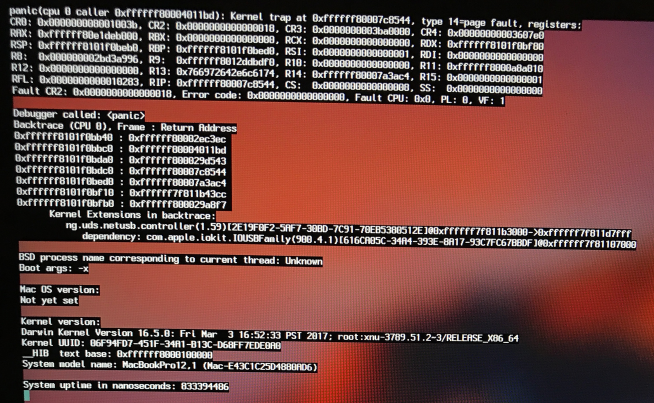
Before the reinstall I could boot in safe mode and login and it would stop with some type of kernel panic on the screen. I haven't looked into that specific error too much yet. Now I can't get it to boot to Safe Mode. I can still boot Recovery Mode but not Safe Mode. I tried resetting NVRAM a couple of times but no help.

She is using FileVault.

I guess a clean install is next up, but I'd like to avoid that if I can.
 
Probably will not work but always worth throwing at it. SMC reset. I assume you are using Internet Recovery not local disk recovery? I wonder what would happen if attempting to install from a Sierra USB drive. If you have another Mac they are fairly easy to make. In any event...Make sure you have a current Time Machine backup before proceeding if possible.
 
The first thing to do is run a test on the RAM and SSD. If it's the RAM then it's a crap shoot, but it's possible the SSD itself is failing. Seen a few of these in my shop with bad SSD's.
 
Probably will not work but always worth throwing at it. SMC reset. I assume you are using Internet Recovery not local disk recovery? I wonder what would happen if attempting to install from a Sierra USB drive. If you have another Mac they are fairly easy to make. In any event...Make sure you have a current Time Machine backup before proceeding if possible.
OK, tried SMC reset too. Still can't boot to Safe Mode by holding down shift at power on.

The first thing to do is run a test on the RAM and SSD. If it's the RAM then it's a crap shoot, but it's possible the SSD itself is failing. Seen a few of these in my shop with bad SSD's.
How do you test the RAM and SSD? Option + D as mentioned by cyabro?

Have you run the built in diagnostics?
Power on and press and hold option+d.
Yes, just tried it. It passed.

Here's what I get now right after booting up, entering user's password and hitting enter:

Monosnap_2017-04-20_08-27-06.png


Installing from USB drive installer with clean copy of Sierra.
 
Couldn't install from my USB drive because it said the software on the computer was newer. Trying a recovery install again.
 
Recovery install worked. Then after a while it goes back to same issue. I rebooted a couple of times to try to force it.

One thing I've noticed: her machine boots to the login screen VERY fast.

My rMBP is almost identical. It's got a little more RAM, CPU and storage. When I power mine on I see a black screen, white Apple logo, then a progress bar before it gets to the login screen. Hers: black screen, white Apple logo, NO progress bar, BAM you see login screen. On hers there's an option to Restart or Shut Down. Mine includes those plus Sleep.

I suspect there's something going on with power management, sleep, fast boot, etc., but can't put my finger on it.
 
With FileVault enabled you get the login screen before the OS loads, as you need to enter in the pssswird for the encryption.
That's why you see the login screen almost immediately and then the loading bar after that.

The option+d will run some basic tests on the hardware and report any issues, you don't get any control on what to test though.
 
With FileVault enabled you get the login screen before the OS loads, as you need to enter in the pssswird for the encryption.
That's why you see the login screen almost immediately and then the loading bar after that.
Oh, that makes sense. I don't have any experience with FileVault. I'll remove it as soon as this recovery install finishes.

The Option+D didn't tests all passed.
 
Are you doing clean installs or restore in place? Usually the restore in place works fine but I recently had an issue with my Retina, 10.11, with FV though. Did the latest update 2017-1 a few weeks ago. The thing was acting like the drive was failing. Taking for ever to boot, all the app shortcuts failed, etc. Ran regular repairs etc. No change. Finally decided to do a nuke and pave, works fine. Tried restore from TM, craps out again after the update. Not sure what is causing the issue though.
 
So another reinstall, then I removed the FileVault encryption. On the next reboot the system went into a loop. It would power on, chime, go off, turn on, chime, over and over again. So I went ahead and did a N&P then I restored their data from the backup using Migration Assistant (but didn’t restore applications). Seems to be working fine now.
 
Back
Top