Any way to perma disable New Outlook until we just can't anymore or are we there?

thecomputerguy

Well-Known Member
Reaction score
1,468
Client is used to importing ICS calendar event files into her calendar in Outlook and New Outlook is not working the way she expects. I removed her account from New Outlook and Uninstalled it and ... shazam ... it's back again today, fully configured with her email account again.

I know this is a ticking clock but any way?
 
I'm confused here as to whether we're talking about Outlook for Windows (free New Outlook) or M365/Office 2024 Outlook.

For all the paid versions of Outlook under 365 that I've worked with the UI is now something that "floats over the underlying account and data structures." I can have the New Outlook UI open and Outlook Classic UI open, at the same time if I so choose, and what's accessed is precisely the same accounts.

I don't know how or why you'd attempt to remove an account from New Outlook (paid UI) without it simultaneously being removed when using the Classic UI, and vice versa.
 
New Outlook calendars aren't fully functional yet with importing a .ics file. I recommend staying on Classic, it will get figured out at some point.

Change the default apps to Classic and take New Outlook off the task bar, that should help.
 
For a while I was pushing a policy in InTune to hide the "Try new Outlook" slide button....to prevent users from accepting that prompt.
There's also a script you can push out via InTune to remove (uninstall) the New Outlook app.

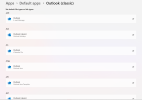
What do you have set for "default apps" for Outlook? There are those...16 or so settings where you can flip between Outlook New and Outlook Classic. Make 'em all Classic. I've been meaning to create an InTune policy to make this easy....haven't gotten to it yet.
1772799271302.png
 
forces everything down your throat with a shovel.

Hardly the case for the Outlook Classic versus New UIs. It has been dirt simple to switch between the two, or to use either one or both side-by-side, for some time now. I haven't bothered switching between the two because of the latter fact.

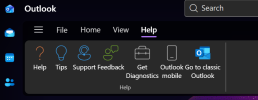
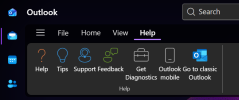
But if you switched to New Outlook and want to go back, how much more obvious can it be to switch back than this in the Help Menu:
1772808724399.png

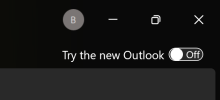
And in Outlook Classic to try the New UI:

1772808786121.png

The fact is that the "New" UI will be the only UI come 2029. I far prefer that folks have as many chances as possible to play with it, switching into and out of it cyclically to see what from Classic may now have been integrated in to the New UI.

If this is what you characterize as forcing things on people, well . . . A clearer, easier, user-controlled choice mechanism I cannot imagine.
 
It's fine for home users to dabble around, but when managing a couple-o-thou endpoints, the issues with things that don't work well yet...need more "cooking in the oven"....results in a LOT..and I mean..A LOT...of helpdesk tickets and calls to us..which result in a lot of time spent in total telling people over the phone, or via email, to "go back to Outlook Classic". Too many little things that get used more in a collaborative business environment..just don't work yet in New.

I can't wait for New to mature all the way. I'm using it myself most of the time, as I know I can launch both classic and new at the same time. And for basic users who don't use much for collaboration...new is fine.
 
Last edited:
@YeOldeStonecat

And it's been my experience, direct experience, that when those managing a couple-o-thou endpoints want to lock all kinds of specific things down, the tools to do so have existed for decades now.

If that's your (generic your) situation then you should be doing that locking down. I agree that unnecessary calls to the helpdesk benefit no one.

But for home users, or anywhere that it's not locked down, I can't share the opinion that anything is being "forced down someone's throat with a shovel," which was my central point.

There have been plenty of times where that characterization is accurate, and not just for Microsoft, but this ain't one of 'em!
 
@Blues "Don't we love how MS spoon feeds you its latest and greatest aka forces everything down your throat with a shovel"

I came in with New Outlook a bit freaked at first, then I realized how it would impact my business directly. I planned for the future. After reviewing all the New Outlook work I'm doing now, the future is tenant management for break/fix folks in 365. I created a long list of all those "tasks" and am studying up for them now, so like New Outlook, I'm ready lol.
 
I've run into multiple problems trying to get "Old Outlook" to work with Modern Authentication. I know MA is in there, it tries, it just doesn't work. AOL, Hotmail, Gmail have all failed at points (and worked other times on other client PC's). Switching to New Outlook seems to work fine for Modern Authentication each time. It always returns with either a) Bad user/pass (but it is correct) or Server failure/no comms.
Has anybody else seen this? And yes.. Sometimes mail will work but not the calendar, or vice-versa (like a policy is on somewhere)... but these are end-user accounts.

If that ends up being the case for a client, I just let them know, "The New Outlook is where it's all going, like it or not, but your email is working!".

Seems like more planned failure/obsolescence, to me.
Reason: It's email. This is simple, established stuff. The code-base can't be that different between New and Old Outlook (In regards to MA) - and the MA features were added to "the old outlook", not that long ago. This has been going on for months, for various clients, for me.
So at the very least, MS is giving ZERO F's toward "The Old Outlook".
:reason

And yes, I've tap-danced Installing Office, uninstalling, cleaning reg keys, and waded into the abyss of asinine MS help articles and Reddit, Removed all accounts and mail accounts from Settings/Control Panel - Mostly to no avail.
I have not gone as far as full-reinstalling Windows and starting totally fresh for this particular issue - but I did do a repair install of 25H2 over-the-top... and the problem remains.

I have checked the email provider's settings, app-passwords, Security Settings, changed passwords and manually entered server settings, updates, BIOS firmware - none of that changes the problem.

A common thing seems to be that the user had 2016, 2019, 2021 or some version thereof - and then had M365 installed at some point.
Though again, fully removing ALL versions and doing various "cleanup ops" - then installing the latest... is still no go.

Anyways, it's far and few between, but I've already dealt with it 8-10 times.

 
I've run into multiple problems trying to get "Old Outlook" to work with Modern Authentication. I know MA is in there, it tries, it just doesn't work. AOL, Hotmail, Gmail have all failed at points (and worked other times on other client PC's). Switching to New Outlook seems to work fine for Modern Authentication each time. It always returns with either a) Bad user/pass (but it is correct) or Server failure/no comms.
Has anybody else seen this? And yes.. Sometimes mail will work but not the calendar, or vice-versa (like a policy is on somewhere)... but these are end-user accounts.

If that ends up being the case for a client, I just let them know, "The New Outlook is where it's all going, like it or not, but your email is working!".

Seems like more planned failure/obsolescence, to me.
Reason: It's email. This is simple, established stuff. The code-base can't be that different between New and Old Outlook (In regards to MA) - and the MA features were added to "the old outlook", not that long ago. This has been going on for months, for various clients, for me.
So at the very least, MS is giving ZERO F's toward "The Old Outlook".
:reason

And yes, I've tap-danced Installing Office, uninstalling, cleaning reg keys, and waded into the abyss of asinine MS help articles and Reddit, Removed all accounts and mail accounts from Settings/Control Panel - Mostly to no avail.
I have not gone as far as full-reinstalling Windows and starting totally fresh for this particular issue - but I did do a repair install of 25H2 over-the-top... and the problem remains.

I have checked the email provider's settings, app-passwords, Security Settings, changed passwords and manually entered server settings, updates, BIOS firmware - none of that changes the problem.

A common thing seems to be that the user had 2016, 2019, 2021 or some version thereof - and then had M365 installed at some point.
Though again, fully removing ALL versions and doing various "cleanup ops" - then installing the latest... is still no go.

Anyways, it's far and few between, but I've already dealt with it 8-10 times.

Yep that pretty much sums out my reasoning for never liking outlook right there lol. Maybe it's just the luck I've had over the years but I don't get these issues with other email clients...at the same time most of the businesses I deal with are at a very small level too so majority don't really need outlook. Obviously I see the need in the larger business world to have and support outlook I'm just glad I don't have to very often lol.
 
Back
Top