
- You are here:
- Home »
- Blog »
- Manage Your Computer Business »
- Case Study: Attack of the Legitimate Programs
Case Study: Attack of the Legitimate Programs
Today I had an onsite computer repair callout where the description was that “the computer was running slow and they installed some stuff”. I get these kind of callouts all the time and it is usually a malware infection or virus of some sort which uses alot of system resources and lags the computer. This time it was different.
When I arrived I loaded up Process Explorer to see what process was lagging the computer and I couldnt see any sort of malware or virii. However, for some reason the CPU load was still at 100% which was causing the computer to run terribly slow.
Once I investigated further I noticed there was no single process using up all the resources. Instead there were many legitimate programs using up system resources equally. They had the following applications set to load at boot time and all running at once:
- AVG Antivirus
- Vet Antivirus
- Remnants of Norton Antivirus (even when you uninstall it, it keeps parts of it like LiveUpdate hanging around on your computer).
- Prevx (anti malware application)
- MSN Messenger (which trys logging in at bootup)
- Limewire (the non-adware version)
- Windows Desktop Search
- And other monitoring software required for running peripherals like printers, digital cameras and iPods.
All of these applications are considered legitimate but they definitely were the cause of the lagging problem. The antiviruses use resources by sitting and watching for virus activity, Prevx continually watches and scans constantly for any activity that might result in malware being installed, MSN Messenger keeps trying to sign in at bootup and loads the “today screen” website which takes up resources, Limewire trys to continue its previous downloads by reconnecting to all the computers it was downloading from before and Windows Desktop Search was always indexing the contents of the hard drive.
I asked the client whether they used Windows Desktop and they said they didn’t so I uninstalled it. I uninstalled Prevx because it was simply using too much system resources and replaced it with Windows Defender which is a little lighter on the computer. I then removed VET Antivirus because it had an expired license and left AVG as the remaining antivirus.
As for the two programs MSN Messenger and Limewire which they do use and want to keep, both programs have the option to stop them loading at startup and the client can click the icon on the desktop when they are ready to use them.
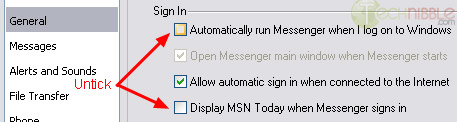
MSN Messenger can be stopped by going to: Tools > Options > General

Limewire can by stopped by going to: Tools > Options > Advanced > System Startup
MSConfig which is a program that comes with Windows XP. Went to the “Services Tab” where it shows me all the services that are currently running on the computer. Most of the services are from Microsoft and are needed to run Windows however if you tick the “Hide All Microsoft Services” box it will show you only third party applications. In here I unticked the Norton Antivirus related services and clicked apply.

We use cookies to help you navigate efficiently and perform certain functions. You will find detailed information about all cookies under each consent category below.
The cookies that are categorised as "Necessary" are stored on your browser as they are essential for enabling the basic functionalities of the site.
We also use third-party cookies that help us analyse how you use this website, store your preferences, and provide the content and marketing materials that are relevant to you. These cookies will only be stored in your browser with your prior consent.
You can choose to enable or disable some or all of these cookies but disabling some of them may affect your browsing experience.
We use third-party cookies that help us analyse how you use this website, store your preferences, and provide the content and marketing materials that are relevant to you. However, you can opt out of these cookies by checking "Do Not Sell or Share My Personal Information" and clicking the "Save My Preferences" button. Once you opt out, you can opt in again at any time by unchecking "Do Not Sell or Share My Personal Information" and clicking the "Save My Preferences" button.
Your opt-out settings for this website have been respected since we detected a Global Privacy Control signal from your browser and, therefore, you cannot change this setting.
