
- You are here:
- Home »
- Blog »
- Computer Technician Tools »
- UBCD – 100 PC Hardware Diagnosis Tools in One
UBCD – 100 PC Hardware Diagnosis Tools in One
Most of us have heard of UBCD4Win which gives you a Windows like interface on a boot CD. In fact, I have used it in a few of my tutorials here on Technibble. UBCD4Win is great but what if you need to do some more low level work such as testing the RAM, doing a low level format or testing the condition of a hard drive? This is Where Ultimate Boot CD (dos version) comes in.
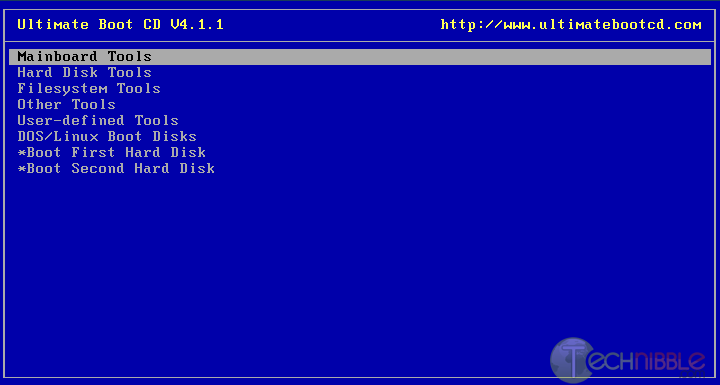
UBCD assembles over 100 PC hardware diagnosis tools into one bootable CD. It boots up very quickly (about 2 seconds on my machine) and provides a menu to many DOS based diagnostic tools such as:
- CPU Tests
- Memory Tests
- Peripherals Tools
- CPU Information
- System Information
- Benchmark Tools
- BIOS Tools
- Hard Disk Installation Tools
- Hard Disk Diagnostic Tools
- Hard Disk Device Management Tools
- Hard Disk Wiping Tools
- Hard Disk Cloning Tools
- Hard Disk Low-Level Editing Tools
- Partition Tools
- Boot Managers
- File Tools
- NTFS Tools
- Antivirus/Malware Tools
- Network Tools
- DOS Boot Disks
- Linux Boot Disks
A full list of the applications it contains can be found here. This application makes a great partner for UBCD4Win and is a must in any technicians kit.
Screenshots:
Downloads:
Session expired
Please log in again. The login page will open in a new tab. After logging in you can close it and return to this page.
We use cookies to help you navigate efficiently and perform certain functions. You will find detailed information about all cookies under each consent category below.
The cookies that are categorised as "Necessary" are stored on your browser as they are essential for enabling the basic functionalities of the site.
We also use third-party cookies that help us analyse how you use this website, store your preferences, and provide the content and marketing materials that are relevant to you. These cookies will only be stored in your browser with your prior consent.
You can choose to enable or disable some or all of these cookies but disabling some of them may affect your browsing experience.
We use third-party cookies that help us analyse how you use this website, store your preferences, and provide the content and marketing materials that are relevant to you. However, you can opt out of these cookies by checking "Do Not Sell or Share My Personal Information" and clicking the "Save My Preferences" button. Once you opt out, you can opt in again at any time by unchecking "Do Not Sell or Share My Personal Information" and clicking the "Save My Preferences" button.
Your opt-out settings for this website have been respected since we detected a Global Privacy Control signal from your browser and, therefore, you cannot change this setting.

Last time I used this it was a bit lacking in the hard drive diagnosis department but it looks like they fixed that now.
The website states that there is an option for creating it on a USB stick. That would be GREAT. Anyone tried it yet?
We use this all of the time, and it has saved us a ton of time.
I was also wondering about the usb option. Im going to download it and see what happens. Thanks Bryce
Use it all the time also :)
USB option can be a bit of a pain… but a feeling of triumph when successful! Some bios can boot from a usb now but not all of ’em.
Another thumbs up. I use it all the time.
USB Ultimate Boot CD (UBCD) prerequisites:
* UBCDfix2.exe (does the USB conversion)
* UBCD ISO
* USB flash drive (fat32 formatted)
* A windows host PC to perform the build
Simple USB Ultimate Boot CD How-To:
1. Download and launch UBCDfix2.exe, a UBCD folder is created
2. Download the UBCD ISO and move to your UBCD folder
3. From the UBCD folder, click fixubcd2.bat and follow the onscreen instructions
4. Reboot and set your computer to Boot from the USB device
5. On next launch, you should be booting Ultimate Boot CD from your USB stick
UBCD4Win works fine for me.
when i insert the CD, then it asks for a password, any idea?