
- You are here:
- Home »
- Blog »
- Computer Technician Tools »
- XPQuickFix – Fix Errors on XP Caused by Viruses
XPQuickFix – Fix Errors on XP Caused by Viruses
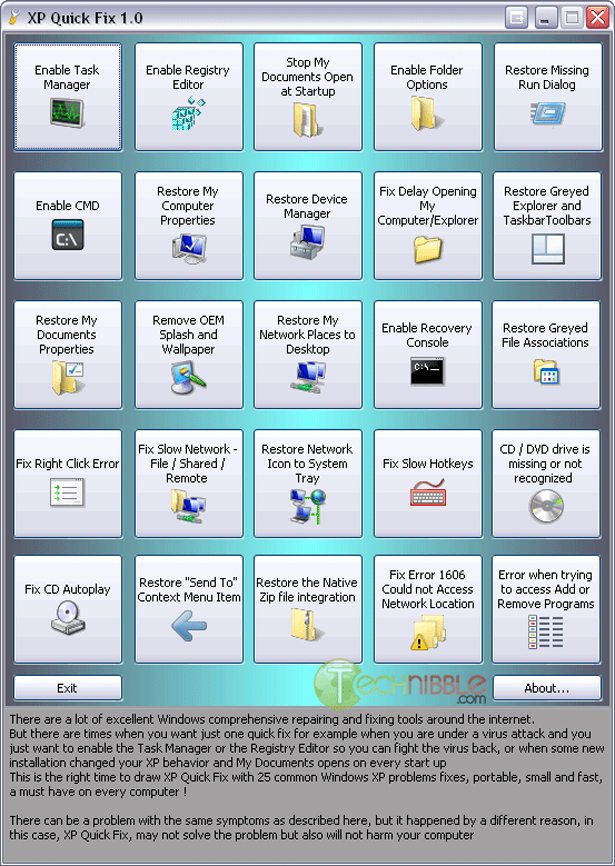
XPQuickFix is a small, freeware and portable tool designed to quickly fix any restrictions and other errors that are often caused by viruses. XPQuickFix can correct 25 common Windows XP problems such as enable the Task Manager, enable Registry Editor, fix a CD autoplay and more.
Here is the complete list of the fixes:
- Enable Task Manager
- Enable Registry Editor
- Stop My Documents open at startup
- Enable Folder Options
- Restore missing Run dialog box
- Enable Command Prompt
- Restore My Computer (Computer) properties
- Restore Device Manager
- Fix delay in opening Explorer
- Restore grayed Explorer and Taskbar toolbars
- Restore My Documents properties
- Remove OEM splash and wallpaper
- Restore My Network Places to Desktop
- Enable Recovery Console
- Restore grayed file associations
- Fix right-click error
- Fix slow network file/shared/remote
- Restore Network icon to system tray
- Fix slow hotkeys
- Fix CD/DVD drive is missing or not recognized
- Fix CD autoplay
- Restore “Send To” context menu item
- Restore the native ZIP file integration
- Fix error 1606 couldn’t access network location
- Error when trying to access Add or Remove/ Program and Features program
Screenshots:
Downloads:
Session expired
Please log in again. The login page will open in a new tab. After logging in you can close it and return to this page.
Haven’t tried this one yet. seems similar to dial a fix. will give it a try anyway. thanks
Nice find. I hope it works good. I will have to try this on the weekend.
A nice little tool to add to the flash drive. Nothing outstanding to make it truly unique however.
These three things are worth the download. I know that there are registry fixes for these, but hate committing that stuff to memory and it takes time to look it up.
Fix slow network file/shared/remote
Fix CD/DVD drive is missing or not recognized
Fix CD autoplay
So, yeah… this app is a keeper.
Great stuff, thanks for this :)
Wow, great application! Nice!
Thanks for sharing. Looks like a great tool for small but essential fixes on XP.
I wish I’d had this a month ago whilst trying to recover from a Trojan (which Norton didn’t pick up).
Reformats are so much fun!
At the authors site is a newer version…
http://leelusoft.blogspot.com/
There is a new version of this tool: XP Quick Fix Plus.
With 40 quick fixes, a single file, portable and only 550kb:
http://leelusoft.blogspot.com/2009/10/xp-quick-fix-plus.html