
- You are here:
- Home »
- Blog »
- Computer Technician Tools »
- SARDU – Turn All Those Bootable CDs into 1 Mutliboot Disc
SARDU – Turn All Those Bootable CDs into 1 Mutliboot Disc
SARDU (Shardana Antivirus Rescue Disk Utility) is a small freeware utility designed to combine all of your bootable ISOs and turn them into a single ISO with a boot menu. You can either burn this ISO to a single CD/DVD, or you can get SARDU to create it for a bootable USB drive. Basically, this aims to eliminate the need to carry around heaps of different bootable CDs.
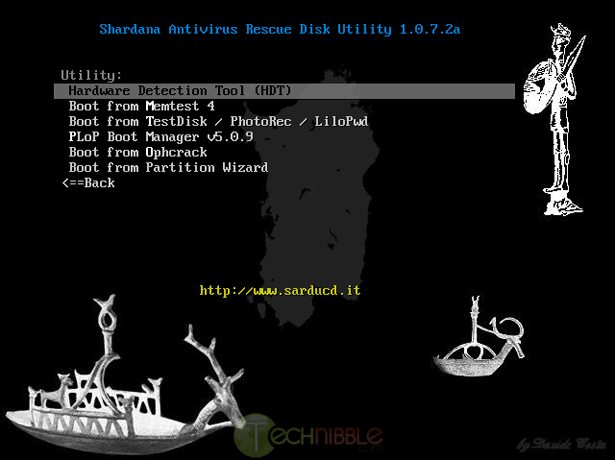
Despite having “Antivirus Rescue Disk utility” in its name, it is not limited to just running Antivirus boot CDs. You can also include other tools like GParted, Ophcrack, UBCD4Win and various Linux live CDs.
The creator of this application is also a member of the Technibble community so if you have any feedback or suggestions, he is likely to read it.
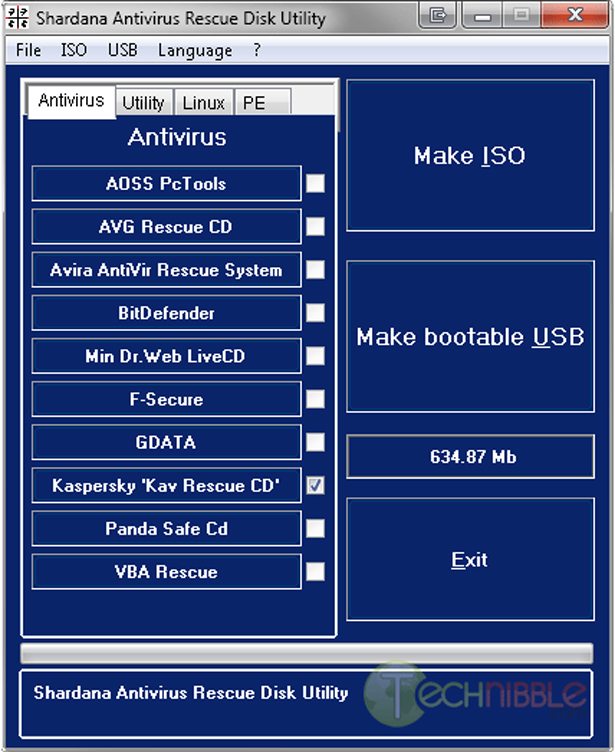
To use it, there are 4 tabs. Antivirus, Utility, Linux and PE.
Click on the tool you want to use and SARDU will take you to the download page of that tool. Once you have downloaded that ISO, you need to copy it to the “ISO” folder beneath the SARDU program folder. To make use of any of the PE enviroments (ie UBCD4Win), you will need to run the separate setup file for that utility which requires your Windows CD so it can generate an ISO. Once this ISO has been built you can then put it in SARDU’s ISO folder.
Once you have done that, press either the “Make ISO” or “Make bootable USB” button and it will check to see which ISO’s you have placed in that directory, then create a single ISO.
If you chose “Make ISO”, it will place the single ISO in a folder called “ISO created” below the application folder. If you chose “Make bootable USB”, it will ask which drive letter the USB drive is and place the files there.
Note: Due to the hacking nature of some of the rescue CDs you might download, they might set off your antivirus software. This is most likely a “false positive”.
Screenshots:
Downloads:
Download from Official Site – 3.01mb
More Information (Scroll down for English text)
Special thanks to davidecosta for creating this, and PcTek9 for recommending it.
Session expired
Please log in again. The login page will open in a new tab. After logging in you can close it and return to this page.
I have heard a lot about Sardu and I will definitely look into this program. Thanks for sharing!
Have used this on a usb stick and it works most of the time but due to the age of some pc’s not having a boot from usb device cannot be used on all,so i carry both the dvd and usb stick, highly recommended.
I have tried to use this before but I am just too lame to get it setup correctly. Still using multiple CD. :(
Tom
I’ll have to give this a try. I’ve had a lot of trouble getting UBCD4Win to work on a USB stick. Maybe this will get around it. Anyone know if it’s win7 compatible?
I have used this before and it seems to work pretty well. I just wish there was an option to add my own boot CD’s to the mix.
Looks useful – I’ve struggled in the past to make bootable USB drives, so if this streamlines the process, I’m all for it!
I’ve been playing around with this for a while. I’ve had some trouble booting in previous versions, but I think it was probably more due to BIOS glitches. Lately it’s been working great.
A few weeks ago, I had to boot into Ubuntu to delete some files in a host protected area, then I booted into Gparted to delete the HPA partition and increase the size of the remaining partition, and finally, into Clonezilla (after a reboot to let chkdsk run) to clone. It was great to be able to do that with one USB drive.
@ MI Computer Repair: Define “win7 compatible” because it’s not dependent upon the OS itself, its GRUB…you can add UBCD to it to run hard drive diagnostics, cpu benchmarks, etc, you can use Ubuntu or any other linux distro (or a PE environment) to modify and edit system files, regardless of the OS. In terms of the Windows 7 repair disk, I was able to successfully use it and it was able to detect and identify the host PC’s OS (Windows 7 Professional x86).
This is an impressive program, although it was particular about the ISO names (in order to identify the program), I haven’t found another GRUB thats as compatible and does the job so well. Hats off to Signore Costa for such a fine program!
Also if I misinterpreted what you mean, the program itself is running fine on Windows 7.
I’ve given it a try and so far it looks like a great bit of kit. The only issue I have with it is that there is a folder marked ‘Extra’. If you put an ISO (such as Spinrite)into this folder it is added to the SARDU ISO which is OK until you realise that it is not included in the menu system. Otherwise looking like a great help.
@john
Extra folder is made for the user to prepare the boot iso not directly supported by SARDU.
SARDU check the file extra.cfg. According to the size adds a link to the main menu.
SARDU isn’t mandrake :).
Behind every iso added there is a job of hours.
Thanks for sharing this. I have heard of this from another computer technician, but never had the chance to try it. This is the 2nd time I have heard it recommended and that means it is a good time to try it out.
@davidcosta
Thanks for your comments. I’ll need to explore the menus more. I didn’t see a link to the main menu but there were a couple of menu items that I hadn’t installed and which didn’t do anything. I’ll keep playing with it – what I have seen so far is brilliant.
Just been playing around with this today… brilliant stuff!
ahhh! :) who dares awaken djinn from slumber! :)
A round of applause for Davide Costa!
Thankyou from all of us Davide.
The ‘job’ has been a wow to use, it’s like overspeeding on the autobahn without having anyone to arrest you. I have been waiting all my IT life to have something like this in my kitty and guess what, it’s free. Thanx to Mr. Davide Costa and the Technibble crew. Oliver Twist wants more, please do something about the Extra folder. Thanx a million.
el_lazarus…..
i use hirens boot cd ver.10.5 to repair PCs
very useful links, thanks :)
I have tried to use this before but I am just too lame to get it setup correctly. Still using multiple CD.
SARDU is great no doubt…BUT it is extremely picky on ISO names. Doesnt recognise avira,OPHCRACK,NTPassword among others. Anybody on how to fix it
It would be nice to add some blank spots to
be fill in with other user iso to included
in usb and cd/dvd
Also need to know exat name each download is
looking for so we could know what download file/iso is needed. 25% of download could not
figure out what file was needed.
mred
@mred you ‘ve read the help file or see the site?
There are all names of all files