
- You are here:
- Home »
- Blog »
- Computer Technician Tools »
- Universal Silent Switch Finder – Install Applications on Multiple Computers
Universal Silent Switch Finder – Install Applications on Multiple Computers
Most software is easy enough to install. You just open the setup file, press next, next, next, finish and your done. However, what if you want to install software on hundreds of computers? or multiple applications on a single computer? Computer Technicians frequently encounter these situations and write their own scripts to automatically install the software by making using special switches.
However, its hard to find out what those special switches actually are, this is where Universal Silent Switch Finder comes in.
Universal Silent Switch Finder is a small, standalone application designed to find out what switches can be used on a certain installer. From there, you can create your own .BAT files to automate the install process.
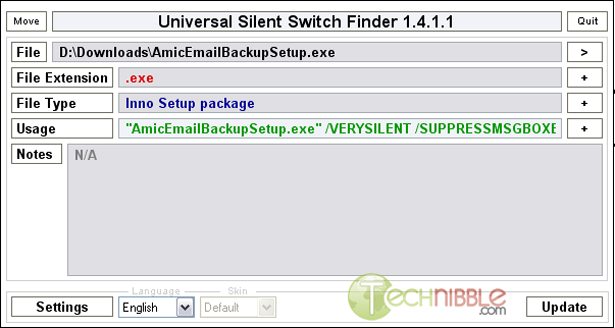
In the screenshot below, I used Amic Email Backup’s setup file and it showed me the following switches which could be used.
"AmicEmailBackupSetup.exe" /VERYSILENT /SUPPRESSMSGBOXES /NORESTART /SP-
If I create a shortcut and set the above line as the Target, it will install the application without me ever seeing the installer. For those of you who make use of scripting applications like AutoIT to help you automate some of your tasks, you can see how useful this application can be.
Note: This seems to only work on programs that use a standard installer, unlike something like Skype that has its own special installer.
Screenshots:
Downloads:
Session expired
Please log in again. The login page will open in a new tab. After logging in you can close it and return to this page.
Nice tool. Thanks Bryce
Thanks Bryce, this should come in handy as soon as I can figure out how to use Autoit.
Interesting read but I think that is a bit beyond me.
I Second that..
Perhaps we could have a follow on article either here or in the forum.
All the switches we find the the programs we use?
Sounds like a great idea Nathan.
Oh yeah! This is going to come in real handy. Thanks!!!
I feel like I may get in over my head with this one, but I’ll give it a whirl. I love tasks that simplify my life, but this may very well complicate it depending on how long it takes to get the hang of it.
Anyone know where to download this? I tried and it says it is no longer there
http://www.appdeploy.com is a great resource for this info too.
Yeah not working for me either
Think this is it:
I’ll try that again: Click Here
CMenu v2.6
Released 23 August, 2006
CMenu is a handy, context menu extension. Adds a branch to your context menu called More Options.
* Uses PEiD, which is able to recognize installer types, if available in it’s the database. Identify Installer uses this information, and is able to popup a window to show parameters associated with that installer. Identify Installer can unpack, admin, record, silent installations, if available. And also create a template AutoIt Script, to suit.
* Includes CMenu Editor. This allows further customizing.
* Files can Execute With Parameters, optional working directory, and allowing for different window states.
* Create a Directory List. Preset options are available, as well as a custom options.
* Create an AutoIt Archive Script, that can be included into your main scripts. This allows AutoIt to act like an archiver.
* Includes PEiD as a separate item also, which allows the user to enhanced, portable executable identification.
* Filenames and paths can be easily sent to the windows clipboard, by using Path To ClipBoard.
* Allows for the user to download and add Resource Hacker or Stud PE. These will be detected, if placed in the correct folder, and will be added to the context menu.
* MyUninstaller is included in CMenu.
* Force Delete is included in CMenu. Use this only, as required. When deleting multiple files, do not do anything, until the operation is complete. A msgbox will popup and will allow, not to proceed. Use at own risk.
* AutoItMacroGenerator is included to handle recording of AutoIt install scripts.
* Reg2Au3 quickly converts Regedit4 type registry files to AutoIt3 syntax.
* Ini2Au3 quickly converts Ini files into AutoIt syntax.
* Constants Generator retrieves the constants declarations that your AutoIt script only needs.
* 7-Zip2Sfx for easily converting 7z archives to self extracting archives.
http://www.msfn.org/board/CMenu-t47645.html
This is a great tool for the Administrators like me who have SCCM in their environment.
Thankx man.