
- You are here:
- Home »
- Blog »
- Computer Technician Tools »
- System Explorer – Monitor and Analyze A Computer System
System Explorer – Monitor and Analyze A Computer System
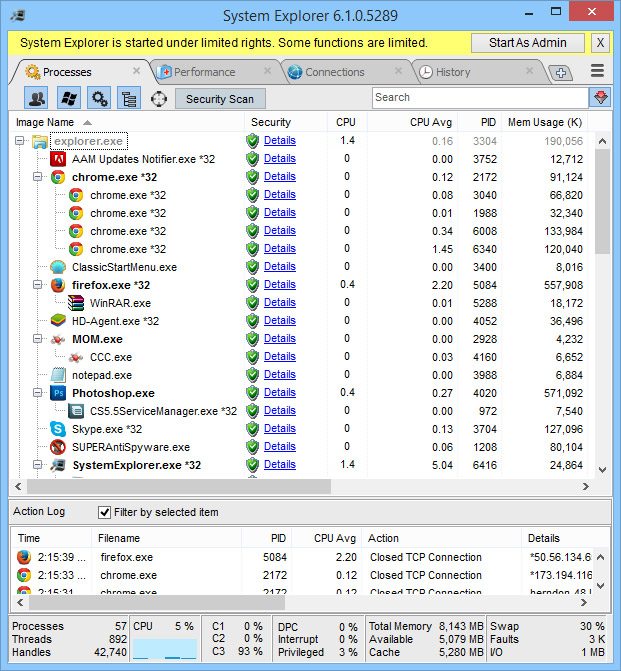
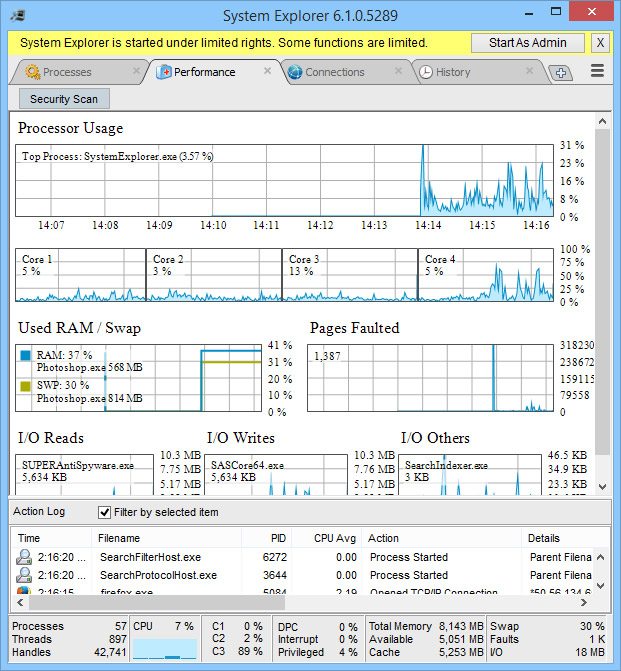
System Explorer is a small, stand alone free utility designed for monitoring and analysing a computer system. System Explorer pretty much picks up where the built in Windows task manager left off. System Explorer expands the functionality of Task Manager by not only showing you the proccesses, but the IE addons, Drivers, Connections, Open Files, Process History, Startup Programs, Services, Uninstallers and open windows. This application rolls parts of Task Manager, Hijack This, Processs Explorer, Netstat, MSConfig into one.
Although the process manager section doesnt show process trees, System Explorer makes a great tool to run first on an infected system so you can quickly look at all parts instead of having to load Process Explorer and Hijack This seperately.
Some features I personally like about this application is that you can right click on any process and search processlibrary.com (or google). You can also right click on any process and instantly upload it to virustotal.com which will check the file with many different antivirus and antispyware engines to check to see if the file is malicious.
Another neat feature of this application is its “History” tab which shows you events that have recently happened on your such as a file being opened, created or deleted which is good for those “woah! what just happened then?” moments.
Screenshots:
Downloads:
Download at Major Geeks – 1.22mb
Session expired
Please log in again. The login page will open in a new tab. After logging in you can close it and return to this page.
interest tool.
Is it freeware?
Alex, of course.
Thanx for the info it looks like a really usefull tool to add to my collection.
Is this better than Process Explorer created by SysInternals which is also freeware?
Process Explorer is better than the Process section of this application, mainly because it shows process trees.
This tool is good as a “jack of all trades”.
Wow, what a great tool!
will be used for sure in the future.
Cheers Bryce.
I use Sysinternals extensively but this is a really good alternative and has really cool features I miss like the open files tab.
GREAT work!
Keep it up..you’ll look like another Mark Rusinovich soon :)
Have you tried Processlibrary.com’s ProcessScanner and Process quicklink? Also free and really good.
They provide you with loads of info too.
Link broken. New link found. http://systemexplorer.mistergroup.org/downloadp.php