
- You are here:
- Home »
- Blog »
- Computer Technician Tools »
- LSP-Fix – Fix Internet Connection Damaged By Malware or Software
LSP-Fix – Fix Internet Connection Damaged By Malware or Software
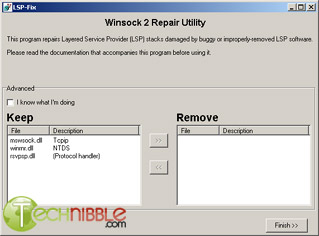
LSP-Fix is a free tool designed to fix internet connections damaged by malware or buggy software. The Layered Service Provider (aka LSP) is a part of your operating system that your computer uses to connect to the internet. Some legitimate software (such as firewalls) and illegitimate software (such as malware/adware/spyware) place files in this location and if they become buggy or removed incorrectly, you will no longer be able to connect to the internet. LSP-Fix will show you the files placed in this zone and will suggest which ones need to be removed to gain internet access again.
I have personally used this tool many times on clients computers. The two most recent issues was one client had installed Zonealarm Firewall which didn’t install properly thus placing a “bad” file in the LSP. The other client had the adware “New.net” installed and used adware removal software to remove it. However, it wasn’t removed correctly leaving a damaged file in the LSP.
In both cases, their internet connections were crippled and LSPFix fixed the issue.
Screenshot:
Downloads:
Session expired
Please log in again. The login page will open in a new tab. After logging in you can close it and return to this page.
We use cookies to help you navigate efficiently and perform certain functions. You will find detailed information about all cookies under each consent category below.
The cookies that are categorised as "Necessary" are stored on your browser as they are essential for enabling the basic functionalities of the site.
We also use third-party cookies that help us analyse how you use this website, store your preferences, and provide the content and marketing materials that are relevant to you. These cookies will only be stored in your browser with your prior consent.
You can choose to enable or disable some or all of these cookies but disabling some of them may affect your browsing experience.
We use third-party cookies that help us analyse how you use this website, store your preferences, and provide the content and marketing materials that are relevant to you. However, you can opt out of these cookies by checking "Do Not Sell or Share My Personal Information" and clicking the "Save My Preferences" button. Once you opt out, you can opt in again at any time by unchecking "Do Not Sell or Share My Personal Information" and clicking the "Save My Preferences" button.
Your opt-out settings for this website have been respected since we detected a Global Privacy Control signal from your browser and, therefore, you cannot change this setting.

Does this work for Vista?