
- You are here:
- Home »
- Blog »
- Computer Technician Tools »
- GSpot – Determines What Codecs Are Needed to Play Videos
GSpot – Determines What Codecs Are Needed to Play Videos
Your client comes to you saying they cant play certain videos. You take a look at the computer and see the error message saying “Error loading codec..”. You instantly know the problem. You tell the client that the computer simply hasn’t got the right codec installed to play that video. Now, you just have to figure out what codec that video actually needs.
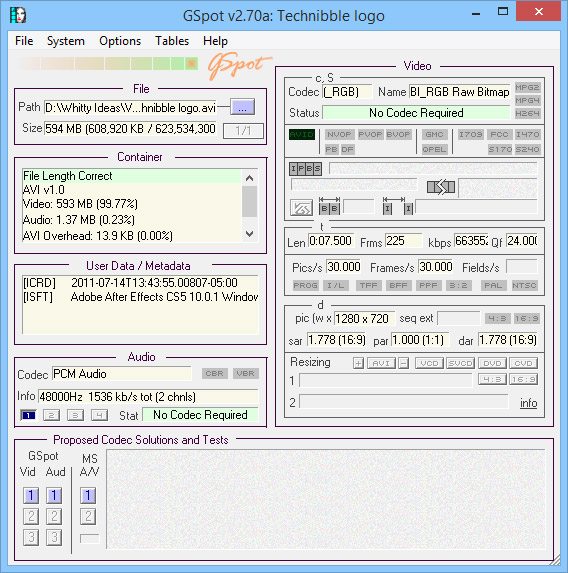
This is where GSpot comes in. GSpot is a free utility that analyzes any video and can determine what codec its video and audio was encoded in. GSpot can also show you a wealth of other information such as the bitrate, frames, width and height etc..
Once you know what codec the video was encoded in using GSpot, you can download the appropriate codec and the video should work.
Screenshot:
Downloads:
Session expired
Please log in again. The login page will open in a new tab. After logging in you can close it and return to this page.
If you download the K-Lite codec pack, it has almost all the codec’s required to play all sorts of files.
I also use the alternate real media codec and the alternate quicktime codec to the official ones as they consume lower system resources.
Better yet install the VLC player. Retains system stability by having fewer codecs of dubious quality in the Quartz chain.
I agree, I try to get all my customers to convert to VLC or GOM player. Good software anyway
I hate VLC just becuase it’s controls are terrible and there is little I play outside of DivX and Xvid files. I like this tool for finding all kinds of information on the files including the codecs. I think it is a good tool to have the people may not like VLC and refuse to use it even though yes it basicly plays any and all video.
For me personally, Id use VLC as well. But you have to keep in mind that clients aren’t as likely to make the switch, they want to go with what they know. So its your job to get it working on Media Player or whatever they are using.
I love the extra tools in the belt! Especially since there isn’t a one-size-fits all tool kit or codec bunch that will be 100% compatible for 100% of our clients.
ok so for me i knew about the codecs and gspot and all but when i loaded different codec packs on my vista system it caused wmv not to play nice with media player, also mp3s dont work or video with mp3 sound, iTunes works though but i think thats because it uses its own mp3 codec. any ideas how to completly remove the bad codecs? ps just uninstalling them didnt work!!!