
- You are here:
- Home »
- Blog »
- Computer Technician Tools »
- Anti-Malware Toolkit – Bulk Download Recent Versions of Malware Tools
Anti-Malware Toolkit – Bulk Download Recent Versions of Malware Tools
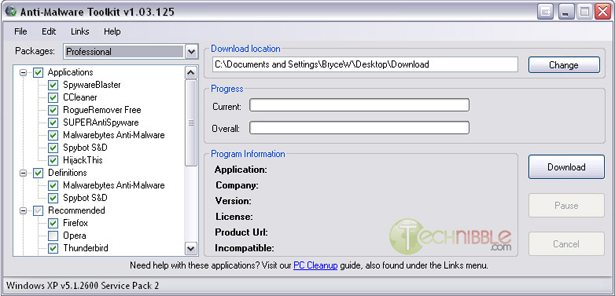
Anti-Malware toolkit is a free, portable application designed to bulk download the most recent versions of the tools we use for malware removal and put them in a designated directory (such as your USB thumb drive). Just tick the boxes of the software you want and press Download.
It has options to download the following software as the main malware removal applications:
SpywareBlaster, CCleaner, RogueRemover Free, SUPERAntiSpyware, Malwarebytes Anti-Malware, Spybot S&D, HijackThis
It also has the option to download the most recent definitions for Malwarebytes Anti-Malware and Spybot S&D. The software then has a “Recommended” section that gives you the option to download Firefox, Opera, Thunderbird, Avast, AntiVir, Comodo Firewall Pro and UPHClean.
It also provides the option to download a handful of common repair utilities such as Dial-a-fix, JavaRa, Autoruns, Process Explorer, Unlocker, LSPFix and Windows Installer Cleanup.
This is a handy tool to keep the installers on your USB Drive up to date.
Screenshots:
Downloads:
Download from Official Site (Installer .exe)
Special thanks to Steve for recommending this one.
Session expired
Please log in again. The login page will open in a new tab. After logging in you can close it and return to this page.
We use cookies to help you navigate efficiently and perform certain functions. You will find detailed information about all cookies under each consent category below.
The cookies that are categorised as "Necessary" are stored on your browser as they are essential for enabling the basic functionalities of the site.
We also use third-party cookies that help us analyse how you use this website, store your preferences, and provide the content and marketing materials that are relevant to you. These cookies will only be stored in your browser with your prior consent.
You can choose to enable or disable some or all of these cookies but disabling some of them may affect your browsing experience.
We use third-party cookies that help us analyse how you use this website, store your preferences, and provide the content and marketing materials that are relevant to you. However, you can opt out of these cookies by checking "Do Not Sell or Share My Personal Information" and clicking the "Save My Preferences" button. Once you opt out, you can opt in again at any time by unchecking "Do Not Sell or Share My Personal Information" and clicking the "Save My Preferences" button.
Your opt-out settings for this website have been respected since we detected a Global Privacy Control signal from your browser and, therefore, you cannot change this setting.

Wow! I already use many of those tools and I’ve wanted to check out some of the others. How many people out there currently use this tool?
Very handy. That was way to easy.
Looks like this might come in handy.
JRoss already said it… “Very handy. That was way to easy.”
This is definitely the new tool in my Antispyware-Antivirus arsenal.
@Bryce
Thanks for the great app!
I will definitely give this a try. Thanks
Has anyone used this and also used Hitman Pro? How do they compare?
This is a post from heaven. i have been struggling getting the right software for months now, everytime I found something good, it was a trial version, which doesn’t do much but scan your system, report the problems it has found but prompt you to register first before it can fix them for you. Gosh how I hate that. Thanx!
Hi Bryce,
Thank you so much for this great review! It’s so rewarding to see that people have found this program useful. I plan to continue to improve it, and always welcome suggestions and bug reports.
Thanks,
Tarun
Bryce, great tool kit I’ll put this on all my thumb drives
Malwarebytes owns.
Just remember to always run these in safe mode after updating.
Wow!!! How’d I miss this? This is awesome!