
How to Fix svchost.exe using 100% CPU / Memory Leak
As a computer technician, here is a problem I have been coming across more and more. About 30secs to 1 minute after booting into Windows the computer starts lagging heavily. When CTRL+ALT+DEL is pressed it shows that svchost.exe is using up maximum CPU resources and only occurs when Automatic Updates is enabled. Microsoft has recognized this problem and has released a patch. However, on all computers I have worked on with this problem, the Microsoft patches don’t fix the problem. This is a guide on how to fix this problem with svchost using maximum CPU.
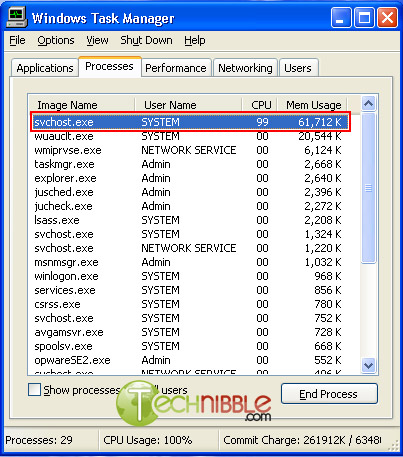
First of all, to identify if you have this problem you need to press CTRL+ALT+DEL all at the same time, go to the “Processes Tab” and then press “Mem Usage”. If you have this svchost.exe memory leak bug after about 1 minute you will see that the amount of memory usage svchost.exe uses will keep increasing until CPU becomes 99 or 100%. Below is an example of what this looks like:
How to stop svchost.exe using up 100% system resources (Windows XP Only):
- Visit the Microsoft website and Download Windows Update v3 WindowsUpdateAgent30-x86.exe and save it to your C:\ drive
- Download this file fix_svchost.bat (right click and choose save as..) and save it to your C:\ drive
- Download this file WindowsXP-KB927891.exe and save it to your C:\ drive
- Reboot the computer and log in to Windows XP in safe mode. To do this, press F8 just before the WindowsXP logo shows up during boot and press up to choose “Safe Mode”
- Once Windows has loaded and you have the option of which user account to use, log on as “Administrator”.
- Click Start > Run, choose the Browse button and find the fix_svchost.bat file you saved before, press Open, then OK.
- A black screen will pop up and white text will scroll past. Wait for this process to finish as it could take several minutes. It will close itself when its finished.
- Once the black screen disappears, Click Start > Run, choose the Browse button and find the WindowsUpdateAgent30-x86.exe file you saved before, press Open, then OK. Follow the prompts as it installs.
- When Windows Update Agent finishes installing, Click Start > Run, choose the Browse button and find the WindowsXP-KB927891.exe file you saved before, press Open, then OK. Follow the prompts as it installs.
- Reboot the computer
Session expired
Please log in again. The login page will open in a new tab. After logging in you can close it and return to this page.
Great tip, I love it! I can’t wait to use it :)
Have you come across this issue yet? As mentioned in the article I am coming across with with increasing frequency.
Hello,
Thanks!
I too have been coming across this with increasing frequency on my network.
Thanks,
Melanie
I see it all the time… I usually just disable the msconfig startup options and I find that helps some.
I was trying to do this fix as I was having this on my own laptop. I was unable to get into safe mode my laptop would die when it got to what looked like my ATI drivers. I did the updates in standard mode under my login which is an administrator. It looks like it works I couldn’t find any information on this issue till I saw this article. Seems resolved so now I just have Symantec lagging me on bootup.
Hi Bryce,
I followed your advice above and unfortunately it did not work. When I rebooted the computer it just kept freezing. I went back into safe mode and went into msconfig where i unchecked most of the services. When I rebooted, it worked, but without many services.
Is there anyway to reverse the 3 files that I installed? Any help would be greatly appreciated.
Did the computer start freezing AFTER installing those three files? or was it freezing beforehand?
If it was freezing before hand you might as well leave them on there since they are Windows patches that you probably should have anyway.
There is a possibility that your issue isn’t what is mentioned here in this article. When you go into Task Manager, is svchost.exe using 99% CPU?
To check, follow these instructions:
First of all, to identify if you have this problem you need to press CTRL+ALT+DEL all at the same time, go to the “Processes Tab†and then press “Mem Usageâ€Â. If you have this svchost.exe memory leak bug after about 1 minute you will see that the amount of memory usage svchost.exe uses will keep increasing until CPU becomes 99 or 100%.. Look at the picture above for an example.
If it is the case, try going to Start > Control Panel > Automatic Updates and choose “Turn off Automatic Updates”. Restart the computer and see if you are still having the freezing issue. If it fixes it, it IS this issue. Let me know.
I have similar problem for the memory. The svchost.exe kept runnung until the memory usage reach about 1.93GB and then stay there. CPU usage is low (about 1~3%).
Can the fix mentioned above be able to correct this? Thanks.
If svchost.exe’s memory usage keeps growing (regardless of CPU) then yes, this will fix that.
Yeah I have been coming across the same problem alot over the past month or so took me a while to work it out but got there in there end.
Britec IT Solutions
http://www.britec.co.uk
Hi Bryce,
Thanks for getting back to me. I noticed that svchost.exe was definately using 99 to 100% of the CPU. It was spiking to 100% every 10 seconds or so then back to 1% then up to 100% again. Thats why I thought I would try your solution. The computer was not freezing before I applied the 3 files, but was definately behaving oddly in the task manager as I mentioned above.
I have also turned off automatic updates, but this does not solve the problem.
Mind you, the svchost.exe is no longer spiking to 100% so that bit is fixed, but it still freezes approximately 40 seconds after windows boots up then that only thing I can do is turn off the power and restart in safe mode.
I have tested all the services one at a time to see what was causing the problem, and the computer froze when I activated the “Windows Management Instrumentation” and the “Windows Management Instrumentation Driver Extensions” services. Unfortunately these seem to be essential services so I have no idea how to solve this problem…
Because it was not freezing before i applied the 3 patches you mentioned, I was hoping that if i could undo them, I could solve the freezing problem, but live with the svchost.exe problem..
Im so over this computer!!!!! Any help would once again be greatly appreciated :-)
Robyn, in Control Panel > Add Remove Programs. Look for “KB927891” and uninstall it. You may need to tick “Show Updates” up the top in order to see it.
Well I never Did have this problem until I JUST UPDATED and INSTALLED THE FIX, :( that’s when the svchost started this, however it seems it did go away as of posting this after I installed the SBE 2k3 SP2..but again the Cure update made mine go whacko..
I’m going to try the fix anyway, but in Normal Windows mode as Litestep sucks in safemode, it tries to start up everything.. oh wait that’s right. :) i can just set explorer as shell again, reboot into safe mode, follow the directions and when done switch back.. I just of that when I was writing this comment.
It doesnt seem to work for me, i have 2 xp pro comps networked, they seem fine until i both are booted and accessed. I was getting 100% cpu usage but about 25mb mem. I also was getting 40kb traffic between them even when doing nothing, i noticed this svchost.exe (system) i could stop by ending process, which also stoped the transfers! if i am on the net (still 56k) i cannot bring my other pc online or access the h.d’s on it as it kills, downloads etc i assume from cpu prioritization? I noticed the problem only about a month ago which maybe coincedence but my internet speed also has droped aswell. (rather than a re-install id like to fix if poss) installing your fix my pc took about 30 minutes on regsvr32 /s initpki.dll and also may have had an error as i briefly saw you can access help? thx for your help
I think the best way to get rid of the svchost.exe problem at STARTUP is: to make an administrive account, log on to that, delete you’re actual account (but not you’re files!) and maybe create a new account if you want to. This usually works for me. Seems like problems accure on old ragged accounts.. dunno
Thank you,
Clear and concise. I’m looking forward to try this
Hi i have the same problem but it’s only intermittent every now and then it just make everything go really slow and then 1 min later back to normal is this the same problam if it is i will try patch as it’s most annoying when i’m coding
thanks
Hi
i have the same problem and your workaround solution works perfet with me.
Thanks with best regards.
Othman :)
Hi.
I had the same problem. Your solution fixed it.
Thanks,
Chris.
I cannot find the words to thank you enough, Bryce. The last few months have been painful with the slowness after start up. I used to blame it on wuauclt.exe, but your solution fixed it immediately. Thank you ever so much. I will bookmark this site (and your name) for future questions.
Thank you!!!!!!
Don
can’t thank you enough for your easy and simple fix! , saved me alot of hassle.
thanks again :)
My svchost.exe isn’t the problem when I checked the processes. Mine is something called System Idle Pr???
I don’t know what that is, but it uses over 99 CPU. Is that something to worry about. My computer freezes constantly while I’m on Yahoo and I can’t figure out how to fix it. I use Windows XP with IE 7.
Very usefull information. It helps me and I’m happy now. :) If you have same problem, just fallow this guide and everything will be allright. :)
Oh, i wanted to say THANKS, great job Bryce Whitty! :)
Can you please tell me why it has happened. Any reason!!
Hi
Excellent post! I have been looking for an adequate solution to this problem ever since I first came across it (some 3 years ago). The frequency that it occured wasn’t very high (maybe 4 PC’s a year) but it still worried me that I couldn’t find a simple solution to this problem.
So yesterday an enduser at our company again contacted me for the very same problem, and before excecuting the normal script (which is a highly automated reinstall of the machine) I tried my usual google search first (you never know if someone has found a simpler solution) and there you were…
Works like a charm!
3 cheers from Belgium!
Geert
Hi,
the procedure describe above didn’t help on my computers.
Deleting the Value “NetworkService = DnsCache” in HKLM\Software\Microsoft\WinNT\CurrentVersion\SvcHost
did the trick for me on a lot of systems.
Cheers!
Charles
(SME-Admin of 50+ PCs/NBs)
I went through this fix and it had no affect or improvement. Then I remembered I recently installed HP software for a new multi-function printer. I had problems with HP software before. I un-installed the software after seeing a similar post on svchost on Ask Leo’s site. The problem went away. WTF HP – what gives with your software?
it worked well because the cpu of the svchost went down to 0 and memory to about 23,000 and my pc is working normally now thanks!
did not work
Our laptop just started doing this about a week ago. My family is a bunch of gamers, so the lag is creating a huge disruption for all of us!:) Anyway, I saved everything you showed above, but when I go to run the fix_svchost file, it won’t run. I also don’t get the black screen pop up, but it goes straight to the screen where I can run or cancel. I click run & nothing happens. Please help! We really need to get this fixed!
Disregard my last post. I got everything to work ok & it ended the whole svchost problem. However, now my iexplorer & explorer.exe are running high like the svchost was. What could this be? We run Adaware constantly & have etrust antivirus monitoring everything. We’ve defragmented & did a cleanup of old files & stuff like that. This all just happened suddenly, & we really need your help!
Hi All,
I found out it can happend after buying a new HP printer and installing the latest printer software.
Via the process explorer of Microsoft you can see the a HP process is taking all the time.
This is the solution:
Go to services (start –> run –> services.msc) and put the following service to manual:
HP network device support.
Thanks dude, it was the best and straight forward solution, it works marvellously.
Hi All,In reference to post #33, I also just installed HP network printer software and was having this same issue.
i installed and it works but and error step to me, the windows media player do not open and there was a problem with jbscript.dll and vbscript.dll
do yo now how this step to my computer?
This is really worth :)
Thank you post 33 that finally worked for each comp on my network. I figured I was in for a ride when hp wanted to install 225MB of driver feel good.
My wife’s laptop had a svchost.exe consuming 100% of CPU problem a while back. It seemed to only occur some of the time. After some aggravation I got it to go away using a repair install. The only painful part was re-installing all of the various patches afterwards. Of course this assumes you can find a proper CD to repair install from. I have used the repair install as a last resort on a couple of occasions. Both times it worked the gremlins out of the system.
I did exactly what your post said, worked great. Thanks!
Thank you post 33. simple excelent solution. “Cheers”
Post 33 – solved.I am SO annoyed with HP.
Having a similar problem, I have 5 instances of SVCHOST running, but only one of them is taking up 17,208 KB of memory. The rest are only taking up around 4,000. I only noticed this after I tried playing some Divx videos I had burned to CD a long time ago, Windows thingie said it didn’t want to run the file because it would risk security (Didn’t know I had Dr Watson…) I tried playing the video in Winamp and it crashed. Sometimes even trying to click the file in Explorer would cause an error and Windows to say it didn’t want to play the file. I always thought that viruses couldn’t be attached to media files.
Thanks Bryce for the fix sorted the SVCHOST problem out a trick.
Hi, I have installed SP3 RC and have svchost problems, but that procedure cant overwrite update or that patch cause i have newly installed programs.
my leek is round 1.5 GB of all memory (so round 3 GB RAM and page file)
Can you help me???
Thanks to Toon Schilder (post 33). I finally had sense enough to google svchost cpu HP. Someone with more patience should send this thread up HP’s flagpole, so to speak.
Sweet solution # 33. Yesterday i loaded software for my HP printer and svchost.exe was at 99% cpu ever since. Your fix deserves a grammy award. Thanks.
Hooray for Toon (#33) — I’ve been fighting this for a month (ever since installing an HP all-in-one wireless printer on my network.
Now the svchost thing is FIXED. However, I still constantly lose the HP drivers and have to repeatedly re-add the device. Anybody else having THAT problem?!
Exact same problem occured day after installing software for a new HP C8180 All-in-One printer. Humm. Post 28,33,35,47,48 all similar problems with HP wireless printer. Hope the fix continues to solve this problem. thanks.
Post 48!
There is a patch on the HP web site support center for the problem of HP software uninstalling itself!
Post 33…….I LOVE YOU!!!!!!
Been futzing with this problem from day one of installing an HP all-in-one…….grrrrrrr
Aloha, Pete
I have 6 svchost.exe processes in my Task Mgr. All show a CPU usage of 00 but the Mem usage ranges from 3,xxxK to 29,xxxK. Im running XP Home SPack 2. Should I have this many svchost.exe? If not what can I do?
Great..Post 33..Thanks a lot man !! You save my time for installing windows 3rd time.
After installing HP software for HP4385 wireless printer/scanner a “new” svchost.exe started using 100% of the CPU. After deleting the HP software svchost.exe returned to normal and iexplorer.exe started using 100% CPU. Went into Internet Explorer Tools-Internet Options-Programs-Manage Ad-Ons and disabled “HP Download Manager”. Finally my computer is back to normal operations. Thanks HP for that great software (:
WOW!! Hats off to Post 33. New HP wireless software install. As soon as I did the recommendation…everything was great.
Installed Hp wireless printer about a month ago and have noticed a 100% cpu on SVCHOST..
I tried the solution#33
This is the solution:
Go to services (start
eureka eureka !!
it works !!!
Several people asked about if having so many svchost appear in their process list is okay, but no one responded to their question. Does anyone know this answer. Secondly, I have at least ten occurances of CLI.exe in my list that use up even more resources than svchost. Does anyone know how to fix this issue? Right now CLI.exe is using over 140KB of memory. It appears to be a ATI file. Any ideas are welcome! Thanks, Stardude
I did all of this and it fixed that problem – however now programs such as AOL Instant Messenger won’t open. They start and immediately close.
When I’m clicking a video link in Internet Explorer Windows Media Player won’t open either.
Anyone know what happened?
Gosh this is good onfo, I know I have done that Ctrl, alt and del. and did see all that stuff, Now I will try your segestions and will give you back the info. please do sign me up for your letters
Thanks
test.
This was a gr8 solution!! I am really happy with the performance of my laptop.
Hello Bryce,
i followed your steps you have posted… however when i restarted my comp agen after following your steps.. it appeared up again for 30 secs… is that supposed to happen..? i was wondering was the steps you posted was for eliminating the virus/problem.. or just make it less occuring.
Ps.. please get back to me, here’s my email, chiniz_panda@hotmail.com
thanks ^^
When I sign in mig33 from internet explorer my internet explorer getting slow when I see task manager IEXPLORE.EXE CPU reads 45,80,90 etc.
How do I fix this please?
Hi, my name is shady
Found another solution to the Svchost.exe problem mentioned in 33 and 42 etc. The issue seems to have something to do with the Firewall and the hp Wireless printers/all in ones. I have the hp All In One 4380 (mentioned in some of the other comments). By adding the Exclusion to the Firewall settings, the problem seems to go away without losing any other functionality.
Here it is:
To add “HPSLPSVC32.DLL” file to Firewall exception list, perform the below steps.
1. Click Start –> Run.
2. In Run dialog box, type “firewall.cpl” and press OK.
3. Windows Firewall dialog box will open. Select “ON” option. And then click OK.
4. Again perform the above steps to open “Windows Firewall” dialog box. Then select “Exceptions” tab.
5. Click “Add Program” –> “Browse”.
6. Select “C:\Program Files\HP\Digital Imaging\bin\HPSLPSVC32.DLL”
After completion of the steps, click Apply & OK.
Hope this is some help. This was a result of working with HP Tech Online Chat. :)
Ray
THANK YOU THANK YOU THANK YOU
This just saved me from what would have been a worthless OS Reload.
Virtual Beer on Me.
Hello all in reference to the HP printer driver problem, I have the HP PSC4385 AiO and had the svchost.exe maxing out at 99% of my CPU. Follow post 33’s instructions!
Post 33, you are the best. Did your simple solution, and all went well. You are awesome!
To everyone else that had the issue with HP printers, I work for a 3rd party company that represents HP, so I have some connections. I’ll be sending this one off to our HP lady. Hope they fix this!
Hi
I tried this as prescribed and unfortunately it didn’t fix the problem, I don’t know what to do.
I might try those lonks to downloading the fix.
I am also having problems with the SVCHOST.EXE as a popup, with error reporting. The error message is: IT EVEN COMES UP BEFORE I CLICK ON MY ACCOUNT WHILE IT’S BOOTING UP. I run Windows XP PROF.
SVCHOST.exe Application Error
The instructions at “0x009a96bc referenced memory at “9×00000000”. The memory could not be “written.” Click okay to terminate or Cancel to debug.
I also have a wireless all in one HP. Model 7410. Went to do the fix from #65 and I do not have the HPSLPSVC32.DLL
I’m very sorry I didn’t mention this to you in my previous message. I did purchase TWO very popular spyware and registry programs that promised to get rid of the SVCHOST errors. OMG, the errors got worse One of the programs ended renamed my Norton files and it took me forever to get NORTON360 fixed. I had to uninstall it several times and reload. It is now functioning working again:
OOPS there’s that darn:
SVCHOST.exe Application Error
The instructions at
I wish I could send you a screenshot. No where in services is HP listed. I even ran a search for “HP Network Device Support”, it’s not in there either. I also used the Run command as listed in #33.
#33 This is the solution:
Go to services (start
just got done talking to technical assist with HP. They gave me the same instructions as POST 33.
1. Click on windows –> Search box.
2. In the search dialog box, type “services.msc” and press OK.
3. In the opened Services window, search for “HP Network Device Support”.
4. Right click on “HP Network Device Support” service and select Properties.
5. In the “Startup” type, select change to “Manual” from “Automatic”.
6. And press Apply & OK
After performing the steps, restart the computer
Re Char Post #70
Mine also got worse after trying the programs at the top of the page, I think I’ll try Dave’s #39 doing a reinstal and see what happens, anyone else had any luck with this?
Thank you so very much, Bryce. I have spent the better part of my day today trying to solve this problem. At one point I had to unplug my PC because I had spent 1.5 hours trying to get in to terminate the svchost process that I knew was causing the problem, but I could never get in because everything was locked up! The funny thing is that I didn’t seem to have a memory leak – it stayed stable – but did have 100% CPU usage. So very frustrating. I am very happy now! Time to get to work (10:00 p.m., my day started at 8:30…)
It worked like a charm! Thanks.
I just love this site! I finally took the bull by the nose and called HP since svchost.exe was caused by them. They had me do a grade 3 uninstall of their software, and reinstall the updated version from their site. Not only did it fix all my svchost errors, it also fixed my win32 closure error!
Thanks for directing me to HP all.
Hi All,
What worked for me was to change the time from when Automatic Updates was scheduled for to a later time in the day so the CPU for svchost wasn’t high at startup. Hope this helps
Svchost is essential for Windows. Had the 100% CPU problem after having unintentionally left my firewall off. Fixed the whole problem by 1) activating Firewall, running full virus scan 2) cleaning out all unecessary files, 3) downloading Windows Service Pack 2, KB 884020, Windows Security update for XP KB941644, and Windows Defender, 4) runnig a quick scan with Windows Defender, 5) wiping hard drive with Ace Utilities (other programs do this), 6) Dowloaded CCleaner from CCleaner.com (free software), 7) and then defrag. 8) Discovered I couldn’t access Yahoo anymore so uninstalled Java through Windows and re-installed in off-line mode.
Computer works beautifully now. CPU is back to 10-20% with 4 programs running.
Tip in tools and settings for Windows Defender, turn off realtime protection as it uses quite a bit of CPU and program scan when it suits you.
Thanks for both Bryce and then #33 as I needed to do both to fix this problem, and at last I have a system I can use……..tymuch
Just thought you should know, this fix also works for Windows 2000. Simply download the corresponding KB927891 update for 2000 and proceed as instructed.
You may consider updating the article to reflect this fact.
:)
I was to soon…..When I restart my laptop, svchost goes beserk again……….I have to use Byrce;s fix……BUT as you can understand it’s not permanent, so I have to have something in my startup that overrides Bryce’s stuff and #33, #67 have been done ……ideas………………….HELP
The real problem here is the XP SP3 service pack update. The first thing I did was disable Windows automatic updates, which freed my CPU from the dreaded svchost.exe lock up. Then I took Microsoft’s recommendation and temporarily disabled my CA virus protection and went to Windows update and selected manual update. It identified a file described as windows XP validaiton, then it updated me to SP3, then Office 2003 SP3, then all was right.
Works for me! Most thanks.
Bryce,
Nice fix on the svchost. lots of forums with no knowledge, just commentary. Thanks.
Been looking for a solution to this for a while, and although I use neither Windows Update (I update manually) nor an HP printer I did have problems trying to run Outlook or IE straight after booting.
I found the fix for this in post 27 – DNS caching being set up as a network service at startup through a registry key (although on my machine it is at “HKLM\Software\Microsoft\Windows NT\CurrentVersion\SvcHost” rather than “WinNT” as mentioned)
Presumably on most machines either Windows Update or HP driver update utilities are trying to run at startup and cause svchost to hog resources, so rather than sort each of the apps that use svchost in this way it is better to fix the problem at source (DNS caching)
Cheers!
After many hours of brute force tinkering and asking the laptop owner if they could remember any software install that occurred around the cpu overload, I got a response about it seeming to happen after buying and installing a new hp printer… ugghh .. wish I had found this thread earlier! This Dell laptop had been running flat out 100% hot for months :) Thanks #33
thanks worked like a charm for me
I think Sir, that I should get down on my knees and kiss your feet! I started having this issue on 2 systems at the same time. My wife’s computer was at a crawl/standstill. Check mail? Are you kidding? I couldn’t even get the Task Manager to come up without waiting for 15 minutes. I tried everything I could think of.
Thanks!!!!
Awesome Fix! I had the problem both on my laptop with XP Home Edition and my desktop with XP Pro Edition. Incredible efficiency difference immediately in the two PCs I was beginning to call “Legion One” and “Legion Two.” So can I contribute to “The Society for Unemployed Technology-Anchored Techies?” Among other serious problems they exhibit, they believe that if their peers think their skills are indespensable to the organization, managers and other bean counters will think the same thing…you of course must do the disgusting type of networking to survive in today’s techie environment.I will answer my own question, “No I can’t contribute because I’ve just been downsized (again” If you want to understand how you could have ever thought that your peers’ opinions could trump the opinions of the downsizers, see, “Career Anchors” (copyright ~1994). It is as awesome a self evaluation procedure as this svchost solution is a prized silver bullet! Thanks! Sincerely,OnePointFiveYearsToGo!
Thanks for the fix. I just upgraded to Win XP SP3, and out of nowhere, arose this issue. Hopefully with the svchostfix, this won’t be coming back.
This worked until I went on the internet
then 100% svchost
I also found the “microsoft” update site was not working
When I went into the options & went back to “windows” update the problem went away
yahoo
;-)
Hope that helps some others too
cheers
I started having this problem after I recently installed SP3. Big mistake. I should have waited until Microsoft geniuses would figure out the immediate patches they needed before releasing something. (as usual).
Holy crap! This completely worked for me. THANK YOU THANK YOU THANK YOU!!!
I also recently installed HP printer software and started seeing the svchost.exe run at near 100% cpu usage as well. I did what #33 suggested and it worked wonderfully! Thanks Toon Schilder for posting your solution. I am so grateful.
If you have Ca Anti-Virus, there is a hotfix for this problem on their website http://homeofficekb.ca.com/CIDocument.asp?SimpleUI=1&GUID=95781F6810644AAF9A0AA509450E414B&ExternalCallID=0&Ver=&AddBookmark=0&KDId=3196. It worked for me with SP3.
I have been looking for a solution to this problem for about 2 weeks. Microsoft always gives their half arse answers as they did this time. This work very well. Thanks for the time and research.
Thanx a lot.
i had the problem with the memory usage of svchost. i run the three files that you indicated and by now everything seems to work fine.
one of the problems that i was facing and seems to no longer exists was that i couldnt even hear to mp3s. the player was asking for some codecs. after the patching everything was resolved “magicaly”.
thanx a lot
This fixes my problem but after a period of time, sometimes hours, sometimes longer, the problem returns. Any suggestions?
Had the same problem as #33. Thanks toon.
Great advise! I am using Service Pack 3 XP and I believe the only fix that was required for my installation was Fix SVCHost.Bat
Thanks for the advise
A tip is to go and buy Vista!
i cant download anything from microsoft. can someone send zip or rar to yahyeq@hotmail.com
I followed your steps to shut down svchost.exe. Now I get alot of BLANK web pages or no video. In most cases the links don’t work. and System REstore comes up with just a blank box! HELP!
And Now it will not let me D/L updates from Microsoft!
About 2 weeks after installing service pack 3 on my XP pro, I was suddenly hit with this bug, exactly as described above, only even more severe, with an instance of svchost.exe reaching 70-80K in task manager, leaving my computer ‘dead in the water’ at my modest 512MB of RAM. Bring up task manager under these conditions was a feat in itself. Some people here have flagged HP software as being a trigger for this,(in my case, it was uninstalling an O&O drive backup program) but I really think the root of the problem is with Microsoft and no one else.
I was ready to do a new clean install of Windows,
which would have been very inconvenient right now with the amount of work I need to do on the comp, but this fix worked perfectly for me! Windows update does, however, present some serious flaws and apparant memory leaks when connecting to the update site. I may try turning automatic updating off completely if it creates problems.
I would have expected Microsoft to have addressed the issue more directly, especially in SP3, but, obviously, they didn’t.
Thanks Bryce for providing this fix!
This fix worked for me on XP with SP3. It even got my network use up to almost 100%, which I´ve never seen go over 20% or 30% on my 100Mb LAN.
However, this svchost problem is a symptom of more serious problems that most likely need a clean installation to solve completely.
I think this problem surfaced after having a virus. Removed the virus and searched for weeks for a solution to the SvcHost problem. Your procedures worked perfectly. Was able to complete without going into Safe Mode. Running XP Pro with SP2.
Thank you man, but the problem keeps repeating it self after a couple of days! any suggestions?
I found the best way to solve this for the moment (after the above solution) was to go back to ‘Windows Update’ (not Microsoft Update) which can be changed in the left-hand column (change settings) at the update site and also turn off automatic updates.
This is less than ideal, but it works well and the computer can be scanned for updates without problems.
hi,
i wanted to know if this could work in vista to?
I followed your instructions but it did not work. I even registered with Netcom3 and paid $49.95 for it to clean it out but it was still there. I found that the only way I could stop it is to go into Task Manager and end its process and also run msconfig and disable it from startup. But when I updated Windows, it came back on again! Does that mean it is an inherent Microsoft Windows problem? Anyway I did the 2 things again and killed it again.
WOW!!! post number 27 did it!! thanks a lot bro i’ve been looking for this solution for 7 months wheeeeww!! Thanks a lot your such a nice guy mwuuuaaahhh……
Cheers!! From Philippines
R.A. Padilla Carranglan Nueva Ecija.
thanx a lot.. seems to work.. i hope for no surprices in the future !!!
The fix did not work for me either. I have a pre-release version of service pack 3, and I followed your instructions. I had already installed the 927891 or whatever number it was service pack that you mentioned, and already had the windows update agent. But now, my automatic updates window doesn’t show up any more – let me check whether the service is started. And I still have that svchost memory leak error. When I end the process in Windows Task Manager, it seems then that my RPC server is then toast. I have another computer which I use to connect to the internet, as a gateway, and this one connects to the internet through that computer. So after I toast that process, I can no longer go into Network Connections and connect to the internet under that Internet Gateway icon. Plus when I open “cmd” and type in ipconfig /renew it says that the rpc service or server something like is not available. Plus, if I’m already connected to the Internet, I won’t be able to use that icon to disconnect – it just won’t work. And if I’m disconnected, I can’t use it to connect. I’m thinking of going into my services and switching all of them to manual just to see if that will help. Maybe if I got an updated version of svchost off the web or something that might help as well. I wish I could find a program that would in more detail tell me what svchost is all about and what it’s running, which dll file it’s working with and what not. But it seems that it’s the RPC server. But that’s pretty general as that’s used for a lot of services.
it seems working
thanks:)
Its stupendous bro…. great tips. kinda love your awesome site.
Cheers man**
(Lilliput – Singapore)
Incredible!… I found a very noticeable improvement!
Cheers! :)
its not work 4 me….help me….
According to Post 27
“Deleting the Value “NetworkService = DnsCache” in HKLM\Software\Microsoft\WinNT\CurrentVersion\SvcHost
did the trick for me on a lot of systems.”
another solution is to flush the DNSCache
Cmd Box:
ipconfig /flushdns
That solves the Problem for me
Hi,
There are definetely guys on the Web that are worse tha the worst viruses!!!
How can’t big guys like you just see that those “experts” are just playing “the professor” with you, whatever the consequences.
They do not know a damned shit more than you, but they have fun , for sure!
If you do all the garbage listed here, for sure SVCHOST will not bother you anymore :)
Your PC will be dead until format and reinstall.
Ryt on, Bro #33! Just installed HP4380 wireless network printer, locked up CPU. Uninstalled HP software, fixed! Reinstalled, problem back, svchost.exe 100%. Followed ur advice, rebooted, 10 svchost.exe’s all zero! Ur a winner! Watch for my $100 bill in the mail.
Dear Bryce Whitty,
The Article is Great, I just done it and fixed the problem. I hope your in a good health and wish you a happy day =).
Dear Bryce,
My system became crippled by this problem today, while trying to convert a 117 silde PowerPoint presentation to a Word Handout. This maneuver really hosed Windows. I created wuite a mess. (Could not even Restart or Shutdown without resorting to the “10 sec power button hold” method.) Your solution really worked! In fact, the applications I use routinely (Word, PPT, AOL, IE) all run much more efficiently now. (They all had been running sluggish for quite some time.)
Apparently I already had the 2 Windows .exe’s you refer to installed. When I attempted to install them, they each said they were already on my system. Would it have worked if I had just downloaded and run fix_svchost.bat?
Thanks I am try it now my pc working fine and svchost using normol cpu and memory.
The suggested fix didn’t work ( I found the same elsewhere ) on my ibm thinkpad a22m, but I read about windows live installer, and I uninstalled that sucker… and that did it!
My computer runs normal without that windows live, svchost is normal and the speakers work.
Now I ignore the reminder to update that faulty windows live installer. What can I run instead of windows that is safe from hackers and from microsoft’s updating of their platform?
I just installed a new HP network printer as well (see post #33). Using this info corrected my resources.
My question now is – will printing on the network still work correctly?
Update – when putting the HP info to manual it did fix the svchost.exe but from there I was no longer able to print.
I’ve turned it back to automatic, rebooted, & am still unable to print.
What else is odd is I can’t shut down my PC unless I end hpqtra.exe.
Looks like it’s time to call HP.
I have an HP printer (4380) and the same svchost problem. However, I did not detect a problem until I installed my nvidia geforce 8800gs video card. I thought it was either windows or nvidia but could just be HP not agreeing with certain hardware vendor video cards as well I guess…. Anyway, I have read this whole page and have taken into consideration all of the above posts in order to solve my problem. I have not started on it yet, but plan on it tonight. However, due to my experience with HP prducts sucking in the past, I plan on starting there. Even though the problem started when I put in my video card (which usually would indicate the problem is the video card) I really don’t think it is. Anyway, I will let you all know what fixes my computer. I am running the same HP software on Vista with no problems as well as a mac (of course mac is a totally different ballgame). ANyway, wish me luck!!
OK. I went over all of the solutions posted here, and tested all of them. By the way, Bryce’s fix works if your computer is not up to date. However, mine is. Anyway, this is how I fixed it. Of course, I did start with the HP software as it is usually junk (but the printer was less than $50 new, so I cant complain if I can fix it!!).
First step was using HP update. It found a driver update and didn’t resolve the problem. Then, I tried to flush DNS to no avail. However, once I uninstalled the HP software, my problem went away!! I tried to download the latest software for my printer from HP’s website, but their website is worhtless too. I could not download the software because the request timed out both on their http link and ftp. Anyway, I decided to reinstall off the disc and the problem came right back. I put HPSLPSVC32.DLL in the firewall… I thought this solution was a bunch of crap much like the registry edits. If anything, I thought they would break more than they fixed. I did try them anyway in order to prove their ineffectiveness. However, I also made sure I could go back and undo what I did.
So here I am and the problem still exists. HP update says that there are no new updates… Wait, I had an update after installing the software last time!! Either HP’s software did not uninstall completely when I told it to or the software updated while it was installing. I don’t know this for shure because I didn’t have time to sit in front of the computer during the grueling HP all in one installation. Someone suggested changing a service, HP Network Device Support, from automatic to manual. This doesn’t disable the service, but when I manually stop it svchost stops. This service is responsible for finding your printer on the network. Anyway, the service still starts up right away at startup, but svchost does not freak out and kill my performance. I am guessing this service depended on something else in order to work correctly. When the program dependant on the hp network device support service didn’t call it in order to start it, then it causes the shoddy HP network device support to consume all of your performance. I think we all owe HP’s developers a round of applause for bringing back a problem previously fixed by microsoft. Way to make your products look more like a polished turd!!!
Thanks a lot. The problem is solved.
Okay, I did the fix and not sure if it worked. The computer runs faster but now the flash and java script doesn’t want to work. any I have not updated to sp3 yet. should I try this fix first. Please help. thanks
I tried to install the second program, windowsupdateagent30-x86.exe and I received a message stating that it was not a valid win32 application
i started haveing this problem as well but i have no HP anything. I tryed each fix that was valid for me but none of them worked except #27 .. that worked like a charm.. btw the dns flush didnt work either it wouldnt allow me to do it for some reason even though i was logged in as administrator in both normal and safe mode.
my problem happened to me everytime i started my pc and now the process is restarting even when i end process
i dont recommend deleting the svchost if you dont know what it is
i had 2 svchost.exe and one of them was the problem
@ powerslave’s resolution
dns cache? had the same problem, just go to admin tools/services and then go to dns client and activate it, be shure that auto starts and that restarts if theres a failure (maybe that made my svchost restart xD)
now im trying to instal the fix
In my case the svchost.exe are not using the 100% CPU memomry…is the “System Idle Process”.
Can someone help me?
Regards
thank you very much for this subject
Quote:
Vargas says:
August 26th, 2008 at 8:50 pm
In my case the svchost.exe are not using the 100% CPU memomry…is the “System Idle Process”.
Can someone help me?
Regards
Reply:
I wish I had a “System Idle Process” which could use 10000 tragazamilliono memory…rofl!
Hi Bryce,
Unfortunately when I try to download and save the file “fix_svchost.bat”, what I download is not a bat file but a text file…which I can’t obviously run.
Can you let me know what I am doing wrong and/or where/how I can get the correct .bat file?
Thank
This did not work for me. My svchost.exe (Service that controls Remote Procedure Calls – rpcss) gradually increases in memory utilization until my PC maxes out with no RAM available. Will continue searching until someone comes up with a solution – or until i have enough time to reload.
<>
Olivier – just rename the file to fix_svchost.bat and it will work fine
Bryce,
What exactly does your fix do?
Juan
Dave, how you could rename it if windows doesn’t give you a possibility?
Hi Bryce
Many thanks, it worked
I have XP SP3, using Microsoft Update
The bat file worked, the Agent update not quite, failed on first attempt then said it was already installed on the second attempt
The KB file was unneeded as SP3 was installed
Rebooted, all was well, down to zero usage in 15 seconds
Well done, I owe you many beers
i do these things whish u write but when i do the last step to execute window xp-kb……..exe then my computer said that it is not compatible with my system…now wht should i do …
thts my id..haiderraza72@yahoo.com…
wait of ur reply..
I did the fix discribed in #33 and it worked but I have a different problem, two of my dozen svchost’s are slowly using up my memory similar to #138. If I end the process on one of them then the usage on it will go down but will not go up again untill the scvhost that I stopped restarts. one of them is a local process and the other is a network process. I used to be able to stop some of the processes and they didn’t restart but now they do. For me the CPU hog thing wasn’t that big of a problem because all I did was end the scvhost process that was using the CPU and it didn’t come back untill I restarted the computer.
If I let my computer go long enough then it will use up all my RAM and I have 3GB. I would reinstall everything but I’ve had to do that way to many time with virus problems and I have a lot of stuff on here so it would take awhile.
If anybody has any suggestions it would be greatly appreciated. Thank’s.
I have a very similar problem. SVChost using all my CPU and ram… so much so that i can’t boot up far enough to start the task manager and end the process. my toshiba satellite, my baby for the last two years, took half an hour to get to my desktop, and couldn’t open a single program for an hour. would installing a new OS help, what do i do?
for me the memory leak is recent. The cpu hog thing I’ve had for a while. for a while that was the only problem that I had. I was thinking about trying to reinstall my OS since I’ve never had these problems before. There are other problems that I’m having that I didn’t have untill now that would probably go away. you should try some of the fix’s that are given here. The one I tryed worked for me. Now I have a one less problem to deal with. If you read reply #33, that is the one that I used, it tell’s you what to do.
well Ithink I fixed my problem. I removed all of the hp printer drivers and programs on my computer and reinstalled only what was required and then removed hp center solutions and the digital imaging drivers for the printer. I left the all in one drivers on my computer and all of the problems that I’ve been haveing are gone.
the first thing that I did was remove all the hp stuff to see if that was causeing the problems. after I restarted the computer all of the problems were gone. I first suspected that the hp stuff was causeing problems when I took a look at what the svchost were doing with process explorer and found that the scvhost that was running hp drivers was causeing the problem.
I think the problem is a software conflict with one or more programs in which problems only occur with, at least on my machine, hp drivers installed.
just for your information I have norton 360 and have all the available updates for windows XP.
oh and almost forgot, I also have an officejet pro L7680 all-in-one
Fixed my svchost.exe with no problems.
Thanks!!!!
Hi, I have been coming across a similar problem since a couple of months ago, but i have this problem after my laptop wakes up from sleep or hibernate mode. Im not sure if the svchost is the main reason for this, but do you think that these patches would solve the problem ?
I have come across this problem for the longest time. I have downloaded all the files listen above and followed every direction. I reboot my laptop and it did not solve my svchost.exe problem. I disabled Automatic Updates and in the Services.msc , I have diabled and stopped the Automatic Updates. I do, however, have a HP PSC 1510xi All-in-one printer that I connect with a USB cord. I have looked for “HP network device support” in the services (services.msc) but I could not find it. I have unistalled my HP PSC 1510xi printer but as soon as I restarted my laptop, no success.
I have been looking around websites for quite awhile. I have read that it isn’t one specific software that makes svchost.exe like this. For example, I have read that it was Automatic Updates causing the problem, HP Printers, JavaTime(?). Also, I forgot to mention that the command flush/dns and putting HPSLPSVC32.DLL in firewall exceptions did not work either.
Please help. :[
If you need any specifications of my laptop or any other information, please ask.
I am in great need of fixing this problem.
Thank you.
-Justin
Thank you POST 33.
My CPU jumped to 100%.
Tried many solutions in vain.
Had no idea as what caused the CPU to full trottle. Then I came accross your post. Guess what? I had installed HP wireless.
Tried your solution. Now CPU is back to normal.
Thanks again. Saved me a lot of trouble and irritation.
i followed it but i still have the problem and i have Hp laserjet 1005 drive. could it be the cause of my problem?
i don;t have anything about Hp in my services
OMG thank you soooooooo much. now my startup is like 10x faster and nooo stupid lag after startup
Hi I have this problem with my cpu that it jumps up to 100% and is very slow I have just come accross your Article lovely but I am not even able to find those Files that you mentioned in your Article. Please advise as I am a complete Novice in computers.
Brilliant!!! I’ve racking my brain for the last 2 months trying to fix that stupid thing and then in five minutes it’s done! Thanks Bryce!!!
Some explanations as to what everything you explain does would be appreciated. I may not know how to fix the problem myself, but I know enough to know that blindly installing .bat files (or even the .exe’s) can be very dangerous.
What does your .bat file do exactly? What is the update agent? What’s the hotfix for?
it works ! tnx man. ur d man!
The easy way i found out to stop and reactivate the svchost memory eating problem along with cpu, was to download Process Explorer.
When you get into the program, select the svchost that uses alot of memmory and cpu.
Bu finding the right one,
start->run->tastlist /svc (and look for the ID)
Then you go into Prosess Explorer, Rightclick the svchost.exe and press restart.
The svchost.exe file stopped and returned to normal, atleast for me is has.
for those of you that want to do a full reinstall it is a good idea because it give you a chance to see which programs are cause ing the problem if done slowly and with a restart tosee what it does. I also suggest for those with the memory problem to install the basic software and drivers for your hp printer. I downloaded them from the hp website. I suggest doing this instead of using the install CD I think the hp updater can cause problems. I just wiped my hard drive did a full OS reinstall and non of the other problems have shown up except for the hp thing.
I’ve gotten this fixed now.
All I did was disable the Windows Automatic Updates and that seemed to fix the problem. Although you get the bubble warning to enable Automatic updates every startup, clicking the X will make it go away. The only downside effect to it. :P
Also, I have reinstalled my HP Printer with the CD. That may have fixed the solution as well.
It works for me thanks to you
Thank you for this!! I am really hoping this will solve the nagging problem I have been having with my laptop. My laptop had become literally unusable most probably because of this problem. It just wouldn’t respond and wouldn’t even start in safe mode. I had to do a complete rebuild of the OS and the applications. The problem disappeared but has started resurfacing again now, though it is not as severe as before. Can’t wait to go home and try this out!! Fingers crossed. Wish I had come across this post before rebuilding my system :o(
hi!I’m having a problem with my comp too.The svchost is rising high but doesn’t reach 99 %, it only goes to 70%!The other 30% is occupied by the system.This doesn’t happend all the time,some times the wauclt goes to 60% and the explorer goes to 40%, anyway the result is a 100% cpu usage an a dead computer.
any help?
done it..wont work..bullshit..
How to- get rid memory leak cause by svchost.exe in Windows XP.
Make sure you have plenty of RAM to do this (minimum 515mb preferred). Get rid of the current page file (virtual memory), it may be corrupted causing memory leaks.
>Right click My Computer on your desktop
>Choose Properties
>Click the Advanced tab
> In the Performance panel,
>Click the Settings button
>Advanced tab in the Performance options
> In the Virtual memory panel,
>Click the Change button
>Select C drive/partition, if it isn’t already selected
> Tick ‘No Paging file’ in the paging file size for selected drive panel.
> Press the SET button
> Then click OK, OK, OK.
>Reboot, the system will re-create it.
This possible solution should end your worries.
Those were my early days of blogging, i feel extremely embarrassed now. I did mention your site name below, but at that time i didn’t know about linking back. Sorry again, corrected myself.
Many thanks to post#33 . Great Job!
I also have an issue opening Word or Excel Docs it takes more then 45 sec somethime even a lot more. Does anyone have a fix for this issue? I tried reload XP SP3 and repair MS Office 2003 but not luck as yet.
Many thanks in advance.
Maddox
Hi Bryce, thank you for this site.
I couldn’t go to safe mode (it just stopped after running some lines…). I then tried to only use the Microsoft patch, which didn’t fix the problem. Next I tried to use your fix in normal mode (like Hank in post #5). I changed the .txt to .bat and let it run. When I executed the Microsoft patch -x86.exe again it told me it was already installed. Finally I tried to execute your KB927891.exe which stopped, telling me that “the language installed on my system is different from the update language”. Which is probably true as my system is in German. So I’m left in the middle of the fixing process after executing the files in the wrong order. Funny thing: it solved the problem. Thanks a lot! Do you think it’s safe to leave it like this?
Last note: SVCHOST problem might have started after installing HP printer driver for HP L7680
Oh my God… it worked! I’ve had this problem for the past two months and the only thing that stopped it was turning off Windows auto updates. And even then, when I tried to update manually the svchost.exe problem started again and the updates wouldn’t finish. After applying this fix, I was finally able to download and install the latest updates and after rebooting, the svchost.exe problem is gone! Thank you! Thank you! Thank you!
hello i have the same problem. I recently installed an HP printer (c4390) and ever since i got this annoying svchost.exe exploding cpu. sad. I thought i could solve the problem by eliminating hp printer from startup programs with no success.
I have downloaded the files, and tried to solve the problem.
Only hick is that the fix_svchost.bat appears in txt form ! i have tried to rename it, nothing happens. Can you tell me please how can i do it?
Urgent plz, i’m desesperated.
Thanks in advance !
Thanks buddy.. its works fine in ma system
will this work on ASUS EEE with nlite xp
I learned quite a bit from reading this entire page. My ‘svhost’ problems began recently after installing a new Linksys wireless card. I was actually surprized that noone had already mentioned Linksys, so perhaps it is only a problem for some systems.
Thanks for all the great suggestions and so on!
Mansion Trash
I was wondering if this fix will also work for svchost.exe under the user name: NETWORK SERVICE, instead of the user name: SYSTEM. I just have a memory usage problem. svchost.exe doesn’t affect CPU usage at all, it just starts at about 4,000 KB mem usage when i start my computer and will constantly rise while it is left on. Earlier today before I restarted, svchost.exe was at over 900,000 KB mem usage.
lol, so nevermind. I found the cause of my svchost.exe problem. Apparently it only rose while I was running iTunes, so I’m just going to stop using my iTunes and see what happens.
Is this fix included with Microsoft Updates for XP or does it have to be downloaded separately?
From the last one month i was facing the same problem (SVhost.exe eating my CPU speed like hill) it was happen only after HP printer software installation) just now i fix the problem as per post# 33 and it work fine now..
Thanks every one
There are many different variables that can cause this, however something that has worked on different systems I have worked on is opening task manager, finding the svchost.exe that is causing the problem, right clicking and setting the priority to low. This seems to work best on systems where svchost.exe is utilizing 50% to 70% cpu utilization.
Simple solution, just use Windows Update instead of Microsoft Update, which causes the problem.
Goto windowsupdate.microsoft.com
Select Win updates (instead of MS updates)
I have had this problem as well, your solution did not work for me but i was able to isolate the problem to my an hp.dll file i think came with my printer, i disabled it with winpatrol.
it is HPSLPSVC32.DLL.
hope this helps
Regarding svchost.exe using up 100% of CPU. I spent a lot of money on software guaranteeing to get rid of this problem. “WRONG” Live and learn, I scoured this site and thanks to Candela post# 166 solved the problem with svchost.exe. If I could virtually kiss her I would assuming Canadela was a girl. THANK YOU! My laptop runs cool again. (and fast)
This fix did NOT work for me.
I’m using WinXP Pro SP2.
It seems Candela’s comment #166 was the solution for my slow boot up problem. Thanks.
Cain.Exe file is also using 95-100% CPU,Any Solutions ? Pls. Reply and Email me sharadtolwala@gmail.com
Regarding Post #183, you also have to do post #33. Good Luck!
I just went through a svchost ordeal, where it would take up 50% of my processing power (one of the dual cores?) and would not let me connect to the internet for 15-30 minutes. After that time, everything worked as it should. Finally, it occurred to me that it was the ultimate fault of the host file I downloaded, with about 80,000 domains/sites on it. The host file may have offered greater protection, but made my laptop a pain in the butt. I restored to the windows default host file, and now all is well.
Ok i noticed the problem after an update from microsoft….for me it was linked to Windows Search… version 4 update from microsoft i think….any way i set it to snooze mode so when i am doing something it stops indexing everything….and i told it to not start with windows either…and my system resources returned to me…
Tried on and off for the past few months to correct svchost.exe running at 80% to 100% consistently upon bootup. Usually, just dealt with it by highlighting the svchost.exe process that was using 100% of the processor and click “End Process” from within the Windows Task Manager Processes Tab.
Even XP SP3 didn’t correct the issue.
Finally found something that worked.
Using the Process Explorer Utility that people have recommended, I clicked on the svchost.exe process utilizing 100% of CPU. Right click and select Properties yielded the culprit.
I then clicked Start, Run and typed in MSCONFIG. I clicked the Services tab and found a service that was close to what I found in the svchost.exe:PID Properties box, Services Tab from the prior step. I unchecked the box, clicked apply and rebooted the PC.
In my particular case, it was a Hewlitt Packard service that was performing scanning for HP printers on my home network. As long as I don’t change the IP address of my printer, all will be wonderful.
Thanks to this site and recommending Process Explorer. Initially I thought #33 would be my saviour since we just got a new HP printer. But that didn’t work, but with process explorer we found that it was WIA windows image acquisition service that didn’t properly start.
AND in the end it was an issue with HP’s software (do a search).
I’m somewhat incredulous because for both the update files it said I had it already or the one I had was newer. The notepad file was just that. I couldn’t tell that it was executing anything. However, I keep checking my processes and SVCHOST.exe isn’t going over 29MB. It’s pretty cool, thank you.
Hi, is the fix_svchost.bat link supposed to take me to this?
https://www.technibble.com/downloads/windows-tools/fix_svchost.bat
Thanks,
Pat
I’ve being fighting with and fixing this issue on a lot of our systems for years. After all my normal “fixes” failed on one of our server. I trying yours and it worked like a charm. Thanks!
What if the computer using windows 2000?
The svchost problem I’m having causes my mouse and keyboard to not respond after booting into Windows. How can I Alt+Ctrl+Del if this happens?
What If I start in Safe Mode?
Hello,
I have already install this 3 programs but the last one – WindowsXP-KB927891.exe doesn´t work. Some window with error appears. It writes that a have setted up bad language. Can u help me ??
I was plagued with this on both my home and work PC’s. My company IT replaced memory, re-imaged, and replaced hard drive. I took the laptop to HP for warranty repair. They replaced the motherboard as well as charging $150.00 to find nothing wrong. IT wanted me to run over my laptop so they could replace it. I installed the patches and fixed both of my PC’s. This has been the greatest fix ever. I have since repaired 4 other computers with this issue. My IT dept. was amazed and asked me for the fix. They were able to repair numerous other PC’s. Thank you so much for the fix. What a lifesaver. My only question is why does it happen and why is it not noted on the MS site? I have since used auto-updating for MS and have not had any issues since. This update feature is activated on all my PC’s with no issues.
To Flacky,
Follow the instructions exactly as stated and in the same order. Make a folder in my documents, right-click and save to the folder. Open and run as stated. 1-2-3 and your done. I would download agaain and repeat the three files. I have never had an issue. Good Luck, it’s worth the hassle.
thank you..i got this problem and will try this solution maggot.happy!!monkey magic
This DID NOT fix my problem.
I downloaded the three programs as stated above and put them into a folder on my C:\ drive. I ran the fix_svchost.bat first. It did exactly what is written above. Next I installed the WindowsUpdateAgent30-x86.exe and then the WindowsXP-KB927891.exe. I rebooted my computer twice, and I still have the same SVCHOST.EXE file pulling down all my CPU resourses. I am not sure what this FIX_SVCHOST.BAT program did but I feel it changed a lot of information in all these *.dll files on my entire hard drive.
I have found a program called “PROCESS EXPLORER” very handy to figure out what file is causing the SVCHOST.EXE to use up the CPU resources. My problem is a file called HPSLPSVC32.DLL, which I found out by using the PROCESS EXPLORER program.
My quick fix to this error problem is to just change the name of the file ext. from a “DLL” to a “BAK”, which cured my problem. But I am sure that it will bring up another problem somewhere in the future. Well at the very lease that SVCHOST.EXE program is not using all the CPU resources anymore.
I hope the editor of this article reads this and will reply back to me so maybe a fix for the HPSLPSVC32.DLL fix can be obtained.
Thank you for taking your time and reading this posting…
Big Al
I had the problem solved by installing Norton 2009. The problem was a bunch of Trojans which were causing svchost.exe to run at about 65% and winlogin at about 35%.(all of my resources were shared by these two programs) I gave it a couple of days to do a scan in the background and it solved every problem I had. I am 99% idle now. (I am not a salesman for Norton, fyi.)
I am now plagued with this problem :(
I have tried the first fix but because I use XP SP3 it would not allow the last file to be installed. The restore option keeps being disabled and I cannot back track to a previous working system. The computer is NOT connected to the web.
In despiration I have inserted HD into another computer (as a slave) and run anti-virus, which duely found one trogon. Re inserted HD and found prolbem still exists.
I also tried reinstalling XP SP3 – but just freezes!
My only recourse now is a fresh installation, which I would like to avoid – unless anyone can help? please….
Maybe I missed this in the forum questions and answers. My problem is I have seven ‘svchost.exe’ which use a total of 264,032k, but when I check the cpu is 0; but the System Idle Process is 96-99% when I check. The performance tab shows spikes of CPU history from 50-100%. Will the fix by Bryce Whitty on Sunday, June 3rd, 2007 at 11:35 pm fix this problem being the ‘svchost.exe’ is not all in one place? (3x System; 2x Network Service; 2x Local Service)
I see from the comments above that this post continues to help people sort out this common issue. Great post! Thank you!
Immediate improvement on the reboot. Great fix.
The WindowsXP-KB927891.exe said the WindowsXP-KB927891.exe isuncompatible with my operatin system
What to do?
i follow your step. but while i am installing the window update i have another problem
install failed with following number:
0x8024d007
how can i solve both of problems?
help!!!
I was having this exact problem for the longest time (svchost.exe CPU running 100%), but your tip complete fixed it! Bless you for using your talents to improve the world rather than messing it up, as so many seem to enjoy doing. I appreciate the way you use language that anyone can understand. Even I was able to follow your instructions. I finally have my computer back! Yeah!!!!!!
Bravo! Thank you so much! Comment #33 solved a problem we have been struggling with for ages.
Better to stop a service than to reimage a machine…. :-)
Hi all, I have this problem with Vista, anybody know what the fix is ? cheers – Stuart.
I have the same problem with windows vista as well. I have 12 svchost.exe running at the same time taking up near 100% cpu at times. I see this forum is for windows XP. Any suggestions on what to do with vista? Thanks so much!
I noticed this problem right after I started using SP3 for my 32-bit WinXP. In the beginning svchost is “silent” so to speak, but after I install SP3 and all recent updates to the system and some other software (like Office 2007, for example), my computer becomes much slower… It takes ages to start all the services (I carefully manage them through StartupCPL) and I find that when using my browser (Google Chrome) I cannot open up a single webpage unless the browser automatically opens the homepage. Searhing from the address bar doen’t work at all, the new link appears but the page doesn’t load…
Anyway, I downloaded all three files, but for some reason intentionally didn’t boot up in Safe Mode, because I already have all the offered updates from Windows Update… I suspected that I already have the WindowsUpdateAgent v3 installed, and I was right…
Although I followed your steps. I downloaded the bat file and applied it, tried to install the rest of the files. For the Update Agent is said that I already have it, and for the hotfix said something about having a newer version installed already because of the SP3… So I just restarted the computer… AND IT WORKS LIKE A CHARM! The svchost doesn’t hog my CPU anymore and I noticed that my computer is A LOT more fastar than before, not just internet but ALL the other daily tasks I perform…
So thanks a lot, I shall keep this .bat fix for future refferences :)
I just need to say… FUCK… You’re awesome! I have been searching for how to fix this for months.
The .dll inside svchost that was causing the problem was Crypsvc.dll and this fixed it… I could fucking kiss you man!
I was having this same problem.. Normally I leave automatic updates turned off on my computer and all computers that I service — I suddenly realized while reading this article, that I had automatic updates set to the highest level of … automaticness. I disabled automatic updates, set XP to not pester me about the fact that it was disabled.. And problem solved. So, try that first before you go through all of this!
Post 33 – Fixed this issue in a round about way – ‘HP CUE DeviceDiscovery Service’ was the offending service. HP “%$£^%$”.
Great Forum, thanks.
I think someone should take the trouble to tell HP about the irritating behaviour of their software. I tried, but gave up in their jungle of search for an appropriate address.
A printer driver is supposed to be a small and easy application, making no nuisance until it is needed. HP’s software is a huge installation with lots of irritating, memory-consuming gadgets all geared to persuade me to buy their ink cartridges and other gadgets.
I bought an identical printer for a friend because he is always asking me for help, and on his computer HP’s software behaves even worse.
When you have to change an ink cartridge, you should set off at least one hour to trouble-shooting. First, a built-in mechanism prints out a test page and wants you to scan it. If you have installed their “Solution Centre”, that application also starts and makes more trouble. At best, you risk to restart your computer to make it work.
And in the Task Manager, there are several memory-consuming HP processes that are difficult to get rid of, without any possible benefit for me.
Because of this, I will buy a different make next time.
Me too had the same problem of svchost.exe like so many other people. Whenever I tried to connect to internet for the first time, svchost.exe used to block almost 100% cpu for at least 40 seconds. During that period my computer used to remain almost freezed.
After going through this discussion, I decided to use the trick offered by Charles (post=27) because it was a easy trick. I applied the trick and restarted my computer.
And VOILA… My problem is gone.
Thanks Charles… for giving such an easy solution of this problem. I love you, Buddy!!!!!!!
Great Results, and easy to follow.
Hi Bryce,
I have had this situation many times in the past. Tried a lot of different fixes, always resorted to rebuilding as those fixes never worked.
FOllowed your article and advice, Had success First time. CPU utilization back to normal, and svchost not hogging the CPU at all.
Thanks. Great results achieved, first time.
Eugene
I’ve been struggling with this for months now. I opened up the .bat file before i ran it and took out the /s so i could see if there were any errors one re-registering the dlls and whatever else it did. I got about 2 dozen “couldn’t find entry point”s, had a permissions error on the renaming the folder, and I couldn’t run the installer update in safe mode because of disabled services. So far, just running the bat file worked for me, even if it didn’t do everything in it. Thanks!
Bryce,
I just did your fix and now my computer gets a BLUE SCREEN at startup. Please HELP!!!
Also i am stuck trying to boot into safe mode.
My boss is going to kill me cause this is a work LAPTOP
The Windows Update issues are old and did not work for me either (my system said they were both already installed by 2009 Windows XP SP3.) It is the #*()%@#! HP printer software that is DEFINATELY the issue (I have an HP Photosmart 7200 model). During install, I thought I had unchecked nearly all of HP’s crapware, but they put some almost essential functionality outside of the actual driver, so even diligent people will get caught on this. Many people i this thread speak of a specific hpxxxxxx service, but the service is running with the svchost so will won’t see it in the TAsk Manager. Even if you go go to Control Panel>Administrative Tools> Services (which shows svchost “sub-tasks” you still won’t see hpxxxxxx service but rather “HP Network Devices Support”. You need to DISABLE this bugger because it will automatically re-start even if you switch to manual (as some people have posted and HP service recommended). While HP makes great hardware, their software is HORRENDOUS (why do I need a 100MB+ install for a friggin’ printer driver?!) I’m going to buy the new EPSON line printers as I’ve had WAY too many problems with HP printer software.
Also, just to help others search for this solution, in addition to svchost.exe pushing the CPU to 100% I also had services.exe, spoolsv.exe, ASFAgent.exe and rundll32.exe topping the list.
This above mentioned fix is only for XP 32 bit Or For Xp 64 bit or for both.
Found another fix for HPSLPSVC32.DLL using 100% CPU. I had unchecked “Use simple file sharing” in “Explorer/Tools/Folder Options/View/Advanced settings.” I went back an re-checked “Use simple” and the problem went away.
Hi I used this i couldn’t use the Ms updates as I’m using SP3 and are already installed but I hope this has fixed it. I will have to wait and see
Just thought I would write a quick note and say “Thanks a Million!” This fix definitely worked for me!!! I followed your instructions precisely and everything worked as advertised!!
Thanks!
Windows won’t allow the original fix in this thread because the fix precedes current updates.
I have an HP7600 series printer. It’s very likely an HP issue because the printer driver was recently installed and the svchost.exe issue recently began.
The suggestion from Randy (post #223) did not work.
I encounter the same issues as Paul S (post #221). I disabled “HP Network Devices Support” service and comment again after reboot.
For some reason the .bat file doesn’t open in a cmd prompt and it just opens in a notepad .txt file.. can you help me with this?
Hey i tried this just now and it worked. That svchost.exe was such a pain.now the bootup is so fast and stable.THanx. – @ mastuhhan (#227) i had the same problem but then did the download using explorer.it will download it in the correct format.google chrome gave me the .txt format and that just opened in word. IT works!!!
hi..it works for me…recently sp3 got updated into my laptop and it started giving 100% utilization issue.by following your instructions,running the batch file fixed the issue…
Thanks a ton….
My laptop accually caught fire with this damn thing luckly it still works now I know how to stop itdoing this. Thanks.
doesnt work on SP3
FOllowed the advice of stopping and putting HP Network Devices Support to manual works for me.
It works! Thanks a lot!
Thanks for the fix, worked great for a client computer. BTW, I looked this solution up using my MacBook Pro.
Do you have an HP printer?
In my case (running xp home), I discovered that the application causing the problem was an HP printer monitor. I uninstalled it just to see if it will work. I was surprised to see that green bar go down from around 98% constantly to almost 0% at idle. I don’t know what the printer monitor is doing exactly, but I am not going to install it again as I can still access the printer from a vista computer on the network. I would think that you can install HP’s printer driver without the printer monitor.
I had the “hyper svchost” problem after a destructive recovery and install of XP. It started after I copied my old hosts into this new setup.
Deleting the hosts file fixed it.
I tried all the fixes here and some elsewhere. It might be worth a shot if you have a big HOSTS file. I found a program that loaded new hosts. It appears to be a common program for hosts. I don’t want to look like a spammer since this is the topic.
After weeks of searching for an answer to this problem… and trying out everything on this page … Just wanted to let you know #27 worked ! Thank you !!
In my case it was also the HP monitor, HPZ12, running behind svchost. It would start out okay, but after an hour or so, it opens 400 to 600 concurrent UDP connections between the PC and the network printer and pegs one of the cores on the CPU at 100%. If I disable the service ‘PML Driver HPZ12’ everything goes to normal, and the printer still appears to work. I would much rather have HP fix their frigging software instead of me having to cripple it manually…
I’ve been looking for this fix for ages Bryce and it was right in front of my nose. I did also try 27 but that made some funny stuff happen. Fortunately, I had backed up the registry first!
Sorry for the double post but I thought the article was well worthy of a tweet:
http://twitter.com/Gadgets4nowt/status/3875361262
Go to Control Panel/Administrative Tools/Services and then highlight the DNS Client – Right Click and “Disable” this service.
hey thanks for the tip…
My operating system is on D drive. Where should I copy these files? C drive or D drive?
I tried to install the two hot fixes, however, Windows responded that one was already installed, and the other one had a newer service pack, so this old one wasn’t required. I ran the batch file, but it made no difference either, so back to looking for a solution again. Thanks anyway, it was worth a try.
O.K. After trying the above fixes and having no success, a bit more research and I found suggestions to turn off Automatic Updates. I’d had mine set on “Notify me but don’t automatically download or install” because that way I can chose what I want and when I want it, and when to restart the computer. Anyway, after turning Automatic Updates off yesterday, no more problems with svchost.exe running the processor flat out. Today I have re-set Automatic Updates again to notify me, and I will keep an eye on the processor usage(I have Task Manager running minimized, so I can see if the processor starts running through the roof again), and if it does, I will turn off Automatic Updates again. ….Gotta go, some updates calling me, … that was quick.
Well, next day now, and after setting Automatic Updates to notify me again, I haven’t had any further problems with svchost.exe running the CPU flat out. It seems that just turning off Automatic Updates and re-booting the computer has fixed the problem, whatever it was that was causing it. If the problem recurs again, I’ll just turn off Automatic Updates again. Hope this will help others. Thanks for your site.
Great post i’ll try using your method and will post the results here.
Is there a solution to this same issue if the process is Services.exe instead of Svchost? My problem is Services, but it does the same thing; the loop to maximum memory on start-up.. How do I fix it?
I have windows Xp with Service pack 3 installed on my computer and for both of these two hot fixes i got massage that they were already installed. I ran the batch file and it works fine now.
Thanks!!!
I have 8 svchost.exe running on my processes. One of them currently uses 30k of memory, wheras all the other 7 combined don’t even add up to that much usage. Is there reason for me to be concerned there?
That svchost.exe process often uses less than 1% of my cpu as the task manager shows it at any given time though.
Hi. I downloaded the files and run as instructed. My laptop is now fine. Thanks a lot
my monitor appears ‘ select r start to repair n i dont how to fix it, help me please
i’m having a abit diff here are my situation.
When i start my PC everything was normal until i started to connect my Internet Line. My Svchost from 6 become more then 20 >< ..some svchost are running as high as 200++ end up my CPU running 100% make it difficult for me to run other program as PC is getting really slow..HELP plz.
brilliant…
Its Working successful…
Thanks lot…
VERY VERY VERY VERY VERY THANKSS… SUPER… WORK!
I have encountered problem with svchost. My Mcaffe Enterprise recognized it as a TROJAN and a Buffer Overflow Error but mcafee cant clean it. I used the fix published here and it worked fine. I am currently using Cacheman XP..it can lower memory processes like SVCHOST.
Thank you!
I have this super-aggravating issue occurring on a WINXP HOME SP3 laptop. Nothing has worked! Killed most services, downloaded and installed the patches and the .bat – SERVICES.exe still pinning the CPU at 98%!!!
The lag on the machine is unbearable!
All this happened immediately after plugging in an 8G thumb drive/Memory stick…(?)
The ONLY thing I havent chased down is the HP issue. This machine was once connected to an HP PHOTOSMART 7900 (seems pretty coincidental, huh?) But it seems those folks are experiencing the high CPU from the SVCHOST.exe file??? Am I lost here?
What else should I try? Can I refresh WINXP from the disc? Will that help?
This has been the most frustrating PC issue I’ve ever encountered (Way worse than any stupid virus) and its a known WINDOWS ISSUE…
Thanks MS!
p.s. this is an excellent forum!
Maaaaaaaannnnnnnnnnnnnnyyyyyyyyyyy Thhaaaaaaaaannnnnnnnnxxxxxxxxxxxxx
It did work for me.
Testing at this moment at a:
Operating System:
Windows XP Home Edition (5.1, Build 2600) Service Pack 3(2600.xpsp_sp3_gdr.090206-1234)
Language:
Portuguese (Regional Setting: Portuguese)
DirectX Version:
DirectX 9.0c (4.09.0000.0904)
Posting next the results.
Result:
System is a diferent version.
Conclusion:
Proposed solution is obsolete.
Problem remains.
Hi, the problem remains. I thought it to be gone but it remained. Plz help. Also KB927891 says the files are incompatible with the one in my system. I have recently uninstalled service pack 3 and am now currently using XP sp2.
Plz mail me and HELLLLLLLLLLLLLLLLPPPPPPPPPPPPPPP.
I FOUND A SOLUTION!
I’ve tested it on many computers. and so far all have been fixed of the SVCHOST problem.
Here’s how:
1)Install Microsoft Update. This might require upgrading from Windows Update. Make sure you can get to the screen that lists the available updates to ensure that you have the latest MS Update version.
2) Reboot your computer.
3) Open Control Panel and click on Windows Update. Make sure that updates are set to being downloaded & installed automatically.
4) Restart your computer.
5) Open Control Panel again and click on Windows Update. This time make updates completely DISABLED.
6) Restart your computer, and you’re done!
Works every time! I believe the reasoning behind it is that changing around the auto Updating Settings somehow clears away ‘junk’ commands in the OS’s kernel.
hi guys! i have the most easiest solution for u ppl who wana get rid of this error nothing to install coz they wont work n will not solve it so herez the solution;-)
Solution:
Follow these simple steps and your Windows will be fully cured of this menace :D
Close Port 445:
1. Start Registry Editor (Regedit.exe) by clicking Start menu, and then click the Run icon.
2. In the small box that Opens, type: regedit then click the OK button. The Registry Editor will now have opened.
3. Locate the following key in the registry:
HKEY_LOCAL_MACHINESystemCurrentControlSetServicesNetBTParameters
In the right-hand side of the window find an option called TransportBindName.
Double click that value, and then delete the default value, thus giving it a blank value.
just like to say thanks same and others in this fourm it been a problem i have had for months and not being able to put a finger on it. its been a menace for my pc Format after format will work sweet for a few months and it will just crap out. it seems to crap out when the computer is under it most load when booting up or even playing games online. seems to set it off but for now i think the problem has been fixed.
Bryce, you are a bloody LEGEND!!!! I was fearing divorce (not really) with the problems svchost was giving my Mrs. and me while trying to work on my laptop. Jesus himself will open the gates of heaven for you, as you have personally decreased the blasphemous rantings of frustrated users worldwide by 87%. Good on you!
these instructions don’t work on my thinkpad t42 running xp. I went through every step successfully, and svchost.exe is still killing me at startup.
I followed the steps for running the 3 files. I got messages that the two .exe files were not necessary as I already had more recent updates. Then I restarted and my CPU seems to be running normally for now. I’ll report if that changes.
Thanks a lot – I’ve been trying to solve this for over a month!
Thank you soooo much for helping me fix this problem. My Dell Latitude was running hot with the fan on all the time. I knew something was not right so i went into task manager and found svchost was gobbling up 99-100% of my cpu. I Googled svhost.exe and stumbled upon your site. After following your steps and rebooting my computer twice, the problem dissapeared. Thanks again and if you need any advice on loudspeakers, feel free to contact me, Speaker Kevin.
I can not perform the operations described above, in Safe mode shows the information about the cessation process SYSYEM NT … Please for quick help.
or whether the operation can be performed without the need to go into Safe Mode
Just like in swenk’s case above, under a SP3 Windows XP installation the two .exe files were apparently not necessary to do the job. Even so the problem seems to have dissappeared and my PC seems to have had a significant increase in performance. Thanks a lot.
I had many errors due to the out of control nature of scvhost. Your fix of the .bat file returned my system to its original excellent performance mode.The system registry not having enough resources error went away completely. This also fixed the behavior of not being able to access folders with large sizes also. Nice piece of work. I think the fact that so many peole are getting this error at this time tells me it was a plant or a mistake in one of the last updates from Microsoft. What better way to convince you to migrate to Vista and or Win7. Both of those programs have been absolutely awesome during my testing of both systems. I think Microsoft was trying to nudge us over before we are ready. Shame on MS if my conspiracy theory is true. If its not then please disregard. Hey isn’t that in keeping with our cultures asking for forgivness and not for permission?
Thanks a lot dude. your tip worked like a blast with me
I had the same problem, but that was because a couple of malwares. But when I got rid of those, the problems disappeared.
And I notice that not only svchost.exe could reach at 100%, but other executables too, like cmd.exe. Of course, the reason is the same: malwares. So, scan the computer first (using Malwarebytes or other software like that) and then see if the problem persists.
My Windows Media Player doesn’t open now either. I noticed others had the same problem. Anyway to fix this?
О да детка, тащи)
Thanks………
I had the same problem – svchost.exe was running at 100% of CPU. I solved it with superantispyware. This software had found trojanbackdoor siszy32.exe. After deleting this piece of crap no problem with svchost.
Hope it will help
Great tip, it works with me. Thank you very much
Thanks a lot, It helped me to get the cpu usage to very low. svchost is now not consuming 99 percent cpu. Gretat job, continue Bryce.
Thank you verymuch mate that’s realy great solution……………Guys comment 261 by hobson but it didn’t work ……..but solution by TechNibble is great:)
Sorry……..same problem happened again and the processor goes to 100% usage……WHY????? Any other Solution?
Didn’t fix the problem at all?????????
this problem can be created by a multitude of programs and aplications. those who didn’t solve the problem by fixing svchost.exe or by turning HP blablabla to manual have to find the source of the problem and kill it. you can do that by installing a program which shows exactly what particular application in svchost uses so much memory. i personally recomend Process Explorer (you find it here: http://technet.microsoft.com/en-us/sysinternals/bb896653.aspx ).
To solve your problem you must follow these steps:
1. download and install Process Explorer
2. open the program
3. when you open it will appear a list of all the processes taking place in that moment on your PC. look on that list and find svchost (there will probably be more than 1 svchost. the one that interests you is the one that shows in the column “CPU” a very high value (100 or 99 or 98 etc). when you found it
4. right click on it and then click properties
5. a new window will pop-up with a list of all processes hosted by it. like you did before, look for the one with a very high value in the CPU column (the second column, the one with an arrow pointing down). when you find it,
6. click on that process and finally press the “Kill” button on the bottom of the window and… the problem is gone.
it’s magic, isn’t it? ;):)
Thank you
i found this idea yesterday in the web and it worked …….. but i don’t think this has solved the problem from its roots, it is not killing the bug but stop it from working i think, and that problem happend to me when i downloaded kind of torrent program, i hope there is MS update for this, but thanks 4 your response
Hi, thanks for another great tip. Worked a treat.
Michael
Leeds
UK
the solution i gave is a temporary one.. indeed it doesn’t eliminate the problem, you may experience the problem each time you open the pc. but at least if you don’t have any other solutions it’s still better than nothing
Hi problemsolver, Michael
what i’m doing is to suspend that bug program everytime i use the pc using process explorer, but i’m not sure if it suspends other system features, and that bug working only when i connect to internet, i hope i can remove it not just suspend it or kill it,
Regards
i solved this problem with Procces explorer indeed. It was Nod32’s fault trying to create a thread or smth like that. thx!
Followed your instructions to the t. It did not solve my problem with svchost.exe. Still sucking up 70% of all memory all day all the time.
It gave me an error message saying that the two update modules had already been installed.
Any further suggestions?
This any help?
[KB927891.log]
0.718: ================================================================================
0.718: 2009/12/29 23:34:30.468 (local)
0.718: d:\927046956a3a761ed12233\update\update.exe (version 6.2.29.0)
0.718: Hotfix started with following command line:
0.796: CheckSystem: ServicePack version Mismatch
0.796: DoInstallation: CheckSystem Failed: 0xf06b
0.843: Setup has detected that the Service Pack version of this system
is newer than the update you are applying.
There is no need to install this update.
13.484: Message displayed to the user: Setup has detected that the Service Pack version of this system
is newer than the update you are applying.
There is no need to install this update.
13.484: User Input: OK
13.484: Update.exe extended error code = 0xf06b
13.484: Update.exe return code was masked to 0x643 for MSI custom action compliance.
thanks a lot.. i solve it with post 283!!!!
Hey,
Thank you for this post! You have assisted my in repairing approx. 50 PC with this on our company network. You are a great person for releasing this data without any payment and this has made me add a link onto my website to this post!
Bye,
MBS
Whoa! Thanks for these tips. Saved me from yet another format. ;)
Cheers!
My computer (Windows XP, Service pack 3) starts up and runs fine until such time as I open explorer and start browsing. Within the first minute, svchost.exe absorbs CPU useage at 99% the machine runs very slowly.
I’ve run Process Explorer and identified the specific svchost.exe as related to Generic Host Process for Win32 Services.
If this is “Killed”, an error message comes up advising “DCOM Server Process Launcher Terminated Unexpectedly… and gives me 60 secs before the machine shuts down.
Any thoughts on what is causing this please? Have cheked numerous web sites for advice on this including running Regcure and AVG virus scanning to no avail.
many thanks
Mr. Bryce!!
What happened to Rob here “above” me, the same
happened to me! I had THE problem with svchost.exe, and your tip worked solving it.. But as soon as i started Firefox, svchost.exe started growing again!!!!
What should i do?????
Many thanks in advance!!
Thanks.
My Problem Fixed.
This is how I fixed my laptop in 5 min.
click ->
1. Start
2. Run
3. type: msconfig
4. goto: STARTUP
5. Look in “startup item”. Find “siszy32.exe”
6. Look where is located in command box. I had mine in “C:document and seatings/Nenad/start menu/programs/startup/siszy32.exe
7. Go to that location
8. Select “siszy32.exe” unlock with unlocker (free program)and delete or kill process in Windows Task Manager and in 60sec. Delete this file.
Problem fixed. Thanks.
Many may not notice 100% consumption cause of they have core 2 duo or similar, on which 50% is noticeable.
mate wuaucul.exe … virus u can fix that by msconfig and kill that process from startup to :)… it’s a keylogger
Entry 296 was the one! Thanks Nenad, I was struggling for more than a week already!
296 was my problem also. key differences to note for me.
#1 I had the High memory usage of svchost, but I DID NOT have a memory leak, memory for the task was at 4,272K.
#2 I did have the startup line in my startup list for “siszy32.exe”
#3 If I attempted to kill the svchost line that was sucking 99-100% cpu cycles in task manager, then I woudl get a RPC error that started a windows critical error shutdown 60 second counter.
#4 I did not find the file in my startup folder as indicated in post #296. Even with hidden files and folders showing, and system files not hidden. Not sure how to remove this, that will be my next step.
#4 a Google search of siszy32.exe shows it to be a trojan, so removal seems imparative.
Thanks for the help, and best of luck to all strugling with this.
JW
For 300 from 296
You can see where the file is located if you look COMMAND BOX in the startup line for “siszy32.exe”
=
=
=
6. Look where is LOCATED in COMMAND BOX. I had mine in “C:document and seatings/Nenad/start menu/programs/startup/siszy32.exe
7. Go to that location
8. Select “siszy32.exe” unlock with unlocker (free program)and delete or kill process in Windows Task Manager and in 60sec. Delete this file.
293 is my problem also how to fix please
THANK YOU… It was driving me nuts… THANK YOU.
I have svchost.exe error.
The exception illegal instruction
An attempt was made to execute an illegal instruction.
(0xc000001d) occurred in the application at location 0x5f0cd945.
Unfortunately, the Task Manager has been disabled. How do i solve this?
Have been suffering from a slow and freezing machine for a time. Using Windows XP serv pack 2. Tried all tricks and advices but to no avail.
But when I disconnected my Anti Virus program, F-secure, the machine behaves as like a F1 Ferrari.
The F-secure is known to be a very heavy program,eating sometimes all of the computer resources.
how can i fix this problem on windows 7??
I had this problem on my computer and I tried everything here with no success. I honestly believe it is a trojan or some sort of virus running in the backround that is hidden by a rootkit.
It would only occur when I got on the internet that the svchost would take up 100% of my cpu. When I tried to kill it my computer would shut down. I found a solution but I do not know if it is a permenant one as it may come back when I turn the computer off and back on.
1.) What you do is open the run option on your start menu and type in services.msc
2.) You find the service DCOM SERVICES and click it. Here you will get another list of options. You hit the recovery option. Here you will see a list of what to do if the service is interrupted.Currently it should say to shut down computer or restart.
3.) You want to select for all three to TAKE NO ACTION then click apply and okay.
4.) Restart your computer and when you notice the slowness again simply open the processor tab and kill the svchost that is causing it.
It should not shut down the computer this time and your speed should be back to normal. Hope this helps. In the meantime if the problem comes back after shutting off and restarting you can apply it again.
In the meantime try to search for the backround program that may be causing it because norton antivirus is not detecting anything for me. But I am certain it is a malware or other infectious problem.
In my case DCOM service caused the error.
Disable the DCOM service and see what happens!
Thanks for your advice, but didn’t help me. This article did, though: http://www.fileinspect.com/fileinfo/svchost-exe/
did the fix –not sure yet if it worked, but my search function no longer works—window opens and little dog appears but no text or boxes,, just an empty window–got any ideas?
Here’s a simple solution I found earlier too…
http://www.proposedsolution.com/solutions/svchostexe-99-cpu/
Wow this is a mega thread isn’t it…
Deso
solved with post 283 . Thank you ProblemSolver … and Turgut for leading me to this “magical” post . all the best !
i cant open fix_svchost.bat, idk why it opens as a text (.txt) so im kind of stuck in the middle of the proces
Hello,
I have seen this problem on my father’s comp and the the root cuase was virus NETUZA32.EXE which I have found in start up programs.
you rule man.thanks.thanks.thanks.thanks.thanks.thanks.thanks.thanks.thanks.thanks.thanks.thanks.thanks.thanks.thanks.thanks.thanks.thanks.thanks.thanks.thanks.thanks.thanks.
it was killing me
#283 is The Man
Rob (293) You don’t kill the svchost you right click on it then click on the Threads Tab, identify which process in that tab (2nd column with arrow pointing down) is sucking all the CPU – kill that process.
Solved!!!
Thank You Post 33
after doing:
” This is the solution:
Go to services (start –> run –> services.msc) and put the following service to manual:
HP network device support”
and also turning it off, Process Explore went way down and comp runs smooooooothe!!! 8D
almost solved???
somehow even set to manual
HP network device support
can turn itself on.
I disabled it, hope this helps and doesn’t cause more problems cause the HP printer is a network printer that seems to communicate with this computer or else its those damn gremlins,
AMC of course! Deano out!!
Post #27 solve my problem!
Charls you are a great person, posting your solution here helped me cure my headache with this annoying prooblem!!!
Thank to all the people colaborating!
CONFIRM! Definately all HP Software and drivers SUCKS!!!!
Pablo
If this is happening to anybody now, it is very likely to be the nasty piece of malware netuza32.exe.
Netuza.exe in the startup was my problem. I also had browsers disappearing at one stage although they were still there after digging around. Took me 36 hours to fix, running of Malwarebytes’ and AVG 9 and TuneUp utilities multiple times in safe mode. All because I clicked on a link to watch a free movie online.
post 283 solved my problem! thank you very much!
Thank you so much 307. You saved my life.
man of the match…..post 283
well i just used it and the .bat ran ok, then it didnt installed the windowsupdateagent30-x86.exe couse it says its already installed and then the WindowsXP-KB927891-v3-x86-ENU.exe wasnt installed couse it says i have a newer version of it.
well i rebooted the pc and never woke up again …i´m trying some other things to bring it back to life but… notheing atm and i dont want to reinstall couse i´ll be losing some data i cant lose
I have the same problem. I am certain it happened after installing my new HP Printer Wide 7000. I tried uninstalling and my memory utilization went down. Now I need the printer working so I have to deal with this. Any solution is Welcome
Post 283 worked for me too. Thank you very much!
Anyone know any good software to update hardware driver automatically.
Thank you
None of this worked for me….I tried just about everything I came across for hours last night (100% CPU under svchost.exe). The last thing I tried was running the free version of “Malwarebytes’ Anti-Malware” (I had tried other anti-virus/malware that didn’t find anything up to this point). It found quite a lot the first time through and I ran it a second time for good measure. Everything is back to normal this morning…maybe this will help if none of the other recommendations are working for some poor soul out there!
Hey could you please tell me the corresponding to download for a Service Pack 3 ?
Try downloading avast 5 and install it and then run a full scan it should remove every kind of virus or trojen in your computer. It fixed the svchost.exe problem for me!!!!! Try it!!!! It never fails
thx
Here is another solution.
YOU HAVE TOO MUCH STUFF RUNNING.
I have 16 things running at startup and auto updates off because your a fool to leave it on. You need a service pack? Go and download it. Everyone thinks that they have to update things constantly. IT’S NOT TRUE! Leave things alone for a while and you’ll find that it’s all ok to not constantly update. I can leave my computer on for weeks at a time and be at 11% cpu usage (11% only because I have 512 megs of ram on xp pro otherwise I’d be at 1% all the time) Nice though it is to have a solution to random bugs I just thought I’d just let people know that if your resources go to 100% probably you have too much stuff running and it’s time to open msconfig and do some house cleaning.
it didn’t work for me. Maybe I am doing something wrong.system is XP sp3,bat file worked,the Agent was already installed so didn’t need that & the KB file.have since then rebooted the system at least 5 times & its of no use. still sitting @ 96-99%. & system is tooo slow. any ideas ??
I had to download WindowsXP-KB927891-v3-x86-ENU.exe in norwegian, so its name was like this WindowsXP-KB927891-v3-x86-NOR.exe <- notice the NOR for norwegian :D
I agree with you Avatar. Avast!5.0 also worked for me. I don’t know how antivirus program can fix such problem, but now it’s gone! Unbelievable!
Toon #33, you rock!!! I have had this problem while running VMWare Fusion on my Macbook Pro thinking it it was some memory issue in XP Pro. Nope, just my piece of crap HP all in one wireless unit. Honestly, this is the last HP I will buy as they seem to cause nothing but heartache. Thanks again.
Wow!!! It works perfectly…
Million thanks for the tip.
hey man,
my problem is i m using windows 7 and i want to end a process which is using svchost. when i m tryin to end tht process it says “access denied”
plz help me out
I had tried everythung, nothing worked. Full scan with Malwarebytes’ Anti-Malware fixed the problem. I strongly recommended everyone to try this.
Post #27 did it for me. Two years of agony, gone in a minute.
Post 283 worked. :-)
Thanks for this, helped me fix a computer I was working on for a couple days. It was frustrating me to no end, glad to have it done
Ran the fix_svchost.bat file which fixed the problem. Thank you very much. The other files were included in the SP3 so were out dated and not necessary.
#283, I luvvs ya.
Bryce
I was wondering if you had any insights for me regarding “a program slowdown”. I have Photoshop CS4 and it’s fine when I’m running off a fresh boot but if I go back several hours later to use it, it is a lot slower and I have to reboot to get it back to good again. I have defragged, cleared memory, and ran Spybot to catch any problems. I’m now looking into Memory leaks and how to detect and fix it. Do you have anything you can add. Thanks, Steve Ferrerio
Hi Bruce and everyone else,
When i try to install the WindowsXP-KB927891-v3-x86 file a message pops up saying “Setup cannot update your windows xp files because the language installed on your system is different from the update language.”
Does anyone know what to do?
I have the same problem and your workaround solution works perfect with me.
Thanks with best regards.
Really appriciate the fix. My XP was loading too slow in the startup and i could see that svchost was using alot of CPU. i bookmarked and did as you said and it worked marvels.
Thanks.
the fix described in comment #27 worked. didn’t even try the fix outlined in this guide. thanks Charles :)
Tried this one, but did not help. Scanned with Registry Easy and it fixed the problem.
can any one tell me the process of resolving the svchost.exe and win32 service problem.
Thanks man! It worked perfect for me!
guys by mistake i have deleted svhost.exe so now i dont have it btw i have formated my pc before 3days what should i do? format the pc again or i can fix it? pls replay
Excelente me sirvio para areglar el problema con svchost.exe intente otras soluciones, pero sin duda este me soluciono de imediato el problema.
Muchas gracias.
all the above procedure are applied, but its not working. its still shows me 99% cpu used. plz help.
cam on anh nhieu!
I was having this problem, and a problem with Windows Update/Defender, and Microsoft Support had me download the following file that seems to have worked to fix it:
http://support.kaspersky.com/downloads/utils/tdsskiller.zip
Good Luck.
To Steve (post 347):
Having similar problem with PS CS4. It slows down, almost freezes if I leave it open and do not work on it for some time. Then I have just restart PS and it would work fine again.
fix did not work for me…… :-(
For some reason its just not working.
Can you please help in this regards and write more?
I see that its not working for many people?
Thank you for the information on the 3 files and instructions to fix the svchost problem.
Jerome.
my svchost was using up a constant 30%
through “process explorer” it was saying “DHCP client” was doing that
with “wbemcomn.dll!CExecQueue::_ThreadEntry” as one of top at 6% with 700 CSwitches
There was alot of SYN_SENT through port 445 to microsoft in TCP/IP tab
got “AVG” found out it was “Worm/Generic.CME” in \system32\uuaiyb.dll …. “rootrepeal” revealed it was running as 2 hidden services under the names of “inoenbb” and “thvignu”
Hidden Services
——————-
Service Name: inoenbb
Image Path: %SystemRoot%\system32\svchost.exe -k netsvcs
Service Name: thvignu
Image Path: %SystemRoot%\system32\svchost.exe -k netsvcs
This post is excellent with many solutions. I’ve been working on a PC for (only) 2 days and have just now fixed the issue. It was the “HP network device support”. Once this was disabled the svchost.exe issue was resolved.
Thanks for all posts highlighting this as the problem.
FYI I was using a HP multi-function device which was causing the problem. All working perfectly now.
Kind regards to all. Jack
I ran the 3 steps in order. The first one ran as explained above. The last 2 steps reported that the installs weren’t needed as my system was more up to date. With great apprehension, I rebooted expecting svchost to still be eating up the cpu cycles. Surprise, surprise… svchost is now behaving as it should. After 48 hours of hair pulling thinking that a re-install of windows was looming, all I can say is THANK YOU!!! :)
Oops. I jumped the gun with my praise. Within a short period of time the cpu usage started to climb back up to the 99% level.
Too bad. I guess I’ll just have to keep digging. :(
What if I have the dreaded Vista program and am running into this CP issue? Any suggestions?
I have 18 svchost.exe’s in my processes on Task Manager. Should I delete them all? Or which ones should I delete?
Totally worked! Hallah-Freakin-Ulah!
Hats down,very impressed.Just to thank i have registered.
i cant download it =(
i cant download it
Thanks Bro
Praise to Charles in post #27. That’s the fix if your running WindowsXP like I am.
i went to safe mode and changed the command line for svchost.exe to a notepad file and my pc works just like new. any comments on that??
Hello.
I have a problem by installing the WindowsXP-KB927891.exe . It says that I don’t have enough STORAGE place to open it. Could you help me please?
Thank you!
Thank you for manual.
If someone have no time to do this operation u can kill svchost.exe through task manager and after that rn command:
Run> shutdown -a -t 2000000
It is abnormal if any process takes even above 5% of CPU. Sometimes, an antivirus scan or a back up operation may spike the CPU usage from 50 – 100%, but that usually losts only for a few seconds. Also, during the start up of the computer or the start up of a program, it is normal if there is 100% CPU utilization for a few seconds.
But an exe file constantly showing up in the task manager with 100% CPU and thus claiming the entire CPU as its own is totally frustrating. This happens a lot with common processes like svchost.exe, firefox.exe, iexplore.exe, spoolsv.exe etc
Read more here:
http://www.bukisa.com/articles/328432_100-cpu-how-to-fit-it-a-complete-troubleshooting-guide
Where to start? This is a really great post. It also seems to raise a lot of questions. The techies may want to skip this, but for those contributors who are trying to understand little better, this will hopefully help. First about 950,000 things can hog resources and slow a computer down. That’s why this post doesn’t fix all problems – just some of the hardest to find.
Second, System Idle Process is not one of problems. It simply represents the percentage of time the cpu is waiting for something to do – pretty impressive how much the processor is just sitting around waiting – huh?
Third svchost does not, in itself, use much memory, power, or do much. It simply acts as a container for other applets or services, keeping them avaiable for windows or other programs whenever they are needed – hence service host. It can hold one or more applets and some of the various applets will be in different containers. That’s why more than one instance runs – totally normal. Some one or more of those applets (usually .dll’s)is the real culpret. To see the candidates, in taskmanager, click view and then select columns. Tic PID (and anything else you may be curious about.) Note the PID of the high usage svchost. Next in a cmd prompt window type “tasklist /svc” without the quotes. The svchost with the same PID will list your candidates. The fixes are elsewhere in this post.
Next, this post has been running for three years now and – wonders of wonders – Microsoft has actually already made the two executables unnecessary after SP3.
As to the .bat, a bat file is always simply a text file with .bat rather than a .txt extension. You can read it by right clicking, and selecting edit. The regsvr32 lines simply make those services available to windows. (It does not cause them to run – just lets windows know they are there). It then deletes windows temporary files, hides from windows the catroot2 fie by renaming it, stops windows update from running, deletes some old data so it can get updated, makes some other services available and restarts windows update.
Now you can safely say you know more than you ever wanted to. :)
I tried all the above. Finally what worked was creating a new user account, then deleting the old. Don’t create a new one and switch to it, it will be corrupted too, reboot into it and delete your account.
BE SURE TO BACK UP YOUR PICS, FILES, MUSIC, etc as deleting auser acct deletes their files, optional but recommended
Tried it and solved my problem! Before this XP I installed on my MacBook barely runs, thanks!
its done..n im using vista ..applause to post 27..
I am sure I have exactly the problem described at top, as well as the symptom of a hang at the microsoft update site when checking for updates, but the fix did not work, regrettably!
I have SP3, Windows XP.
THe pc seemed ok but as soon as I turned on automatic updates the memory taken up by the wuauclt and svchost processes started piling up again, slowly at first and then with ever increasing speed. So I had to turn off auto update again.
I have however been able to disable the microsoft update software and use the windows update site successfully at least. THis prompted downlaod of teh validation tool and then two security pdates and a malicious software removal tool, nothing major.
I would like to try some of the other suggestions in this thread but not all of them make reference to the wuauclt.exe and so may be related to problems only with the svchost.If I leave auto update turned off things seem under control, I wil risk turning it on again and report back. A ttime of writing wuauclt has actually disappeared from the processes list entirely of its own accord!!!
Well I think the problem is solved for me now.
Any solution posted involving removing or disabling wuauclt did not work on it’s own because as soon as I reboot or do various other things the process is restarted, but thanks to posts 91, 108, 180 I think the problem is solved by switching from microsoft to windows update.
Hi,
I tried it.
It worked terrific – for a while.
Then after 15 minutes or so, it starts choking up the memory like before, slowing the system especially the browser.
Any alternative, please because it is affecting everything I do with the computer.
Thanks.
This is not working.
Tried all steps.
I have just started having this issue on both the HP WinXP PC at work & on my home PC – a Dell WinXP system. Both had the exact same issue. The system would perform fine for a while, then after a few hours, would slow to a crawl & these 2 process files would start chewing up resources (sometimes as much as 300,000 kb). I went to the Microsoft Updates website, disabled the automatic updates from the Microsoft Update (but NOT the Windows Update) and the issue was resolved.
thank for you .i did’t
Hi Bruce. Just wanted to say thank you very much for your clear concise and easy to use instructions to fix this problem.
I’ve had it for ages and phoned a helpdesk last year to get some help.
When I ran your procedure I found two of the files were already loaded but the .bat file had not been updated. I guess(?) this is why the fix was not working.
I also experienced the wuauclt.exe problem I notice other users reporting. However, since fixing the svchost problem there now appears to be no compatibility problem between wuauclt.exe and svchost.
So thanks again Bruce. Keep writing.
Regards, Dee
It worked for me. I fix it out, I was having lot of problem with it and you solved it.
Thanks for sharing it.
Regards,
Chintan
worked fine for me, thanks! actually I needed to install only “fix svchost.bat” the other two files were older then what I had on my system so windows refused to install them, also I didn’t have to go to safe mode, just like that was ok. I guess only people whom their computer crashes all the time, need to go to safe mode.
its very helpful for .
thanks
Carried out all your instructions however steps 8 and 9 failed with “newer files on system”
The batch file (step 6)ran and the svchost problem appears to be solved. Typing in this message is VERY sluggish I am not sure if this is related to the fix …. time will tell
the bat file is actually a notepad file and will not “run”!!!!!! ?What the hell? HELLP
Ok, I downloaded the bat file correctly. svchost not as high but I still can not install windows updates. the page is like blocked. Any ideas people?
Hi Michelle,
as far as your ‘NotePad file is concerned, it really is as simple as changing the extension to .bat and saving it like that. Now it is a bat-file.
As far as the install is concerned, you do need to have Administrator rights. Did you log in as Administrator?
i keep trying to download the windows update exe file but it wont work..i try googling it but its blocked for some reason..anyone run into this?
i forgot mention i am admin on this computer…i tried downloading on both firefox and ie but i get a connection error even when googling it, but if i google windows update itll show up just fine, however if i try to download it through another website i get the error again…
could it be that i have automatic updates off?
Working like a charm, thanks for the tip!
I was right to be sceptical, this fix does not work
I had to rename fix_svchost.bat.txt to fix_svchost.bat in order for it to continue on it’s own.
the other 2 files said they were already installed. this fix did not work for me.
any other suggestions?
Try this, go to start, run, type in services.msc than hit enter. Look for dns client. Disable it. This seems to be caused by a host file that is larger than normal, which is caused by anti-spyware software like Spybot Search and Destroy and others that use HOST entries to block harmful sights. At least that is what I have found to be the problem in every XP machine that has a large host file and is running the DNS client service.
hi sir what is the o/s
397 – In order to save the .text file as a .bat file try the following:
open it in notepad
then SAVE AS “fix svchost.bat” with the quotes and make sure the file type is changed to ALL FILES
that should do it.
Hi!!
It works fine here!! Actually, i didn’t need install any of those files, since i installed Windows XP PRO with SP3.
Just ran the script and it came back to work properly!
Thanks and much appreciated with the solution.
Regards,
Daniel.
I am using Win XP. I tried this fix and it worked for me. Thanks for the fix.
Regards
Suresh
thnx very very much for the very Precious information
i was suffering from that problem but now … buff it is gone
thanks very very much @};-
When I tried to install the final file (WindowsXP-KB927891.exe) I got an error “not enough storage is available to process this command”. Any suggestions??
I can’t believe I am lucky enough to have stumbled upon this particular forum, only 5 minutes after this very mentioned problem stared on me. Anxious, now, to give it a quick try…I just love learing something new.
I tried everything above, and in my case I’ve fixed definitevely the problem installing and running this tool (it’s free for the basic features): http://www.keep-pc-clean.com/
Thanks for the hints and Good luck!
Microserf
PS: Fortunately I’ve a double partition with Windows & Linux and these “terrible” weeks for Windows,Linux helps!
I’m sorry if this has been answered already, but I simply can’t bring myself to read all 413 responses.
After hassling with saving the fix_svchost file as .bat (I did get it to work by copying and pasting it into a blank .txt file saved as .bat), I went into Safe Mode and successfully ran the .bat program. However, the two Microsoft programs, the patch and the updates downloads, did nothing because my computer told me they had already been installed, and gave me no option to install them anyway or override those previously existing. Is there some way to force these to install, or is that even necessary at this point? Needless to say, the problem still annoyingly persists, and my laptop seems to run slower than ever.
Also, since running fix_svchost.bat, I have lost access to some things, the two that I’ve noticed so far: I can’t change the priority level in the task manager on the troublesome svchost that’s causing the high CPU usage anymore (before running the .bat I could) and the option to turn on or off the automatic updates is greyed out, set on automatic updates, so I can’t change that either.
Help? Please?
So what can we do with Vista? I think a KB…had something to do with this as 3 months ago I never had this problem. Now it is non-stop!
Hi people
i have had the same issue as chad.. please help
When I tried to install the final file (WindowsXP-KB927891.exe) I got an error “not enough storage is available to process this command”. Any suggestions??
Hello, I had this problem with Windows XP SP3, although this article seems nice it has too many unneeded steps.
Comment #27 has the quick solution:
Erase the value “NetworkService = DnsCache” in HKLM\Software\Microsoft\WinNT\CurrentVersion\SvcHost
Thank you Charles Rippert! ;)
Hello, I had this problem with Windows XP SP3, although this article seems nice it has too many unneeded steps.
Comment #27 has the quick solution:
Erase the value “NetworkService = DnsCache” in HKLM\Software\Microsoft\WinNT\CurrentVersion\SvcHost on your registry
——————————————–
Start>run regedit.exe, locate “NetworkService” on HKEY_LOCAL_MACHINE\SOFTWARE\Microsoft\Windows NT\CurrentVersion\SvcHost and delete it
——————————————–
Thank you Charles Rippert! ;)
Hey, I followed #406’s example and just downloaded fix_svchost as a .bat file and ran it after rebooting in safe mode. My computer has been running flawlessly for the past 10 minutes and there is no sign of trouble. This machine has been acting up all week; trust me, I’m watching my task manager like a hawk now. Thank you Mr. Whitty and good luck everybody!
This fix worked like a champ !!
Hats off to you, though it wouldn’t work in safe mode, I followed the steps in regular load and now my Dell laptop is screaming like it used too..
Dont be afraid to try this people, I was hesitant for about 2 weeks when I found this fix, but after being desparate I thought what the heck, it can’t get much worse with the CPU usage using 99% all the time..
Again thank you whoever came up with the fix.
I have HP dv6000, windows xp pack2, and it worked perfectly for me.
Thanks technibble.
How to stop svchost.exe using up 100% system resources (Windows 7 Only):
Suggestion from Charles Rippert worked liked charm, but now sure what will be other impact of removing that value.
Hi,
the procedure describe above didn’t help on my computers.
Deleting the Value “NetworkService = DnsCache” in HKLM\Software\Microsoft\WinNT\CurrentVersion\SvcHost
did the trick for me on a lot of systems.
Cheers!
Charles
(SME-Admin of 50+ PCs/NBs)
I am having a similar problem under XPx64. Is there a work around for 64 bit? I tried your fix but the programs would not run under my operating system. Thanks, Ken
Ok, about 2 weeks ago I followed these directions and it seemed to have cleared it up for about 2 days, the svchost.exe came back sucking my cpu down, I was about to just give up and use this dell laptop as target practice until I was so upset I decied, heck I am a software engineer, surely I can whoop this issue.
So, what I did was open up my task manager to make sure it was still high usage, adjusted the priority to low, then click on my other svchost.exe programs and made them high priority. Don’t know if that really help, but what I did next was the kicker fixer upper.
I did a search on svchost.exe, 3 files showed up, one of the files happened to have a date on about the time this problem started, it will be the svchost.exe microsoft file that has uninstall worded in it. You’ll know it when you see it cause it doesn’t look the same as the other files. I did a right click on it and my defenderpro virus protector line ask me if I wanted to permanently wanted to remove this from my hard drive, I thought what the heck it can’t be any worse right? I clicked yes, odd thing is, the file never went away but it did disappear once I rebooted it must have fixed it because after I rebooted my laptop has been running like the day I bought it. Even on the task mgr it shows cpu usage neing use high, the priority set to low, it doesn’t seem to be effecting my operation anymore.
it has worked like a champ for the past 4 days and finally the problem is resolved !!
I am running on windows 7 and this problem occurs to me. will this solution work with 7? if not, is there any solution for this problem in w7?
thanks.
I have struggled many a week throughout 2010 with the problem of SVCHOST.EXE taking over a processor (both pc’s are dual). I had this from McAfee for more than 3 months and all year from HP Printer software. I have replace McAfee with AVG9! As I have a HP MFD, I am stuck with it.
The HP Printer software I have re-installed (at least 3/4 times on each pc) but on the final install 3 months back, I did not let it install the MONITOR, PHOTO & SHOP options – ie used the Custom install. This solved it for months then it suddenly started again a few weeks back.
Both pc’s are XP SP3 with all the latest updates to this week 14 Oct 2010.
From post #33 I have just changed to “Manual” and then “Stopped” the HP Network Device Support in services.msc and the 2nd processor just dropped to 0% usage – though I got a Windows error and dump, but the pc is still running fine.
As previously noted in post #380 there can be any number of reasons for the problem. The big boys like MS, HP, McAfee do all their development in isolation and promise not to recompense anyone if their software causes problems/conflicts with other software.
On the HP support site, there are posts going back to Oct/Nov 2009 reporting the issue with their printer software – that they appear not to care to do anything about it does not surprise me.
I have a HP laptop with approx 100 vertical line failures (not just pixels – WHOLE lines) of various colours which meant I had to buy a 22″ monitor as the UK£300+fitting & vat cost I was quoted (as it is out of warranty) is stupidly high for poor quality kit. There are litterally 100’s of posts on the HP support site about this issue – the panel is LG by the way – across a number of models made in the last 3-7 years. Do they offer a customer caring cost sharing option – no way.
It is cheaper & safer to buy another brand! I will never buy HP again! I tell every one I meet in stores browsing their wares! I tell the store geeks as well – and it is amazing how many have had a similar experience and still sell the kit to unsuspecting joe-public.
Note: I have worked in IT for nearly 40 years and was a MS certified techie in the 1990’s yet I still struggle with all the hidden junk foisted on us by the vendors of all software these days. I will be “certified” again quite soon if MS and rest carry on – the little green van with men in white coats will take me away after I have destroyed £1000’s of kit!
Now I have had my rant, I would say Many thanks to Bryce for starting this post and the additions of #27 & #33 particularly, though a number of others are equally valuable (like the Trojans) to some readers, for some basic sensible help with generally easy to follow instructions.
At the time of writing there are 426 posts and counting and I am sure there will be more valuable input to come. Keep it going please; I have put you in my favourites.
Know what, the problem with this process is that sometimes it’s being mistaken for a malware or a virus, when it is not. Since alot of SVCHOST.exe programs normally appear in the Task Manager, this format is often being used by hackers and malware writers for their virus/malware to get unnoticed in your system. Therefore, updating software definitions and then running complete scans to eliminate any problems is important. If you guys encounter an error or a problem with this file, it would be wise to run an svchost troubleshooting scanner to make thing easier.
how do i download the fix_svchost.bat, i tried right clicking and saving it as ” save as link” but it saves it as a text
Hi Jim.
It came as a text file for me too. Enable “view known file extensions” (tools – folder options – view and uncheck the hide extensions for known file types)
Delete the .txt from the file name and it should now be a .bat file.
I couldn’t install the two other files because my pc said the ones i had were aready installed or newer so I only ran the .bat one, dont know yet if it helped anything.
my download did the same saved as fix_svchost.bat.txt and will not run, just loads as text file..
Also on mine there does not seem to be an apparent leak, but takes up 50-60% of cpu, it avgs. 50%..
Tried to do restore from a back-up from a partition from my drive. Everything was going good till today when I was reinstalling my extra’s like office suite, players, virus protection , printer, bluetooth…
This lasted me one day..
any help… please email..
Jim
Hi,
I have tried this solution, but it came up with a problem. While updating the WindowsXP-KB927891-v3-x86-ENU file, it showed a warning saying: Cannot update because language doesnt match with update language. After that I change my standard(dutch)language into English and reboot, but it refuse to update. What can I do to fix this ?
The fix svchost batch file seems to have done the trick! I did not use either of the other files because my computer told me that updates installed on it were more recent.
I am just curious as to what exactly the batch file did. How did that fix the problem?
So the problem came back yesterday. I tried the solution offered in response 27 and it seems to have gone away entirely! Thanks a lot!
I’ve been having the svchost.exe problem for a while. I’m using Windows XP with SP2, and every time I try to download SP3, I get an “Internet Explorer cannot display the webpage” error. In fact, any attempt to update Windows results in the error message, including trying to download Update v3 that you give in your first step of the fix. Why can’t Windows display its own webpage?
I was only able to install and run the fix_svchost.bat file. I got an error on both of the last two downloads, one saying that I couldn’t apply the patch cuz I wasn’t the admin(but I was!) and the other saying that I didn’t have enough space/resources. So I brought my PC back up. Svchost is still running, but it is not at the top of the stack sucking up ALL the CPU!! Will try this for a couple days and see if the fix holds!
James from Oct 29th… I wish I knew the answer, as I am having the exact same problem. If someone can help, please reply.
http://support.microsoft.com/kb/971058
This also works just fine on xp sp3. Man, what a lifesaver!
Hope you are still monitoring these posts! When I “save as..” the fix svchost.bat the file saves as a text file. What am I doing wrong?
I am having windows 7 please suggest what to do ?
Try this one gentlemen, works a treat!
1. Click Start->Run, type “services.msc” (without quotation marks) in the
open box and click OK.
2. Double click the service “Automatic Updates”.
3. Click on the Log On tab, please ensure the option “Local System account”
is selected and the option “Allow service to interact with desktop” is
unchecked.
4. Check if this service has been enabled on the listed Hardware Profile. If
not, please click the Enable button to enable it.
5. Click on the tab “General “; make sure the “Startup Type” is “Automatic”.
Then please click the button “Start” under “Service Status” to start the
service.
6. Repeat the above steps with the other service: Background Intelligent
Transfer Service (BITS)
Step 4: Re-register Windows Update components and Clear the corrupted
Windows Update temp folder
1. Click on Start and then click Run,
2. In the open field type “REGSVR32 WUAPI.DLL” (without quotation marks) and
press Enter.
3. When you receive the “DllRegisterServer in WUAPI.DLL succeeded” message,
click OK.
4. Please repeat these steps for each of the following commands:
REGSVR32 WUAUENG.DLL
REGSVR32 WUAUENG1.DLL
REGSVR32 ATL.DLL
REGSVR32 WUCLTUI.DLL
REGSVR32 WUPS.DLL
REGSVR32 WUPS2.DLL
REGSVR32 WUWEB.DLL
After the above steps are finished. Since temporary folder of Windows Update
may be corrupted. We can refer to the following steps to rename this folder
that
1. Click Start, Run, type: cmd and press Enter. Please run the following
command in the opened window.
net stop WuAuServ
(note, you might need to reboot before the net stop command will work)
2. Click Start, Run, type: %windir% and press Enter.
3. In the opened folder, rename the folder SoftwareDistribution to SDold.
4. Click Start, Run, type: cmd and press Enter. Please run the following
command in the opened window.
net start WuAuServ
Turning off HP CUE DeviceDiscovery Service using msconfig fixed my svchost.exe 100% CPU Hogging Problem.
Hi,
i really love this article cuz i have been search for a solution to this problem lately…….but there is only one problem i am having the problem on my windows 7 laptop …is there i safe solution for win7
Ive had this problem over 18 months.
SVC host 100% for 8 mins after start up.
Def was caused my automatic updates since when i stopped it in services, cpu instantly went back to normal.
Heres how finally I fixed it…
First, Windows genuine advantage tools will be installed after all this, so if you dont want them (if your copy isnt gen) make sure you firstly set updates to “inform me of new updates but dont automatically download or install them) or you can leave it to auto if you want windows to automatically install everything.
Step2: Download service pack 3 from microsofts website (if you already have a copy, you can use that, no need to re download)
3: Install service pack 3 by double clicking on it.
4: Restart pc when prompted
Auto update will start and find lots of things to re update. AS described before, deselect the ones you dont want if you didnt leave it set on automatic (choose custom instead of express if you need to deselect the WGA tools)
restart again when prompted and repeat until all updates have been done.
During this time you will realise that your 100% issue has been fixed without having to fiddle with the registry or be a computer genius.
Happy days!! :)
Thanks Toon Schilder (post 33). I didn’t notice it was a printer issue that was eating my CPU availibilty. Saved my time with just a few clicks.
Just wanted to say thanks for your svchost.exe fix procedure, it greatly improved my laptop’s performance. No noticeable side-effects as yet.
The first link isn’t working for me.
Is it for windows xp sp3
svchost usage at 100 for 1min and 32 sec or more
test
I had this same problem. It was due to McAfee virus scan starting soon after system boot everytime. I had to kill the svchost because it took up all the CPU time. I found another solution later. Simply open the McAfee console – Conigure virun scan option – Uncheck the option “Start Activeshield every time system start”. It disables the virus scan , but atleast you can use your system! Who wants a virus scan that prevents you from doing ANYTHING on the computer??
@Keith Gibson, post 441: that worked perfectly, and quite easy as well!! Thank you very much sir!!
What about for Vista?
Superb!!! Worked really well for me.
Thanks a lot for this grrr9 piece of information :-)