
How to Clean the Inside of a Computer Case
Computers have moving parts such as fans on their CPU’s, Power Supplies, Video Cards and in some cases, on the case itself. Each fan is important for the smooth operation of the computer because they keep the system cool. Should Dust, Cigarette Smoke (which forms a paste when in contact with dust) or Pet Hair clog up one of these fans and prevent it from spinning, can cause those parts of the computer to overheat and become damaged.
In light of this, cleaning a computer is something that should be done every 6 months to a year. In this article, we’ll show you how.
There is a bit more to cleaning a computer than opening up the case and blowing on it with your mouth. You will need something a little more powerful such as compressed air. There are two methods of compressed air available; one is to purchase a can of compressed air which is designed for cleaning hardware and is available at most large electronic stores. However, this method is only effective if the dust isn’t caked on. The other method is to use a compressor (the type used to pump up car tires) which is much more powerful but can damage a computer if not done correctly.
We personally recommend using a compressor if you take a few safety steps which we will mention shortly. To begin cleaning the computer, you will need a Phillips head screwdriver (+) and a pencil or pen. The screwdriver is to open the computer case and the pencil or pen is to stick into the fans to prevent them from spinning up to insane speeds by the compressed air which can damage their tiny brushes.
It is best if you do this outside to prevent the dust form going all over the room. First shut it down and unplug it from any power source.
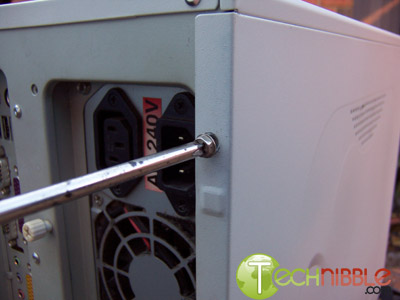
Open the case by using a Phillips head screwdriver to unscrew the screws on the back of the computer and slide the panel towards the back of the computer. Typically, if you are looking at the front of the computer, you will want to open the left panel because this provides the best access. Some brand name computers such as Dell, Compaq or HP may have hidden screws and clips elsewhere which will need to be found and released before you can open the computer.
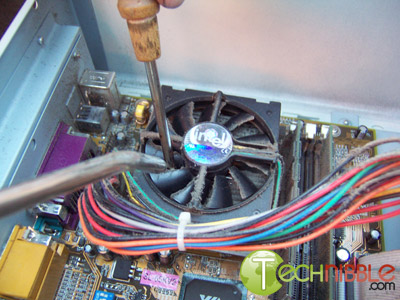
To begin, we will clean the CPU fan. If you are using a compressor, first give it a test spray of air because sometimes they can collect moisture and spray water onto your computer which is something we definitely don’t want. After, place the pen or pencil in between the fans blades to prevent it from spinning and blast the dust away from the fans blades.
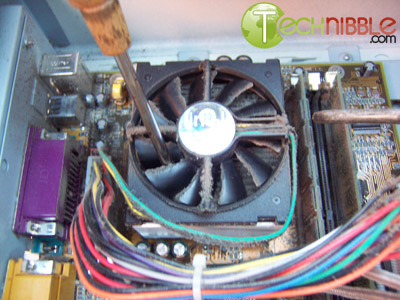
Next, you will need to get the dust out from the computers CPU heatsink just below the CPU fan. A good blast from a low angle facing towards the back of the case should get most of the dust out from in between the aluminum grills.
Session expired
Please log in again. The login page will open in a new tab. After logging in you can close it and return to this page.
Hi, I am using this battery powered mini vacume cleaner to clean the dust from a case, but i find its not very powerful.
Are you able to recomend a good portable compressor for this job? Id prefer if it was battery operated.
thanks
Sorry, I don’t have anything portable to recommend. I typically take computers offsite back to my place where a big chunky compressor resides. Sometimes if I am far from base I’ll goto a petrol station and use theirs. Your best bet for some recommendations would be our forums.
https://www.technibble.com/forums/
Why not use a can of compressed air.. about $15 aussie dollars.. i use them all the time at work. I have no idea what brand you would use in other contries but the brand i use is “fellows” they make shredders n other such office things
Ben, personally I found compressed air too weak to get off dust that is “caked on” (as mentioned in the article). Perhaps it was the brand I was using?
That’s funny, I didn’t see you mention putting the case in the dish washer…Hi All,
Instead of a compressor, try a regular electric leaf blower. It will definitely work. I do it all the time. Make sure there is no water in the leaf blower of course. I have had temperatures drop over 10 degrees after a cleaning.
Dr. John
personally I found compressed air too weak to get off dust that is “caked on” (as mentioned in the article).
First off, if you clean up your case regularly the dust won’t “cake on”. However, if you find yourself in this situation, one thing I tend to do is take a medium-sized (clean!) Paint-Brush to scrub off these places.
Be careful though. Some brushes can build-up a static charge from all the rubbing. So you should mind the brush’s material. You should as well be careful around sensitive areas of the case. I usually screw off the fans before going to work with the brushes so I don’t accidentally scratch anything. But, the hardware is not *that* sensitive that it will break just by touching it with the brush. It can stand quite some treatment.
After you have scrubbed it all clean, go ahead and use your air-compressor/can to blow off the dust.
I find it practical to have a brush for dusting. It’s great to clean up many things on the PC. Even keyboards and such. You should keep in mind that you use the brush solely for this purpose though. You don’t want any alien dirt in your PC like color residue and stuff…
Why not use a can of compressed air.. about $15 aussie dollars
It’s a waste of money and resources. You can get a small compressor for less than 100$. And you can use it over and over and over and over again ;)
Also, if the can is still quite full you have to hold it straight so none of the fluid air comes out, which is highly impractical.
Personally, I’ve always cleaned my machine with a vacuum cleaner. A nice powerful one like a Dyson normally does the trick.
For heatsinks and fans, I attack them with a cotton bud and get the dust off – much cheaper than a compressor or can of air and surprisingly theraputic! Just keep the vacuum handy near the part you are cleaning and the dust will just fall into it.
I also have fan filters on some machines which remove the need to clean them too much.
In more extreme cases, I have been known to take bits apart, especially PSUs – I had one that was cutting out, a quick clean of the insides did the trick – another 3 years of use expected!
I use a vacuum cleaner and compressed air. Think of it like a dentist’s office if you will. Just like they use the water squirter and the sucker to remove everything in your mouth (nasty thoughts I know) anyways, use the vacuum to suck out most of the dust bunnies and combine that with compressed air, that way, you won’t blow all that dust in your face. It works really well, plus you have strong suction, and the compressed air blowing to get as much dust out as possible. Just be careful that you don’t bump any of the capacitors with the vacuum hose. Hope this helps!
Vacuum Cleaner and an old tooth brush for stubborn dust always works just fine for me!
I agree with Dr John above, leaf blowers work great! I’m a network admin at a steel mill, talk about heat, dust, smoke and dirt.
Has anyone thought about static? The last thing I want to be doing is firing some industrial strength air compressor or leaf blower at my PC. A grounded air-line on a compressor is a must but I don’t think I would even chance that on my PC.
The only thing I use on my PC are the anti-static compressed air cans (which are a tad expensive tho).
This article is going to cause a lot of people to ruin their computer. Sure, you’re gonna say that you’ve been doing it yourself for a while now but I ain’t gonna roll the dice.
Something to be careful with when using an air compressor is water content of the air. As you compress the air, the moisture in the air also compresses turning back into water. You can help prevent this by draining the tank periodically, or putting an air drier on the output air line. Water can be bad for computer parts. The place you REALLY have to watch out for this is at a filling station, if you use their shop air they also sometimes have automatic oilers on the air lines for the tools, don’t want that oil residue in your computer.
Using a industrial air compressor is fine. At the company I work for we have 700 small form factor Dell machines. We are building the eastlink freeway in Melbourne so all the PCs get extremely dusty as you could imagine, and just today I used an air compressor to clean out 20 computers. Yes, maybe sometimes we have had a dead power supply after a cleaning but that is very rare and they are still under warranty so we don’t care that much. It is a pain that sometimes the output of the air is a bit watery but even with that moisture, 99% of the machines are fine after cleaning, I’ve already cleaned every machine last year and now I’m cleaning them all again for sale to employees.
Is a hairdryer powerful enough? If not, then il buy the compressed air thing.
I will like to know if use of liquids like petrol to clean can be harmful to a pc?
I use compressed air too. BUT be careful! If the nozzle is positioned in a certain angle you might blast liquid (air) onto the fan/mob/..etc..
It will freeze/damage the more fragile parts inside your system. I am forever twisting and turning the can…on the ling run not an ideal solution. Would go down the route of a small compressor were I to be in a computer repair business.
For the occasional cleaning session, a soft brush, an anti-static wristband, a can of air and a (very carefully positioned) plastic nozzle of a vacuum cleaner will do the trick.
Good Information.
Keep it up.
You forgot to say how mad the customer gets when the dust gets blown all over there rug/desk etc.
Should have a little vacumn with you.
I found the compressed air leaves cold water on my computer, so I evaporate and warm it up with a hair dryer after, and get off the remaining dust.
I gotta agree with Akhenaten, you guys are using anything to clean you’re pc’s :)
I recommend compressed air, but on a related note what do you charge for a thorough cleaning of a PC ?
Toothbrush is a bad idea, and a regular brush will ruin your computer if it’s not the right type of material. Several posts about this, but the right and wrong materials were never mentioned!
Avoid polyester and plastic materials. These are the materials that build up a static electric charge.
Use animal hair brushes. Fox tail is a good, springy hair. The brush should be at least 1 inch wide for good coverage, and less than 8 inches long so you can fit it into tight spaces. If the brush it too long, just use your computer saw.
Hehe, just kidding. “Computer saw” – If you look around, you may also be able to find an air bulb which is essentially a bulb that you hold in your hand and squeeze. It’s not as effective as compressed air… but it is a lot cheaper, and it never runs out of air. The moment you stop squeezing it, it refills itself. Sometimes, old tech is marvelous compared to new tech.
Don’t use the rubber bulb from the store that’s for medical purposes, it makes too much static. Find one for PC techs that has a metal nose on it so it’s safer to bump a board or component.
@certifiedtech – Ummm…TAKE IT OUTSIDE, Duh!
compressed air works fine, avoid high pressure compressor systems there is the chance you will break things!
Keep in mind that components are soldered together with lead and or silver solder, which is fairly weak compared to the high psi that nozzle is going to the throwing out.
is it worth the risk?
I’d say not.
hmhm
Doesn’t blowing the dust out of your computer just blow the dust all over the inside of the computer? I would think it would be wiser to use suction to pull the dust out of it instead of blowing it around. Is there any reason a vacuum isn’t a good idea? Are the ones they sell for computers any good?
Kate, with the side open like in this picture and outdoors. The dust leaves the case so it isnt just blowing around inside it.
I realized after wasting Money on Canned Air, I browsed around on E bay and bought a “pancake” style air compressor , works like a charm and is easily enough to clean out at least 2 full ATX towers in one filling of air. Best Investment I ever made :) Don’t waste money on $5.00 + a can for the canned air that will barely blow the dust off half the tower before you need to put the cold can down and wait for it to “warm” up Invest in a small Air Compressor! it is well worth it ! especially for us PC technicians !
also the Pancake Air Compressor is also very Portable too :) look them up ;)
air compressor, so smart! Duster cans get expensive, even when you buy them by the case.
I generally take the small red portable Clarke compressor, or the one that you can get for nailguns (its made by Palmgren) that is on a belt and weighs about 6.6 pounds, its useful and portable.
I also recommend natural or specifically treated man-made brushes for static (CPC is where I get mine) sensitive items, and would also recommend a tweezers for people with animals because cat hair especially clogs fans badly and can give a massive 30 degree heat rise.
If you are concerned about grime build up on your keyboard, here are a few tips you can take to reduce its infectious potential. One, stop eating lunch at your desk! Crumbs encourage the growth of bacteria, millions of them. Two, improve personal hygiene and wash your hands regularly, especially, after using the rest room. Three, shake out all food crumbs, hairs, and dust and disinfect your keyboard with alcohol wipes. Lastly, wipe down surfaces with a soft, lightly dampened, lint-free cloth. But, be careful what you clean your keyboard with or you could wind up with blank keys. However, to be really sure that your workstation is safe, call a professional computer cleaning service like Auburn, Alabama based Tidy Tec, LLC (www.tidytec.com).
We have found two small shop vacs to be great tools one used as a blower and the other as suction. This way we can blow all the dust out from cracks and crevices .. and pull it into our other vac for disposal.
We also use Long Q-Tips with ethyl alcohol (drys super fast)for cleaning gunked up parts. Don’t saturate the area of course.
Grease and dust from garage or kitchen isn’t going to be removed with Air. We have also seen pet urine in systems (extra charge for this clean-up)
In the explication above i could simple see an picture from an open computer case with a easy to get the fan. That is NOT so by my PC. How to get more information to disassemblage the whole
contents??
My first post here; this one goes out to the true geeks, can I use a high quality CVC cleaner (like used to clean MAF sensors in cars) to get that coat of dust off the mobo? If you really think compressed air is enough to handle this task, at what PSI does it begin to become dangerous to those fragile parts? Also, what about a polymer-safe gun cleaner spray? Yes, these do saturate their target, but the dust comes off so nice with them… and they dry almost instantly, well what do you guys think, and before you shrug off these ideas, please experiment with them! (I believe that gun spray MAY leave a residue….)
Cleaning a computer is a standard to me. I use a vacuum and compressed air (for now). I see the compressor as a better tool because more cost effective. Those little cans of air cost way too much. Yes, cans of compressed air can get that layer of dust off the mobo but since smoke + dust = paste. You might want to use car electronic sensor cleaner as stated above. That stuff will clean almost anything.
Try a small airbrush compressor that should work well for you
Hello There,
Have you ever thought of using dry ice for cleaning PCs? i is an industry and leaves no residue,, :-)
Okay I’ve done compressors, I’ve done 3M can-o-air. I’ve even done anti-static vacuums.
Now at the shop: I’ve told co-workers always clean em up outside. I disliked the contaminating excessive dust and debris. The secret to my success for a nice clean all in one swoop (mind the static discharge – ESD is the killer of the above issues) Here is what we use: @ 140 too 250 miles an hour clean up. Yeah I said that fast. I’ll let your brain capture this moment while you click this link Take me there Hopefully you’ll have a wonderful fast and fun time cleaning up a PC or MAC. Gooooood luck don’t ESD the system.
I use a leaf blower (not in the house). I also plug up the fans so they do not turn. (you will throw the grease right out of those bearings)
The last thing I do is blow into the optical drives from the front doors.
The way some of you are ‘cleaning’ your computers is enough to keep me in business for years.
If you are serious about cleaning the case take everything and I mean everything out including your front panel switches and connectors and dump the case in a bath full of hot soapy water. Give it a scrub to get everything nice and clean. Rinse and stand outside in the sun to dry (Or just buy a $50.00 case and put everything back in that).
If a case fan is that clogged with dust it won’t blow air then ditch it and get a new one.($10.00 fan vs $2000.00 PC hmm which would I choose I wonder?)
Heat sinks are easy. Remove them, clean off the heat sink paste with alcohol and wash them in hot water with detergent, scrub with a nail brush if stubbon build up is found. Leave to dry completely before reinstalling with fresh heat sink paste.
Air vents, clean with a stiff brush. Motherboard, dust off with a soft artists brush and blow the dust of with lung pressure not with a compressor or canned air. You can use a bendy straw to get into difficult to reach places.
ALL compressors (with the exceptions of breathable air compressors)allow oil to bypass the compression rings and that will build up all over everything inside the case making the next cleaning so much harder. Canned air is a waste of money.
I’ve always found a simple gas duster (not canned air!) to do the trick, but this seems like it gets the job done as well :P
I use a party balloon pump to blow out any dust and then use a household vacuum with special computer attachments to remove the residual dust. You have to be careful with static electricity and water from compressed air cans when cleaning inside computer cases.
I also use a leaf blower. But mine is a black & Decker rechargable. Very portable.
You all are crazy! One thing’s for sure – the methods most of you are using will keep computer repair shops alive regardless of the economy.
A leaf blower? A shop vac? That’s insane! The ammount of static generated by those will ruin your PC! Even the particles in unfiltered compressed air are a serious hazard when blasted at the components at high PSI. I know…. you’ll reply back and say “my PC works fine” and “I’ve been doing it for years”. How many times has your PC locked up or given errors after cleaning? Run some intensive memory, CPU, and hard drive tests (not the 10 minutes ones, the thorough long tests) and see if they pass.
Use canned air. Turn the case on its side if you need to reach an angle so the can will remain vertical. Use an anti-static vacuum designed for electronics. Or get an anti-static ionizer gun for your air compressor, but you’ll find buying cans is far less expensive.
Why not use an powerful 2000 watts hair dryer? The ones that are used by those professional hair stylists. Just switch it on “cool” or “cold” instead of “warm” or “hot” and turn it up to 3, or 2 (0-1-2, 0 being OFF).
Forget all you have read so far! The best thing to do to get a full blast of air is find a talkative woman! She has enough air to blast out the dust from just about any computer! :)
I dont know about a toothbrush.. but now i’m tempted to break out the old Hoover and give my PC a makeover :D
All you guys are crazy. Just use this well known effective method, honestly.
First off I spray the whole inside with a high powered water jet that I use for getting the grime off the patio.
I then leave the computer (case off) outside for a couple of days to dry off.
Once dry, I use a wet flannel and a kitchen dust cloth all over the motherboard. I take apart the PSU and give that an extra spray form the old water jet.
The leaf blower tends to not be powerfull enough to get that ‘stubborn’ dust off so I fix the open computer to the bumper of my car and absolutely rag the shit out of it down a dual carrige way.
To be honest, thats a problem solved lads.
You guys have no idea what you’re talking about. I take each individual part out, attach them to the nose cones of Saturn V rockets, and then launch them into space. Astronauts retrieve the components, and clean them during a space walk. Having done that, they then fire them back down to Earth in reentry safe capsules. After they enter the atmosphere and slow down to a safe speed, the capsule is shed, and the parts take a nice salt water bath. Then, a SEAL team recovers the parts, brings them back to me, where I hand them off to a team of eunuchs who spend hours working to clean them again in sanctified water. Finally, I hire a couple dozen lingerie models to air dry the parts out by strapping every part to a different model’s head and ordering them to run around topless. Naturally, the girls who don’t get a part have to wrestle in Jello. It may not be the most cost effective, but if you’re serious about cleaning the dust out of your computer, it certainly gets the job done.
Just to let you all know cleaning your computer with a vacuum cleaner is asking for trouble as the plastic tube creat static electricty which can possible frizz a circuit or two so just be careful if you are attempting to clean witha vacuum cleaner.
Please identify more where can i buy vacuum tools cheapest.I wanted vacuum tools.My friend want it this month. :P
I do think diferrent because my friends and family use another brand.It’s comfortable and save power.But next vacuum I can consider this to be vacuum for which you present.Appreciate!!!
Instead of using vacuum cleaner, i use air compressor to clean the CPU. It is more simple with minimum risk.
I don’t agree with this….. “Leaf blower”
We air compressed the dust out of our hard drive and now it won’t power up. It was working fine before I shut down to do so. Any suggestions? The little green light comes on on the back but nothing else.
Why would you dust a hard drive with compressed air? HardDrives are easy to clean with just a cloth!
I use a compressor to clean the fans, heatsinks, and the air ducts on the case. I use the air to blow all the loose dust from the inside of the case with no problems…
Be carefull with water that can be collected inside of the compressor, make sure you drain all the air out after each use to prevent moisture from collectin inside of it when temperatures go down.
Computers parts are so tough anymore, I wouldnt even worry about static from a compressor.
I wash my keyboard once in a while with hot water and let it dry for about 12 hours before using it! Never fails, I’ve washed keyboards from laptops as well. Just unplug them before you do!!!
A lot of people swear by taking the keyboard letters off a PC keyboard and putting them in the washing machine in a small fabric bag. Although remember to take a photo of the keyboard first for when you have to put them back on….its not for the faint hearted I have to admit.
2007 BMW X3 3.0si 2007 BMW X3 3.0si SUV Platinum Bronze Metallic 6-Speed Manual Cold Weather Package, Heated Front Seats, Heated Rear Seats, Heated Steering Wheel, Privacy Glass, Universal Garage Door Opener at eautoXchange, LLC – Colorado Springs, CO 80907.
I tried a subscription for your rss, but had a difficulty adding it to google reader. Could you please check out this page.
Wow, that cpu fan looks extremely dirty! But very interesting step by step article. Some nice tips listed here.
Oh dear me, what lunacy.
Here’s the proper way:
1.) Turn P.C. off, unplug power cord from socket, then unplug cord from back of P.C.
2.) Remove removable panel (varies). Then touch metal chassis to ground yourself.
3.) Using a can of compressed air designed for use on computer internals, blast any dust away.
4.) Ground yourself again and replace panel.
But here’s the real secret to pristine ‘puter bowels…
REPEAT ABOVE PROCEDURE EVERY 6 MONTHS, YOU LAZY ASSHAT!!!!!
If you’re poorer than dirt and can’t cough-up the few dollars necessary for canned air, blow into it with your mouth, daintily wave at it with your limped wrist, bend over and fart on it for all I care, just make sure to do it every 6 months whippersnappers.
Babs
Laughing my a** off!!!!! I thoroughly enjoyed reading this thread. My stomach muscles are still hurting from laughing.
I agree with a few of the methods on here…but certainly not all!
I highly recommend that you leave the PC on. Drill a 1 inch hole through the top of the desktop with a Bosche powerdrill.
The airflow created it just fantastic.
(Although be sure to push harder when drilling gets tough)
Hello, I am Serene Khoo and I am now in Manchester. I got a call this morning to attend a selection interview this coming week at one of the quality impact socket set and related products vendor. This will be my first and I hope not last interview upon graduation. Do wish me a fruitful attempt. Deeply appreciated.
This thread needs to be cleaned up… so many bad procedures!
…
….
…..
….
…
GAH
Though it is funny
i have had my computer for a lil over 4 years now. it is a alienware high end gaming machine. i can look into my case and see tons of dust caked up all over heatsinks. the fans though are clean and mostly clear. i guess im just lucky. my pc runs fine other then the fact that i have about 600 gigs of information and my hd’s are full. i need more space hahahahah horrible i know. all hail the gaming machine that is full of what is was that “games” i say lol
I don’t know why. Everybody is talking registry cleaning now. It seems your computer can be faster if you clean registry, so I try the tuneup360. It is not free, but it will give a free license if I agree to do a customer survey. I do feel my computer runs faster after that.