
- You are here:
- Home »
- Blog »
- Manage Your Computer Business »
- Computer Killers – Pet Hair, Dust and Cigarette Smoke
Computer Killers – Pet Hair, Dust and Cigarette Smoke
As a computer technician, I have seen some pretty interesting computer problems. The majority of problems I encounter in the home market are adware, spyware or connectivity problems and the occasional hardware problem.
The hardware problems are usually caused by simple manufacturer fault (as in, it was going to fail at one point anyway) or a power surge. However, occasionally I find a computer that was killed by pet hair, dust or cigarette smoke. These three eventually find their way into the computers fans or heatsinks causing the computer to overheat and die.
Over the years I have come across a few bad cases of this and I would love to share some of the photos with you.
Warning: Some of these photos are pretty gross. I purposely kept them at a high resolution so you can see them in all their glory. Click on any of the thumbnails to view the high resolution version.
Edit: Added other computer technicians pictures that they sent in
Computer 1
A client brought in a laptop that kept restarting during bootup. At first, I thought this would be your typical “Windows blue screen of death with the automatic restart option switched on” but the computer didn’t even get to the Windows stage, it would crash out in the CMOS. Suspecting a overheating problem, I entered the BIOS, looked at the temperatures and noticed that they extremely high and climbing. Seconds later, the computer shut itself off again. I knew this was definitely going to be a temperature problem. On the outside, the computer seemed in relatively good shape as seen in the photo below:
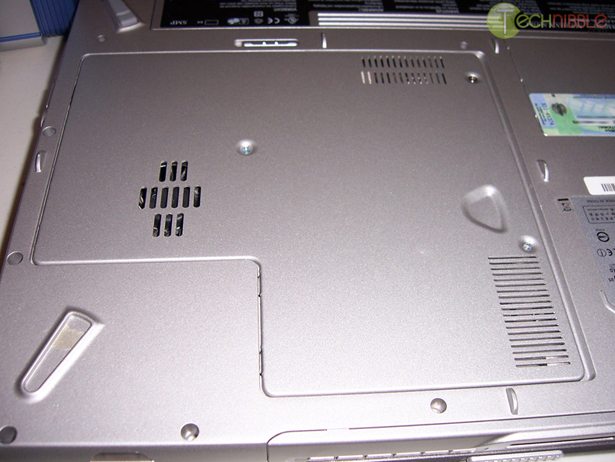
I opened up the laptop and looked at the internal parts. The insides were relatively dust free with the exception of a little surface dust in the CPU fan, but nothing that would totally clog it up. So I continued on and took out the heatsink, heatpipe and fan section that is highlighted in red:
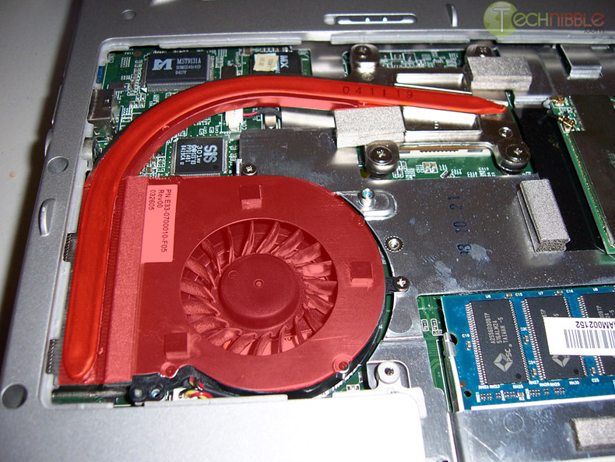
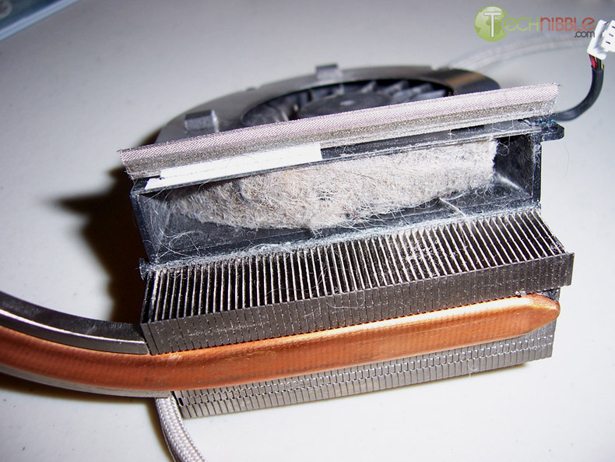
I separated the heat sink and the fan and found the problem; a bad case of pet hair. The fan would pull in pet hair through the air vents shown in the first picture and try and push them out the exhaust air vents. However, due to the fine fins on the heatsink it was getting caught and was building up:
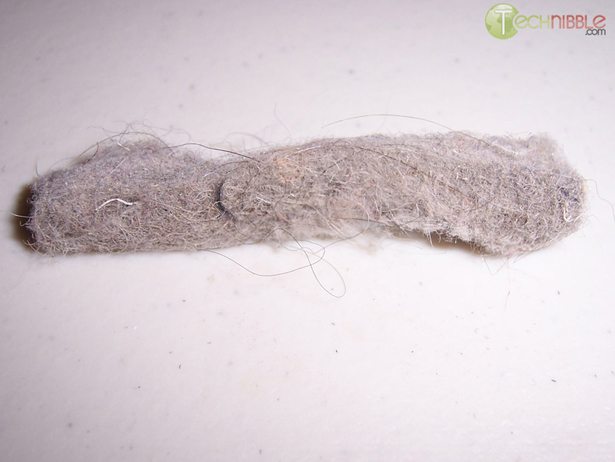
I pulled out the hair using tweezers, gave the computer a blast with some compressed air, put it back together and it worked perfectly. Temperature was normal and it ran for a good 5 hours without problems before the client picked it up again. Here is the photo of the ‘hair monster’ I removed:
Computer 2
This computer came in because it wouldn’t boot at all; as if there was no power. This could be caused by a dead power supply, dead CPU or dead motherboard. I opened it up to find out and was greeted with this:
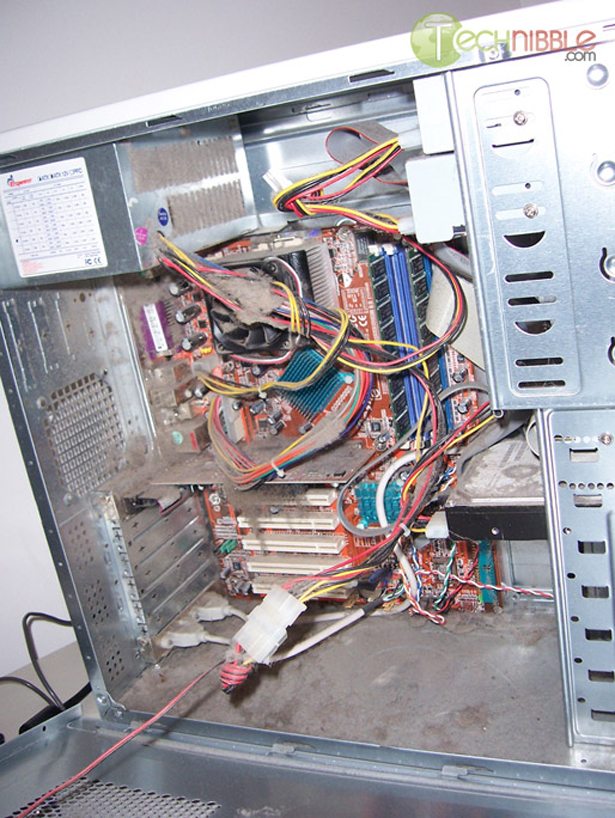
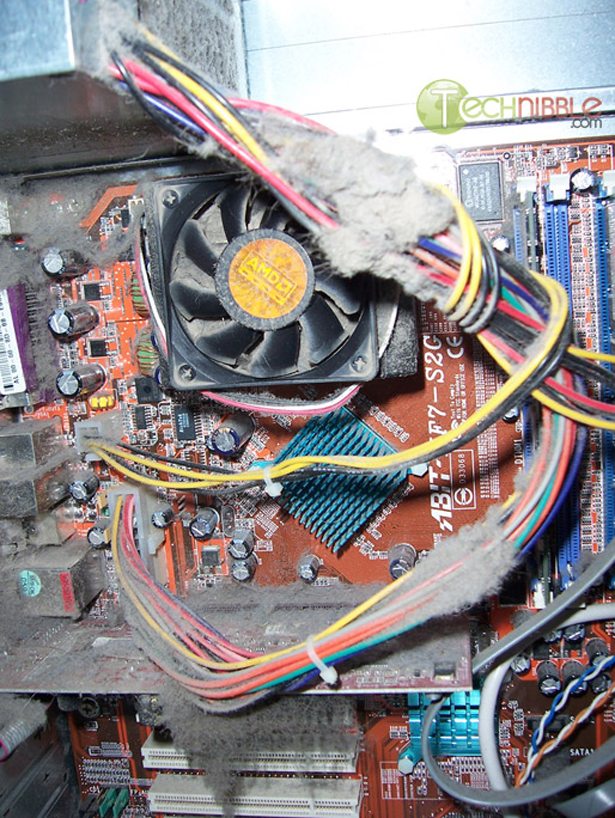
The video card GPU’s heatsink and fan is in there somewhere:
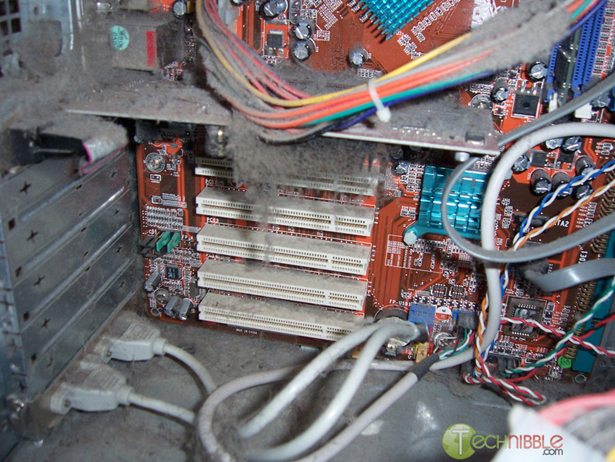
The power supply is barely able to breathe:
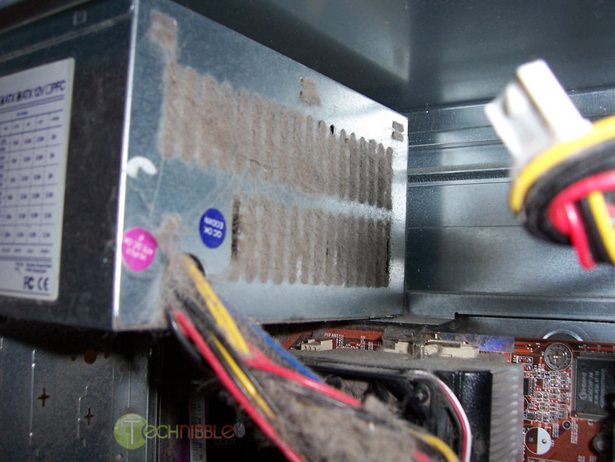
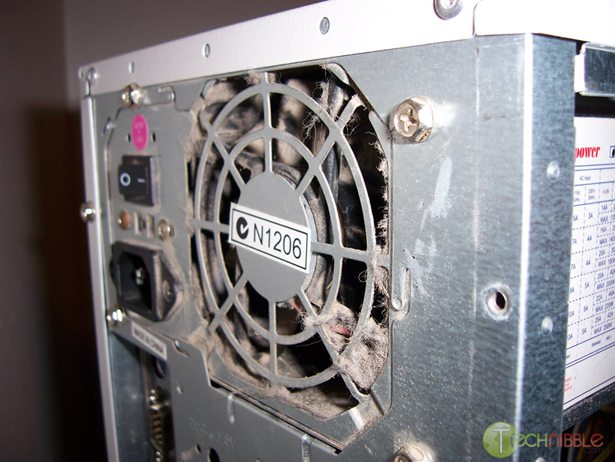
.. and the back side of the power supply doesnt look to great either:
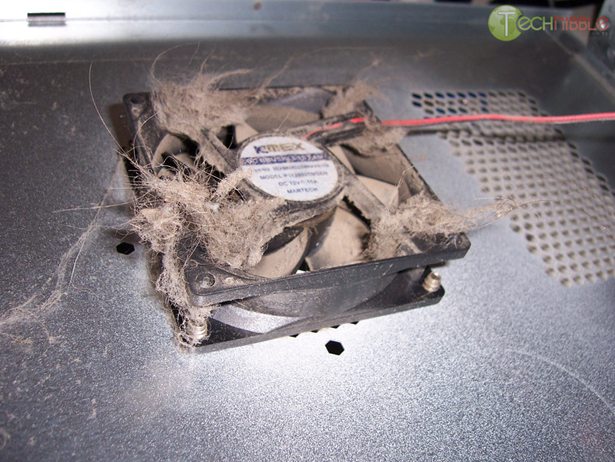
To top it off, the side case fan is barely managing to spin:
Computer 3:
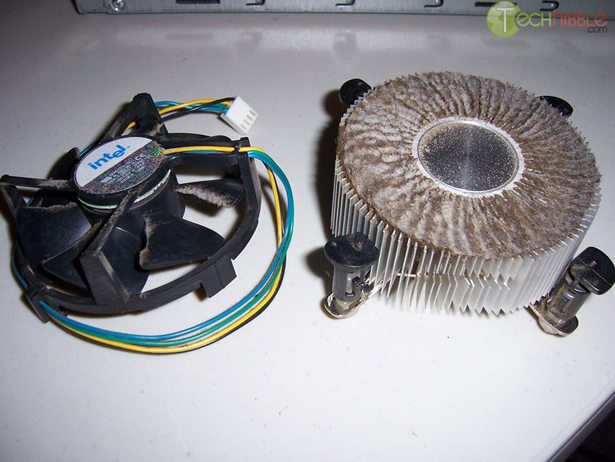
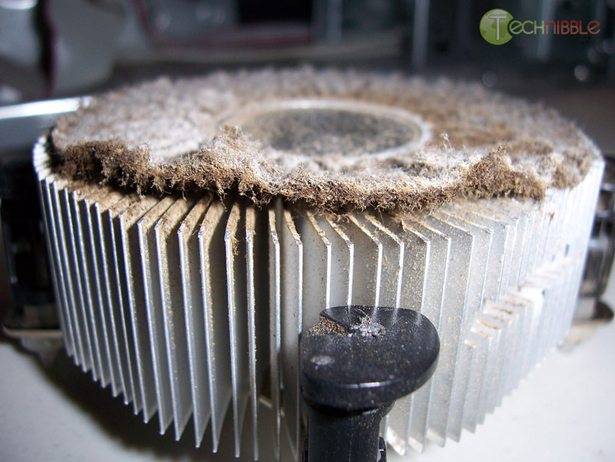
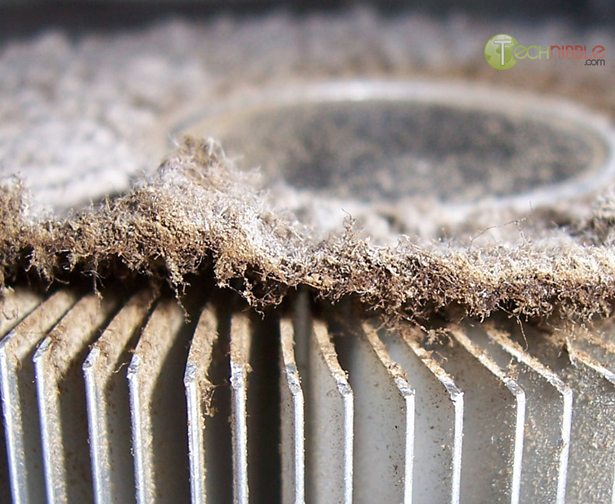
This computer came in because it wouldn’t boot at all. From the smell of it, I was pretty sure the death of this computer was caused by cigarette smoke. You see, when cigarette smoke and dust collide in a computer, it produces this weird dusty-tar combination that has a pasty texture. Its brown, it smells bad and is hard to remove. It turns out that the CPU had overheated and died on this computer because airflow generated by the fan was unable to get air into the heatsink fins; here’s why:
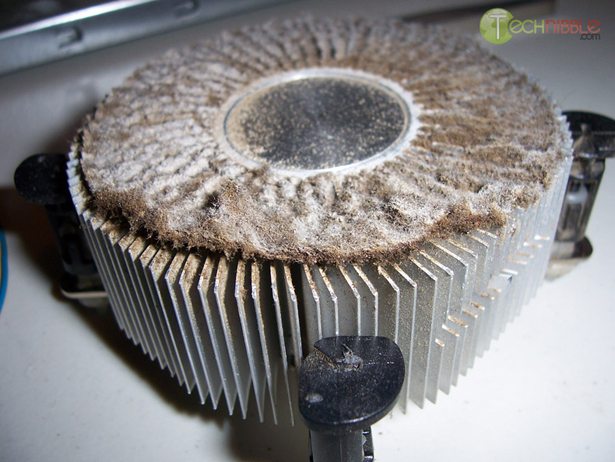
I tried to pull it off as a whole by getting my tweezers in between the heatsink fins and pushing the the layer of dust/tar up:
One of our forum members recently encountered a computer like this and complained about how gross it is, then another member replied:
“Just think, for the pain that they gave you with their computer, imagine whats happening in their lungs”
I’m just glad that I havent encountered a cockroach infestation inside a computer like some computer technicians have.
Other Computer Technicians pictures that have been sent in
David Jone’s Encounter
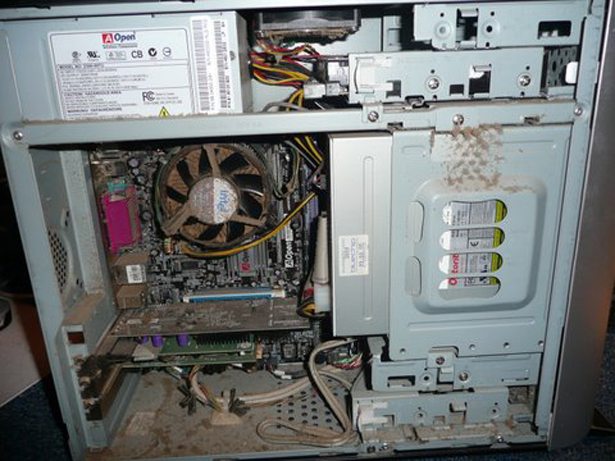
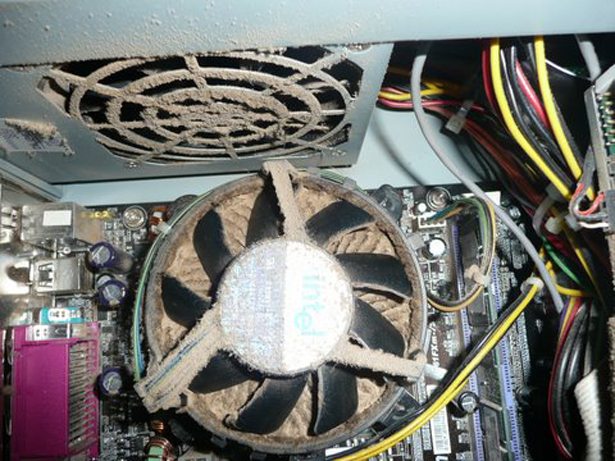
“The pictures attached of a computer I had to clean, probably the worse one, I now carry a small low air compressor with me when I go out to the premises to carry out repairs, with the drought there seems to be more dirty ones about”
This one also looks like a smokers computer.
Pete’s Encounter
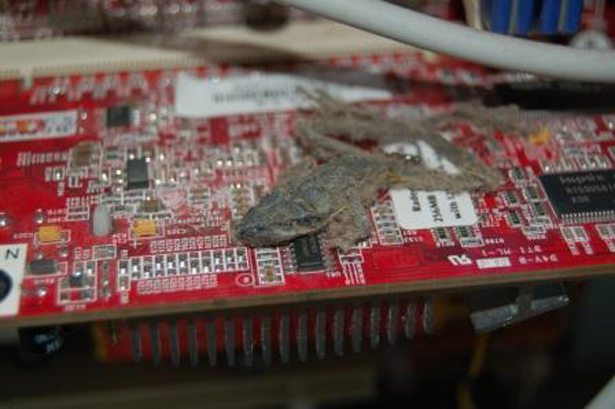
“Pete here – I am a tech based on the Gold Coast. Thought you’d like to see Kermit…..
One of my customers had some weird things going on with their monitor (strange colours and lines on the screen). I immediately thought graphics card, but when I took the side off I was surprised to find a very small (and very dead) frog sitting on top of the card. It had “leaked” frog juice onto the graphics card components and caused a bit of corrosion. The strange thing is that Kermit was completely dry so may have been there for some time. I would have thought there would have been a problem earlier, while he was still wet!”
Anyone else encountered computers like this? If you have your own pictures I would love to see them. Drop us a comment and/or send a picture to host [at] technibble.com
Session expired
Please log in again. The login page will open in a new tab. After logging in you can close it and return to this page.
ahhh thus is the importance of cleaning your pc at least twice a year just like visiting the dentist sure it hurts the wallet but you get a healthier life or in this cae a longer life out of your PC
Computers like these are EXACTLY the reason I keep a bottle of Purell hand sanitizer on my bag.
Bugs and rodents… Y’all have me beat. And I don’t feel the need to catch up.
this also shows what people think about the computer
ITS A DISPOSABLE TOOL
abuse it until it breaks down then bitch about how much it will cost to replace or repair it or complain that the stupid thing ate there expensive data and that they need it back NOW.
when computers cost tens of thousands of dollars they came with a maintenance program and instruction books thousands of pages thick now computers cost a mere few hundred dollars and come with not even a simple pamphlet telling you what to do or how to clean them
Oh yeah… the wife makes me dust them off outside before bringing them in now. I still have the burning scent of cigarette smoke, pet dander and god only knows what else trapped in my nose. Yuck!
Amen to the Purell too! I keep a vat of the stuff in my car.
Oops, I rarely clean my computer’s inside part…
I’ve never put a periodic cleaning routine in place for my own tribes batch of laptops and towers. I do seem to have a need to delve into their innards about once every 6 to 8 months for upgrades or minor PD. The dustiest machines seem to be my home file/print server tower, but nothing like the photos posted here. The most recent tower I built for myself is stuffed into an Antec case with intake filters which get a monthly cleaning. Whne my father worked for the phone company in NYC he told me some amazing roach stories. All used on premise equipment was wrapped and sealed in plastic bags. Roaches were a sure thing in 99 percent of the gear going back to the plant for refurb.
How much should the client be charged if they have crap like this in their computer to clean it up?
I have had so many computers with dust build up that I recently invested in a pc vacuum. Q-tips are also quite handy. Once, I had a computer dropped off which contained a nest of roaches in the power supply. By the time I started on the computer, roaches were everywhere. Now every system that is brought in is taken outside immediately and inspected for insects and dust.
I see computers like this (or much worse even) on a weekly basis. You gotta wonder how these people live it such a filthy environment.
Oh btw…
I once worked on a client’s machine who lived on a boat. The case was covered in rust. His computer would not even boot up until I replaced the video card which had also rusted itself dead.
I have seen many a computer infested with roaches among other things. I once found a dead mouse inside a case, it got in through the hole between the front bezel and the bottom of the case.
The little rodent bit through the main mobo power connector.
Not sure if it died from or lack of escape route( maybe the shock made it forget where it was, hehe).
I really don’t like making service calls where people smoke. I once made a housecall where the cigarette smoke was so thick I could barely breathe while the client’s husband was sitting in a recliner wearing an oxygen mask! I understand both he and the computer have since expired.
Just wanted to include my 2 cents on it:
http://www.housecallsniagara.com/Photo_050608_001.jpg
The rest of the case wasn’t as bad as that part had been cleaned once or twice in its lifetime. I took off the front panel and found a dust bunny blanket.
here are some of the ones I have cleaned recently.
http://picasaweb.google.com/manitookman/Spiders
http://picasaweb.google.com/manitookman/IESDirtyPC
http://picasaweb.google.com/manitookman/EvoN610
I used to not really clean mine but I do much more now. I have been in home with indoor pets and in homes of smokers yet never seen things as mad as what is shown here. In fact for the smokers I have only smelt the stench never seen this film of dust and tar.
This seems to be par for the course around here. I routinely get calls that a clients computer is shutting off randomly. When I get into it I usually see the sticky tar/dust paste that coats everything. Just a few weeks ago I ran into my first roach infested computer. I didn’t realize it right away, but I was seeing these little bugs running around on my workbench. I didn’t recognize them at first, but finally I saw a real roach. They had infested the power supply and burnt it out. When the customer asked what had caused the problem, I didn’t have to heart to tell them the truth. I just told then that excess dirt has clogged it up. Now all my towers get inspected outside before I bring them into my home.
Paul Schwegler- I have found that if you tell customers about the roaches they are usually willing to do something about it.
In fact, any roach infested computer I see leaves with 2 motel thrown in the inside, in effort to kill them before they move to the power supply and other mobo components.
Of course there is an extra cleaning fee- lets face it roaches smell, they are dirty and every customers machine has the ability to infest your place of business.
Wow, just wow… I wouldn’t even believe the frog one without the picture.
Ugh, those are awful! I’ve seen some pretty nasty stuff too but I’ve never taken pictures. One of my newest clients manufactures screws and there’s a thin sheen of oil everywhere, even in the offices. I haven’t opened them up yet but I can imagine what the insides of their computers are going to look like!
Manitook, those are some pretty nasty jobs too. Do you guys wear masks over your nose and mouth so you don’t inhale this stuff when you clean it?
Just in case you haven’t seen this – this type of dust collection especially around processor fins and heat sink, manifests itself in poor PC performance.
Had me scratching my head for a day with a system with erroneous processes running at 100%, took the system apart in the end and one totally clogged set of fins and only 40% of the fan able to pass air.
Enjoy !
Wow, some gross photos – the one with the frog is pretty weird! I always fit filters to the fans on my machines and change them regular.
North Qld always has suprises inside computers like gecko and their eggs in a powersupply. Flying ants invading optical drives. The odd Golden Orb spider building a web over a motherboard, cockroach eggs in floppy drives and European mud wasps building nests on the backplane of old print servers. The common garden variety dust bunnies which are often soggy from the heat and humdity and also mould is often found in older PC’s. But the biggest problem is rust.
I once worked on a computer that was so caked with a strange green dust and smelled like weed. Too bad I didn’t have pictures of that one for you.
Back when I worked as a PC technician, I saw plenty of this stuff too. If only I had a cam back then…
Also, the computer 3, was the CPU really dead?
Because IIRC the S423/478/775 CPUs all have Thermal protection.
What CPU it was?
I usually clean out my PC when it gets dusty.
I smoke and the PC is in a dusty environment.
Lately I have had random shutdowns and it turned
out that my PSU was caked with dust on the inside
like some of these pics. I felt bad, but it’s not
like a PSU is a component I would disassemble to
clean myself. Oh well, new PSU and all is well.
Even better a cabinet make called me saying his computer smelt like it was burning, I told him right away pull the plug and be ready with his fire extinguisher. I arrived pulled off the side……
There was a wall of dust you could not even tell it was a computer, it was completely flat with dust.
Took it to the shop and used their low power air compressor from a distance and blew out around 3 pounds of dust and finally saw the inside. Let’s just say they needed a new computer. Hehe
wish i had my camera with me.
Forget the pet hair and dust…try ROACHES! I am a student worker at my university and I was repairing a computer for a woman. I thought it was dirt like she dropped it in some mud or something but then i noticed roach legs and two crawled out. Another case, with the same computer and I didnt realize it until i opened it up and began working on it, a fat baby roach ran out on me and i almost fell out of the chair.
A friend had me fix his computer because it wouldn’t turn on. I opened it up and it REEKED of cigarettes. Every fan was caked in sticky filthy dirt but that’s not what killed it. I looked at the power supply and it was blocked with dirt. I opened it up and I kid you not, it was a solid square of sticky dirt. There was no open area inside there at all, just a complete square of dirt packed perfectly inside the power supply case. i actually managed to clean the entire computer and make it work again but it took about 4 days to get the disgusting smell of cigarettes out of my nose.
my pc automatic shutting down and after restart my system it will message by system was shutting down overheat enter to continue. what is my problem and how to rectify it. please tell me
sridhar – have you read everything?
TRY opening your computer… if it’s full of shit like above.
clean it else go to some rip off store that rips you off for cleaning it;)
luckily i haven’t met any roaches or mouses etc etc
how ever the worst case scenario i had was a computer filled with dust and no vision whut so ever i refused to clean it cuz i don’t like the cleaning job.
I have a compressor setup just outside my workshop door…it has an inline anti-stat fan and then a length of nitrile tubing which doesnt collect static connected to the nozzle which is brass and has a antistatic cable connected to a grounded pin beside the compessor for cleaning computer cases and power supplies..total cost approx $100…….it saves me from getting all that grit and dust and smell inside my workshop and keeps my wife happy because she doesnt have to clean my workshop more frequently…this is also good for dry powder printers and photocopiers…and saves me money by not having to use my techvac because the cartridges are very expensive
That heatsync is insane! Does this kind of thing happen to laptops? I would think that, if it does, the heat build-up of a few-years’-old laptop could be scary!
.. and I can’t believe the commenter about the roaches! Even scarier!!
lounger chairs are just a must after a overnight erect day of make