
- You are here:
- Home »
- Blog »
- Computer Technician Tools »
- Clonezilla – Partition and Disk Imaging/Cloning Program
Clonezilla – Partition and Disk Imaging/Cloning Program
Clonezilla is a free, open source disk imaging tool that is loaded with features. While it is a little rough around the edges visually, it is very capable. It supports over a half dozen file systems covering Windows, Linux and Macintosh based computers. If Clonezilla does not support the file system, you can still image the hard drive by doing a sector-by-sector copy.
Clonezilla can be run from a Live CD, USB drives or a network drive and has the ability to either create a single image file, or do a direct copy from one hard drive to another.
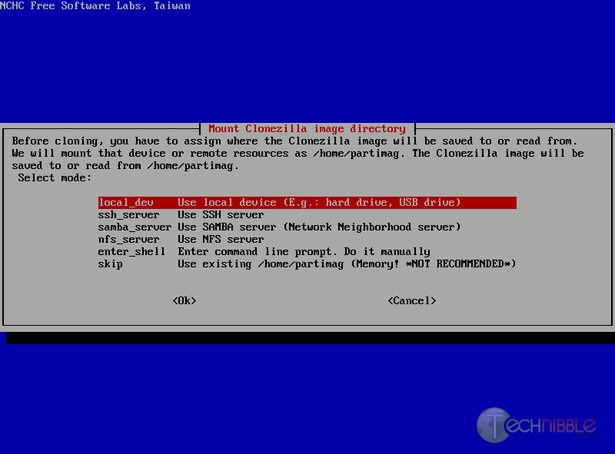
Screenshots:
Downloads:
Download from Sourceforge – 103mb
Session expired
Please log in again. The login page will open in a new tab. After logging in you can close it and return to this page.
I never have been able to get this to work… Ghost works well.. but not this one for some reason. Anyone know the most common mistakes one could make with this software?
Just used that over the weekend to clone my “perfect” laptop setup onto its 13 identical siblings. It works wonderfully and I wish I’d found it a year ago when I needed to do it multiple times before. I highly recommend it.
TCR, I never had it not work. At what stage does it fail for you?
I know this only copies used sectors, but is there any compression that you are aware of to shrink the size of the images?
TCR, if it is constantly not working for you on multiple computers, there may be a chance that the download was corrupted.
Try re-downloading the absolute newest version, and doing a MD5 check sum on it to make sure it downloaded properly, and burn at a low speed.
(This only really applies if you haven’t tried this and it has failed every time using the same disc)
from reading the info, I would say yes, that is possible, Mike.
OK guys they say there aren’t any dumb questions but here gos one anyway.
To clone a laptop HDD can I put the new one in an external enclosure and clone it through a USB port using Clonezilla? Or is there a better way.
I just want to have one ready to go for the next time the one I using fails, it sure would be nice not to have to go through the whole reinstall, find drivers, get updates, set up email,firefox, photoshop,etc.etc. stuff again because the seagaste fries itself for no apparent reason.
Thanks,
Mike
I hate to be the only negative voice on this one, but Clonezilla lost me as a fan. I’m all for open source, but no thanks.
Mike, if you want painless and free, just use Macrium Reflect. (I’m not shilling for them, promise, it just works.) Easier than Norton Ghost because it works from within the OS to make the image. I transferred an OS from one laptop drive to another using a little USB dock, and also via an external USB drive. Flawless and fast.
Macrium Reflect Free has never failed me, and it does a terrific job of resizing partitions. On the other hand, Clonezilla has failed often to understand a small partition expanding into a larger drive. I assume it can do that sort of operation, but I had to give up on it after trying every setting on the program to re-install a cloned image.
I used Macrium on the same drive, and less than 2 hours later I was on the new drive, having had no problems expanding the partition (and easy instructions.)
My other Clonezilla micro-bash is that it took forever compared to Macrium to create the initial image.
Phil,
Thanks for the tip on Macrium, will definitely check it out. Is that Windows XP+ only?
Can I ask what you mean by “a small partition expanding into a larger drive”? Are you resizing the partition? Or just moving a partition to another, larger drive? I’ve not had a problem with that.
I haven’t compared clonezilla’s speed to any other program (tried ghost but not side by side), but in hundreds of images not one failure or error so it will be hard for me to try something new, but will look at Macrium as soon as I can. Options are always good.
Mike, I use the front loading, hot-swappable hd’s primarily so I never had need to try USB, but sounds like it should work. It wouldn’t take long to try it and see. Clonezilla has a simple device list that shows what drives it can recognize.
Funnily enough I’ve never been able to get Macrium Reflect to work.
I was a little harsh on CloneZilla, it did “work” but just failed me for expanding the partition.
I’ve used Macrium in XP and Vista, to create and restore both types of OS. It requires no skill whatsoever, which makes it perfect for me… In both cases, I was replacing a 5400rpm laptop drive with a 7200, and going from a small drive to a larger one. Macrium made that very easy. I removed the source drive and used a USB dock to avoid installing Macrium on the client’s machine or booting from a CD.
On my personal desktop machine, I imaged a 150GB system partition with Clonezilla, and attempted to restore it to a 320GB drive. The only way I could restore it was to limit the size of the restored image to the original 150GB, leaving the other 170GB untouched.
I systematically went through every Clonezilla setting combination trying to get it to work and had no success. I have to assume I missed something, but if it’s that obscure then I need to find another tool to use.
I know Macrium is faster than Clonezilla because I tried it on the exact same partition and it was obviously quicker. Plus, it imaged the system drive while I was surfing the internet and doing email on the system.
Macrium fit the bill, and it took the place of Norton Ghost 2003 (the old faithful) for me. My only complaint is that it can’t do an incremental image update, you have to make the whole thing, but that’s maybe an unrealistic expectation for a system image. Compression options are also there, as well as raw imaging (which includes the pagefile/hibernate files left out by default.) On normal compression settings, it really only saved about 15% space.
The free version isn’t obviously linked from their webpage. Here’s the link:
http://www.macrium.com/reflectfree.asp
Best of luck.
Correction: The paid version of Macrium offers incremental imaging and file backups. Also, there is actually a link to the free version from the main page, I just missed it.
If you have Win 7 or Vista Ultimate, you already have the same functionality built in, and I use it instead of Macrium.
The flaw with using any backup app within the primary working OS is what happens if that primary OS becomes unbootable? That can mean you are unable to get to your application to run a restore. Clonezilla does not require the primary OS to operate since it uses a Live Linux OS. It can also saves the primary OS data to external USB drives. Clonezilla works very well. Highly recommended.
Macrium has a boot CD option, too. I’ve used it once as a test and found it works fine to either make or restore an image.
Thanks Guys I reckon I’ll get one of them external enclosures and give it a try.
Macrium Reflect Free edition uses BartPE to create the boot CD. Does BartPE handle 64-bit yet? Clonezilla does.
If I remember correctly, you can choose between linux and BartPE in Macrium. I just used the default setting, which is BartPE. Worked fine for me with Vista 64. Didn’t try it with anything else, but it’s just restoring an image, so I doubt that’s sensitive to the type of OS.
OK guys.
My external enclosure came in Saturday I used clonezilla to copy to the new drive all went well save for the fact it wouldn’t boot, I had to use the install disk to repair the new one. I’m not sure what went wrong, Maybe because they were different brand HDDs new one is a Seagate original is branded Toshiba so I don.t know who made it.
Thanks for your input,
Mike
Will clonzilla work when upgrading to a new motherboard and sata hardrive from and older install and ide drive?
Clonezilla will copy all of your files to the new drive, but it can’t fix the Windows driver and HAL (Hardware Abstraction Layer) differences between the old motherboard and the new one.
If I am making a copy or image with clonzilla to possibly re-install on a Intel SSD from a HDD.. are there any known problems with the transition from HDD to SSD? same laptop, same MoBo, and or everything else.. Is there anyone here that has mirrored the OS along with app (adobe pro extended 9, office ultimate 2007 sp2).. I have Vista home prmium 64 sp2 as my OS. I have heard great things about clonzilla from users here… http://www.hphdx.net/Forum/tabid/55/forumid/62/threadid/2009/scope/posts/threadpage/1/Default.aspx
Thank you in advance for any time and info shared.
Be well all, JW
“The flaw with using any backup app within the primary working OS is what happens if that primary OS becomes unbootable?”
With Windows Vista or Windows 7, you can create a restore CD. Boot your computer using that and provide the backup image. I believe you can also use the Windows installation disc if you have one. They take into consideration that you may not be able to boot into the OS.
I had the same problem with Clonezilla, restoring an image from a smaller drive to a larger drive. If you want to claim all the space on the larger drive, start the Clonezilla procedure as you normally would by booting to the CD and following the menus. When you reach the page prompting you for “Beginner Mode” or “Expert Mode”, select Expert mode. Accept the defaults on the first page, and select option -k1 on the second page. That’s it.
I want to make an image of my Win7 hard drive and install it to a partition on another hard drive on which I have two partitions. I do not want to erase the data in the second partition. Does anyone know what software will let me do that? Win7 wants to format the entire hard drive so that won’t work.
After hearing all the hype about the wonders of Clonezilla, I gave it a try and was severely disappointed. Just wanted to clone a Windows XP laptop harddrive, both drives the same size. Didn’t list any errors so I thought it completed successfully, but booting of the new drive comes up with hal.dll not found. Looked around on web, this is apparently a common issue with a variety of suggestions on how to repair. Tried fixmbr and fixboot, didn’t work; returning to Ghost. Clonezilla may be fine for Linux, not for Windows. Even if some of the fixes out there will eventually work, it’s not worth the time and effort when there are easily available options that do what they claim.