Outlook 365 Autocomplete - Classic

CaliZ

Active Member
Reaction score
32
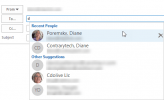
I had a customer recently contact me asking to have the "old autocomplete" list show up in their Outlook desktop app. Having gone through various screenshots of what was described, I finally came across what looked like a function out of Outlook Express or other old e-mail software.

Exhibit A (Old Autocomplete):
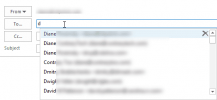
new-autocomplete-list.png

Exhibit B (New Autocomplete):
other-suggestions.png

While these screenshots were pulled from here, https://www.slipstick.com/outlook/good-autocomplete-list/ unfortunately manually editing regedit, nor running the .reg file would restore this customer's autocomplete list to show exhibit A (Restarting Outlook, and the computer both completed).

Has anyone else come across this request, or know of a possible other solution?
Thanks.
 
@nlinecomputers: I don't think the issue is getting the autocomplete list transferred over, at least from what's been offered so far, but getting it to display in the old "text only" style.

@CaliZ: I somehow missed or blotted out your parenthetical about having restarted both the computer and Outlook. Hence my question had already been answered. I apologize for my inattention.
 
I don't think the issue is getting the autocomplete list transferred over, at least from what's been offered so far, but getting it to display in the old "text only" style.
That is a function of the GUI. You can’t change that anymore then you can change the font of the menus.

Edit: I may have misspoken. There is a registry fix that can revert to the old style. See my link below and read the links in that thread.
 
Last edited:
@britechguy unfortunately that fix did not resolve it. As for the other reply, unfortunately it is not a case of dealing with the auto-complete list as far as editing or copying goes. Just the issue of it displaying auto-completes in the "new" format.
I'll look into it further and report back if I do happen to find a solution.
Thanks.
 
Same problem?

 
Welcome to the next wave of UI enhancements that are working on Outlook to bring it inline with the rest of 365 FINALLY.

There is no "fix" other than to update your brain to using the new UI.

Full disclosure, M365 users can do this: "C:\Program Files\Common Files\microsoft shared\ClickToRun\OfficeC2RClient.exe" /update user updatetoversion=16.0.13901.20462

And downgrade to a previous release, but it's just going to upgrade again next month, so it's not a fix... just a waste of time. Again this is Microsoft finally getting around to merging Outlook into the greater M365 offerings. This is an aesthetic change to make the interface more consistent. To my knowledge this is no preference to "go back".
 
Last edited:
This feature came in around 2019 I believe..it's old by now, This end user never didn't Office updates?
I've never looked how to get the old way back, but that Slipstick articles registry change...may just be too old by now, or over written with each update. I know in the past couple of weeks there were quite a few new enhancements to Outlook, mostly pertaining to appearance and more features stored in the cloud (but I STILL don't see the signature stored up there yet...I thought this last update was supposed to bring that, so you signature is centrally stored in the mailbox ...don't have to edit each computer you have!).
But this appearance to autocomplete, with the icons per user..that's about 2 years old now.
 
@YeOldeStonecat Signatures are stored in the cloud now? You aren't seeing that yet?

For me I've noticed that it doesn't set the defaults on the new Outlook instance, but when I open the signitures window it's there! So I can quickly pick it and move on.
 
Welcome to the next wave of UI enhancements that are working on Outlook to bring it inline with the rest of 365 FINALLY.

There is no "fix" other than to update your brain to using the new UI.

Full disclosure, M365 users can do this: "C:\Program Files\Common Files\microsoft shared\ClickToRun\OfficeC2RClient.exe" /update user updatetoversion=16.0.13901.20462

And downgrade to a previous release, but it's just going to upgrade again next month, so it's not a fix... just a waste of time. Again this is Microsoft finally getting around to merging Outlook into the greater M365 offerings. This is an aesthetic change to make the interface more consistent. To my knowledge this is no preference to "go back".

This worked perfect! The registry edit did nothing as mentioned, but downgrading it to a previous version resolved it right away. Will make note of this.
Thank you very much.
 
Same problem?

Same problem as I read it (and actually I posted this not having seen this post).
 
If this is a problem, I highly recommend you figure out how to install M365 with an XML that shoves office into the semi-annual update track, instead of the default monthly. (config.office.com)

But again, my fix above isn't a fix. Office will simply update to the next update level when it's released next month and the problem will be right back.

Version numbers can be found here:?https://docs.microsoft.com/en-us/officeupdates/update-history-microsoft365-apps-by-date

The above command takes you to 13901.20462 which was released on April 23, the most recent is 13929.20296 which was released on April 29th. Semi-Annual is still on 13127.21506. So you miss out on new toys with the semi annual release, but major UI changes only happen twice a year instead of potentially monthly. Saves on support calls if your integrating with any 3rd party software on the desktop.

So I repeat, the cartoon view is the new normal... get used to it!
 
@YeOldeStonecat Signatures are stored in the cloud now? You aren't seeing that yet?

For me I've noticed that it doesn't set the defaults on the new Outlook instance, but when I open the signitures window it's there! So I can quickly pick it and move on.

Nope...nutting new in Siggies.
Checked for updates again...none avail. I'm on E3.
Googled around a bit can find a few threads saying the rollout keeps getting delayed.
 
I have it. But it truncated the signature I have. I updated the "new" signature but I haven't checked to see if it has updated to all the toys yet.
 
Back
Top